
Opera has long stood as one of the most innovative names in web browsing.
Born in 1995 as a research project at Norway's Telenor telecommunications company, it quickly became a pioneer by introducing groundbreaking features that other browsers later adopted. They include tabbed browsing, mouse gestures, built-in ad blocking, a free VPN, and even a cryptocurrency wallet.
Over the decades, Opera carved out a loyal following among users who wanted more than the basics: a browser that felt fast, customizable, and packed with thoughtful extras rather than relying heavily on extensions.
In 2023, Opera took its boldest leap yet by launching Opera One, a complete reimagining of its flagship desktop browser (for Windows, macOS, and Linux).
Far more than a simple refresh or rebrand, Opera One introduced a modular, future-proof architecture designed to evolve rapidly while delivering a visually dynamic and AI-first experience. At its core was the debut of a truly native browser AI—initially called Aria—positioning Opera as the first major browser to bake powerful generative AI directly into the everyday interface rather than treating it as an add-on.
Now, Opera said in a status post on X, that it is introducing the R3, which represents the third major update to the browser.
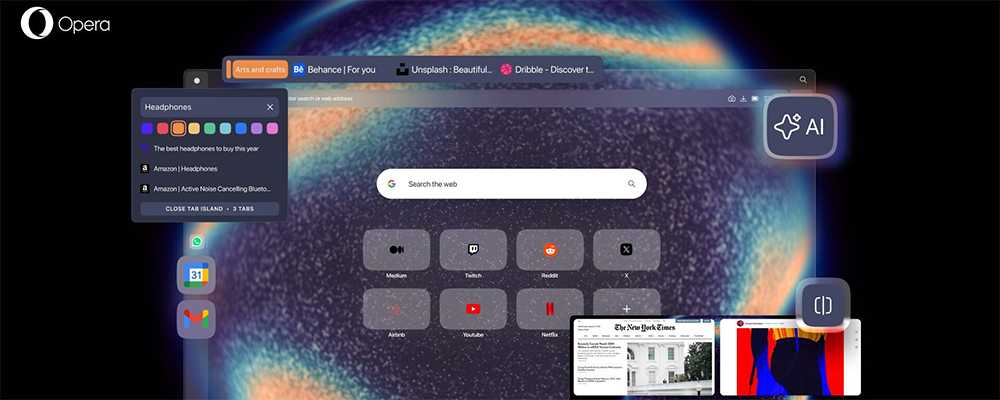
Tab Island customization was our most requested feature, so now you can name and color-code tab islands to add an extra layer of organization. To customize your Tab Islands, hover over the Tab Island handle until a popup menu appears.
— Opera (@opera) January 15, 2026
According to Opera in, the R3 update include:
- New Tab Island customization.
- The new, upgraded, Opera browser AI.
- Google Services, incl. Gmail and Calendar in the sidebar.
- The introduction of Early Bird for beta testing new features.
- An expanded Split Screen that now lets you split your screen into 4.
- Improved Easy Files, Music Player and webpage translator.
- New R3 Themes.
The new Opera AI is faster (up to 20% quicker responses), smarter and has moved to a right-side panel. Given you opted in, it can now use the context of your current tab or Tab Island to give more relevant answers, and delivers new capabilities like YouTube video analysis and…
— Opera (@opera) January 15, 2026
What truly sets Opera One apart is its signature Tab Islands, which is a fresh, organic way to group and manage tabs that feels more intuitive and visually engaging than traditional tab groups.
Combined with immersive, GPU-accelerated themes that animate the browser with color, motion, sound effects, and even background music, Opera One makes browsing feel alive and personalized. With the R3, has pushed this vision further. And that is by allowing users to have more control over how they organize and personalize your Tab Islands.
With Opera One R3, users can now assign both a color and a name to each Tab Island, adding a clear visual structure that helps you spot what they need faster and keep the browser neatly arranged.
Whether users prefer a minimalist setup, like keeping only the active Tab Island expanded, or thrive with dozens of tabs open at once, these new options make navigation simpler.
By labeling and color-coding your Tab Islands, you can create an organization system that fits users' habits. For instance, naming a Tab Island “Holidays” lets users instantly return to travel plans and saved ideas whenever they're ready.
For those who embrace tab-heavy workflows, the added colors and labels act as a practical way to bring order to the clutter, making it easier to jump between tasks without losing track of anything.
Customizing the Tab Islands is quick and straightforward: users just need to hover over a Tab Island’s handle, and a menu will appear where they can choose a color and enter a name.
A few clicks are all it takes to make the browser feel more personal and easier to manage.
And yes, there’s more. Since launching in Opera One R2, we continued improving:
• Easy Files & Music Player
• Built-in webpage translation
• New animated themes: Radiance & Orbit— Opera (@opera) January 15, 2026
Next up, Opera One R3 also introduces a rebuilt, faster browser AI powered by an agentic engine from Opera Neon, delivering responses up to 20% quicker. What's more, the feature is still free and no account required.
The AI now lives in a dedicated side panel accessed via a new “AI” button in the top-right toolbar, keeping it alongside the tabs without overlaying content.
The biggest upgrade is contextual intelligence: the AI uses users' active tab or entire Tab Island as context for precise, relevant answers. Users can disable page/Tab Island access anytime with a simple toggle at the top of the AI chat interface.
New features include YouTube video analysis (summaries, explanations, or jumping to key moments) and wallpaper generation for desktop (horizontal) or mobile (vertical) screens.
Privacy is tightly controlled: the feature is opt-in, requires explicit permission to read page content, limits scope to the current tab or Tab Island, and never accesses your full history or Google services automatically.
Manage it easily via Easy Setup or settings with three toggles: main Opera AI switch, toolbar button visibility, and AI Prompts for highlighted text.
Here’s how you can get early access ahead of official releases:
1. Opera One Developer browser
2. Early Bird inside our flagship Opera One browser, which replaces our Beta channel— Opera (@opera) January 15, 2026
Then, there is an enhancement to the sidebar, where Opera adds seamless integrations for Gmail and Google Calendar, so the Google apps can respond to users feedback and demand right from where it lives.
This joins existing favorites like Spotify, ChatGPT, Instagram, X, Slack, and Discord, reducing tab-switching and boosting productivity by keeping essential Google services always accessible.
To enable them:
- Click the three dots at the bottom of the sidebar to open the setup menu.
- Scroll to the "Google services" section.
- Toggle the circles next to Gmail and/or Google Calendar to add them instantly.
Once open, resize the panel by dragging its edge left or right. For distraction-free browsing, pin it open via the pin icon in the top-right corner in order to keep it visible without overlapping tabs.
Opera One wishes to continues to evolve as a browser that doesn't just load pages. It wishes to be able to anticipate needs, organizes chaos, and infuses creativity into the everyday web experience.
With innovations like contextual AI that understands opened tabs and Tab Islands, seamless Google service integration in the sidebar, immersive animated themes, and powerful built-in tools, it transforms routine browsing into something smarter, more intuitive, and genuinely enjoyable, all while staying completely free.
Packed with privacy-focused essentials like its no-log VPN, ad blocker, and granular control over AI access, Opera One proves users don't need a pile of extensions to get a rich, personalized experience. For anyone tired of plain, extension-heavy browsers that feel stuck in the past, Opera One stands out as a refreshing, forward-thinking alternative.
Despite its standout features and loyal niche following, Opera remains far less popular overall, holding only about 1.8–2% global market share in late 2025/early 2026 (per sources like StatCounter), trailing far behind Chrome (~70%), Safari, Edge, and Firefox. This low adoption means fewer developers optimize specifically for it, creating a cycle that keeps mainstream users away.






















































































































































































































































































