
When Android 16 was first introduced, it made a big shift for the Android ecosystem. Not only in what's new, but in how updates will work going forward.
Instead of relying on one massive yearly OS release, Google is now moving to a more fluid, frequent update cycle. This means that new features can be rolled out as soon as they're ready, and not months later. This marks a fundamental change in how Android evolves: faster, more responsive, and more aligned with how users actually use their devices day to day.
And this time, Google is giving Android 16 updates that emphasize smarter notification management, deeper personalization and theming, more frequent (and faster) feature delivery, and more robust built-in tools for families and accessibility.
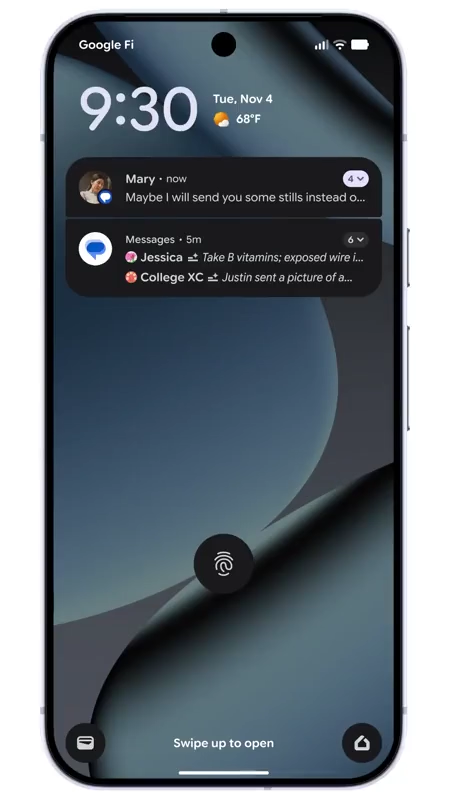
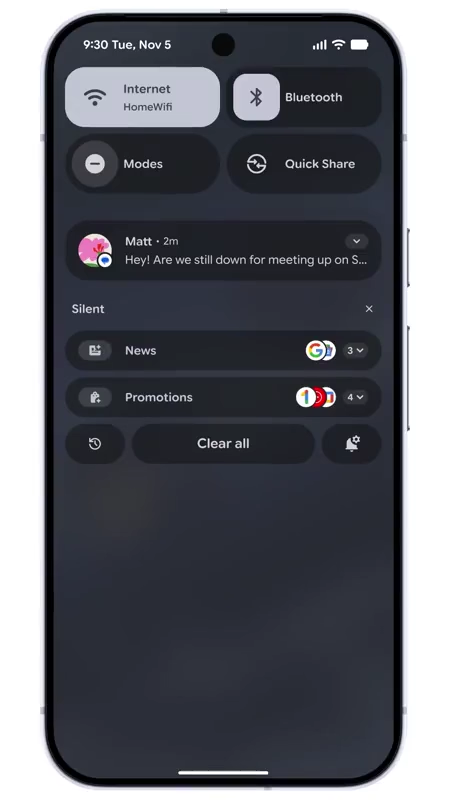
First and foremost, Android 16 introduces AI-powered notification summaries and a Notification Organizer that automatically groups or mutes less important alerts (promotions, social media pings, news, etc.).
This should help reduce noise and keep your focus on what matters.
This is a significant evolution from older Android versions, where notifications simply piled up chronologically or by app, often overwhelming users.
On top of that, Android 16 makes the phone feel more personal than ever.
Users can choose custom icon shapes, get unified themed icons across all apps, and enable an expanded dark mode that can darken even apps without built-in dark themes.
This goes beyond Android’s earlier theming options, and gives users a more cohesive, and also a more eye-friendly aesthetic.
For families, Android 16 brings built-in Parental Controls directly inside Settings, so parents can set daily screen time limits, schedule downtime, block or limit specific apps, and more. And that, without needing third-party parental-control apps.
This is a stronger, more integrated approach than prior versions, where such management often required separate downloads.

Under the hood, Android 16 also targets improved performance, privacy, and accessibility.
For example, Google has made Android 16 to have a: better scheduling and memory management, enhanced support for hearing aids (including faster pairing), and accessibility features like expressive captions or voice-driven interactions. In turn, this should make the OS more inclusive.
Overall, compared with older Android releases, Android 16 shifts Android from being just a platform that runs apps to being a more intelligent, adaptive, and user-centric operating system.
This should make Android the OS that helps users stay focused, allowing more expressions of styles, and supports users' digital life more thoughtfully.
Stay connected, stay focused, and stay ahead with Android’s newest updates — all designed to keep up with your day-to-day.
Learn more ↓https://t.co/ELqa5PKO5G— Android (@Android) December 2, 2025
On top of that, Android is also introducing several new tools designed to make communication more expressive, safer, and easier to manage, all while helping users stay focused.
Expressive Captions now show emotional cues like [joyful], [sad], or [cheers and applause] in real time for live videos, stories, and messages, letting you understand tone even with the sound off. Emoji Kitchen gets new seasonal and expressive sticker mashups, allowing you to mix emojis in Gboard to send bigger hugs, holiday vibes, and more personalized reactions.
Then, the Call Reason (beta) lets users mark calls to saved contacts as "urgent," so they see it on the incoming call screen and know to answer quickly. Calls that are tagged urgent stay in the call history, in case users missed them.
Safer group chats arrive in Google Messages with alerts when unknown numbers add users to a group. Users can instantly leave, block, or report the chat with a single tap.
Catch all the feels even when the sound is off. Whether it’s a live stream or a video message from a friend, Expressive Captions now uses real-time AI to help you know if the speaker’s emotion is [joyful] or [sad] even without sound pic.twitter.com/IMggvmjS5w
— Android (@Android) December 2, 2025
Circle to Search now helps users identify potential scams by analyzing suspicious messages and providing an AI-powered overview with warnings and next steps.
Pinned tabs in Chrome keep most important pages fixed at the front of the browser, making them easy to return to anytime, just like on desktop.
Overall, these updates focus on clearer communication, improved safety, and smoother multitasking across Android.
Wait, you actually needed that tab?! Keep important tabs pinned in your browser so you don’t waste time searching for them, even if you close and reopen Chrome. pic.twitter.com/4yzb5ncH3y
— Android (@Android) December 2, 2025






















































































































































































































































































