The LLM war has been loud, and Apple has been quiet.
When OpenAI dropped ChatGPT, and followed by the AI that powered it, which became increasingly better, each launch was accompanied by fireworks, benchmarks, and breathless headlines. Microsoft introduced Copilot, whereas Google rebranded Bard to Gemini.
Meanwhile, Apple looked like the quiet kid at the back of the class who never raised his hand, content with a modest Apple Intelligence writing tools rollout that felt underpowered next to the competition.
That was the story everyone told. It missed the real move.
While the rest of the industry raced to build the flashiest chatbot, Apple spent the last year quietly wiring its on-device models and private cloud into the one place where AI can actually change daily life: the automation layer.
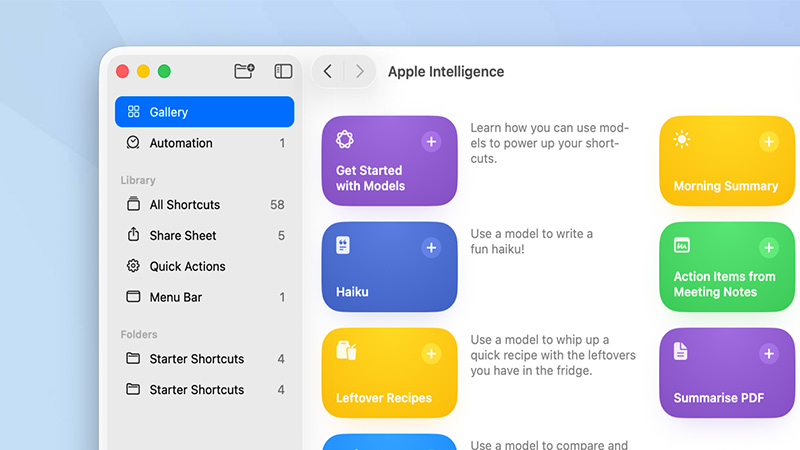
And this time, through macOS 26 update, Apple quietly slipped in an integration so understated that most reviewers skipped right over it: Apple Intelligence is now a first-class citizen inside Shortcuts.
Open Shortcuts, tap to add an action, and there it is, Apple Intelligence, sitting alongside Mail, Messages, and Calendar like it’s always belonged.
Users can use it to proofread, summarize, turn messy paragraphs into bullet lists, or generate images. The real weapon, though, is the 'Use Model' action. With it, a tap allows users to pick the private on-device Neural Engine, Apple’s cloud version, or, without a subscription or API key, straight to ChatGPT.
At this time at least, nobody else has that on the menu.
The result is something others cannot simply copy.
When others try to make a big entrance and demand attention, Apple is doing what it can with AI, and just make the job done.
With Apple Intelligence, Shortcuts can now watch clipboard, spot a text from a friend about dinner Thursday at 7, extract the date, time, restaurant name, and drop a Calendar event before they even finish reading the message. Another can grab a rambling meeting transcript from Notes, summarize it, pull out action items, and email them to the team.
The AI handles the messy human language; Shortcuts handles the rest.

This isn’t about beating GPT-5 on some leaderboard. It’s about making the AI disappear into the tools users already use.
No new app to open, no copy-paste dance, no "hey assistant" wake word. Just faster, cleaner workflows that understand context because you built them to.
While everyone else fights to own the conversation, Apple just turned the most powerful automation engine on its platforms into a personal AI workshop. The war still rages on the surface, but underneath, in the quiet plumbing of a fifteen-year-old app almost no one talks about, Apple might have already changed the game.
Apple may never win the AI benchmark wars or the splashy keynote moment. But it's making it seems like it's fine with that.






















































































































































































































































































