
Chrome remains the world's most widely used web browser, powering the online experiences of billions of people every day.
In recent years, Google has steadily expanded the role of its Gemini artificial intelligence model across its ecosystem, embedding it more deeply into everyday tools and services. One of the latest steps in this direction is a new capability called 'Skills in Chrome,' which builds directly on the existing Gemini integration already available in the browser's sidebar.
According to Google in a blog post, the feature essentially allows users to turn their most useful or frequently repeated Gemini prompts into reusable, one-click actions.
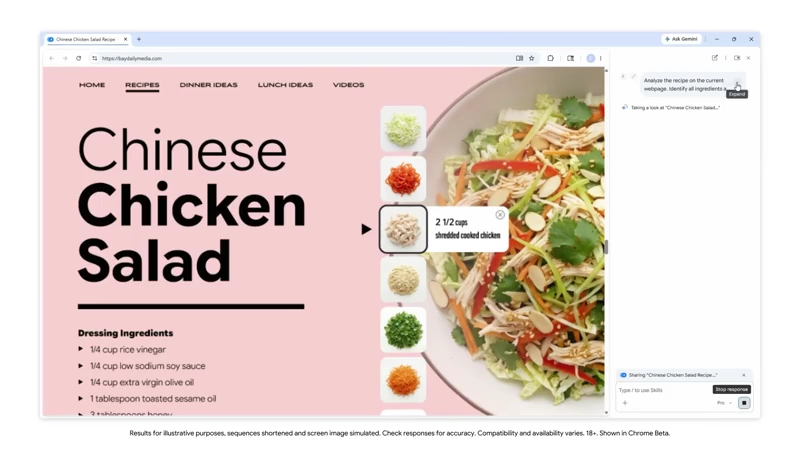
Instead of typing out the same detailed instructions each timem whether for summarizing a long article, comparing product details across tabs, or analyzing a recipe, people can save those prompts as Skills.
Once saved, the Skill can be triggered instantly by typing a forward slash in the Gemini prompt box or clicking a plus button, and it applies to the current webpage or any combination of open tabs the user selects.
Tap into our blog for the latest updates: https://t.co/gJ7c4obRIB
— Chrome (@googlechrome) April 15, 2026
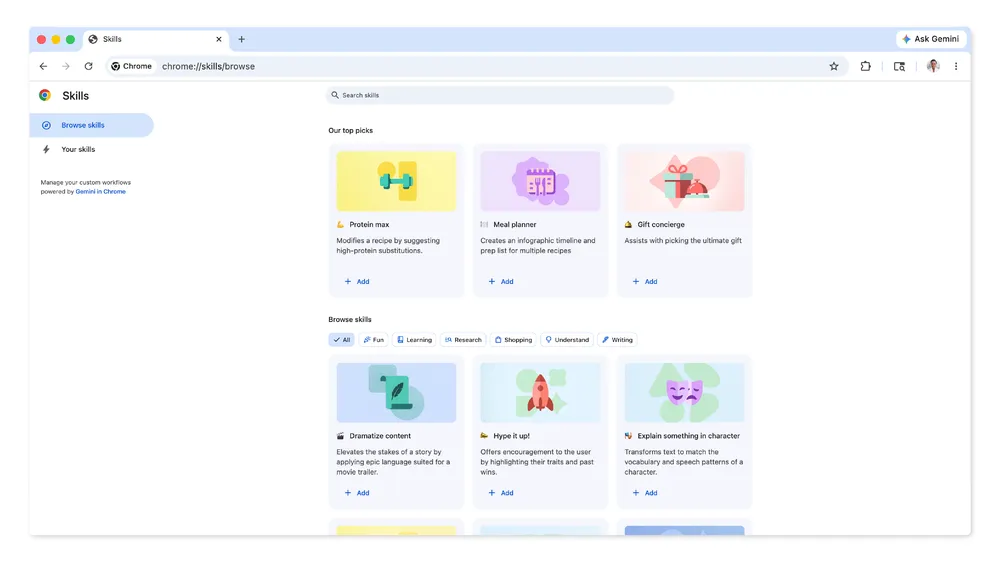
Google is also providing a library of pre-made Skills to give users a starting point.
These cover common tasks such as calculating protein content and suggesting substitutions in recipes, generating side-by-side comparison tables for shopping across multiple product pages, summarizing lengthy documents or websites, identifying ingredients in skincare products, or even turning webpage content into a dramatized movie-trailer-style description.
Users can add these presets to their own collection, edit them, or create entirely new ones from prompts in their chat history.
The Skills sync automatically across desktop devices when signed in with a Google account.
In practice, the system works by leveraging the context of whatever tabs are open and shared with Gemini.
For example, a user researching dinner options might activate a Skill that scans recipes in several tabs, extracts key details, and suggests a shopping list or nutritional breakdown. Another might pull information from a job listing page and format it into a quick evaluation against a personal checklist.
Because Skills run within the existing Gemini in Chrome interface, they inherit the same safeguards and privacy controls already in place for manual prompts, including user confirmation for any actions that affect external services like calendars or email.
The rollout began on April 14, 2026, and is initially available on Mac, Windows, and ChromeOS for users whose browser language is set to English (United States). It does not introduce entirely new AI abilities so much as it streamlines access to those that Gemini already offers inside the browser. For now, the focus remains on desktop experiences, with no immediate mention of mobile availability.
Overall, Skills represent a practical evolution in how people interact with AI directly in their browsing environment.
By turning frequently used prompts into reusable actions, the feature reduces friction and makes everyday tasks faster and more consistent.
As Google continues to integrate Gemini more deeply across its ecosystem, developments like this highlight a broader shift toward making AI feel less like a separate tool and more like a built-in part of the browser: one that can adapt to individual workflows and support users more proactively.




















































































































































































































































































