AI here, AI there, AI everywhere. Major tech companies are racing to make AI smarter, or at least to squeeze it into as many features as possible.
Vivaldi, however, is taking a different path. Instead of chasing the AI hype cycle, the browser maker continues focusing on making its core experience more intuitive and genuinely useful with each update.
With the release of Vivaldi 7.8, the company is even poking fun at competitors like Chrome, Edge, and Safari, which promote AI tools for summarizing articles, writing emails, or generating images. Vivaldi’s answer? Say no to AI slop.
Among the various additions in this release is an update that may seem minor, but is refreshingly practical.
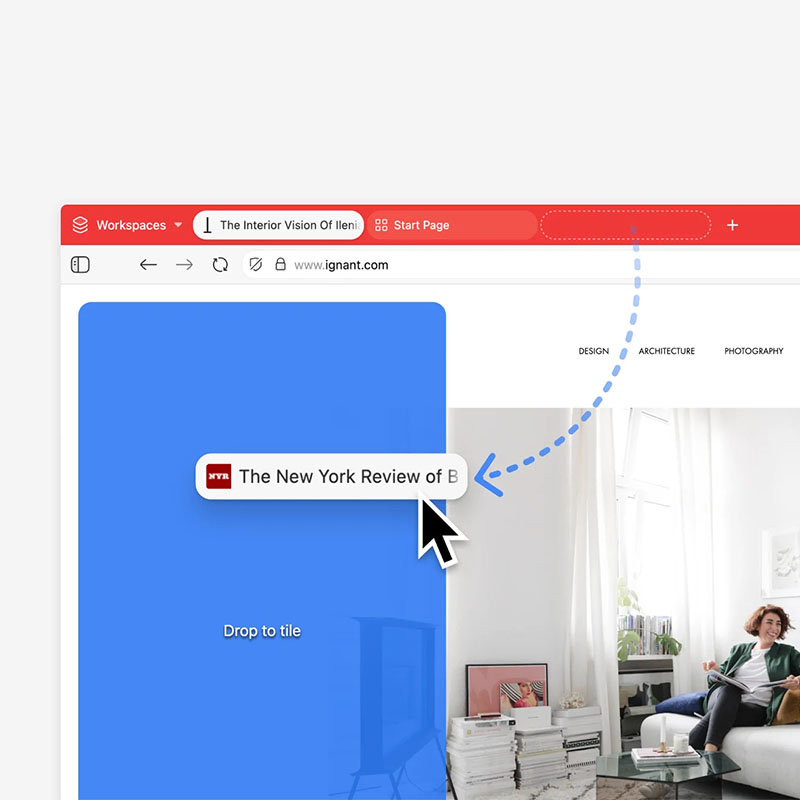
In a video accompanying the announcement, a sleek browser window demonstrates the new unlimited drag-and-drop tab tiling system, allowing users to arrange multiple tabs in flexible grids.
While many mainstream browsers chase AI-powered gimmicks, Vivaldi doubles down on making core browsing tools more capable and intuitive.
Chrome: "We added AI to summarize articles"
Edge: "We added AI to write emails"
Safari: "We added AI to generate images"
Us: "We made tabs actually work"
Everyone: "But... AI?"
Us: "Unlimited drag-and-drop tiling"
Everyone: "Have you considered…."
Us: "It's live. Download now!" pic.twitter.com/4Qr8OlVUBf— Vivaldi Browser (@vivaldibrowser) January 30, 2026
The feature introduces an advanced, drag-and-drop tab tiling system that redefines how users manage multiple pages within a single window.
Instead of juggling endless tabs, users can arrange pages side by side, stack them, or build virtually any layout they need. All inside one seamless workspace. The goal is to make browsing more intuitive, organized, and efficient, especially for people who regularly work across many tabs.
At its core, the system enables flexible split-screen layouts that can be created instantly and naturally, turning multitasking into a fluid, visual experience rather than a cluttered one.
To use the feature, users simply drag any tab, or even several at once, from the tab bar directly into the content area of the active page. As they hover over different zones (left, right, top, bottom, or the edges of existing tiles), visual guides appear showing exactly where the dragged tab will land.
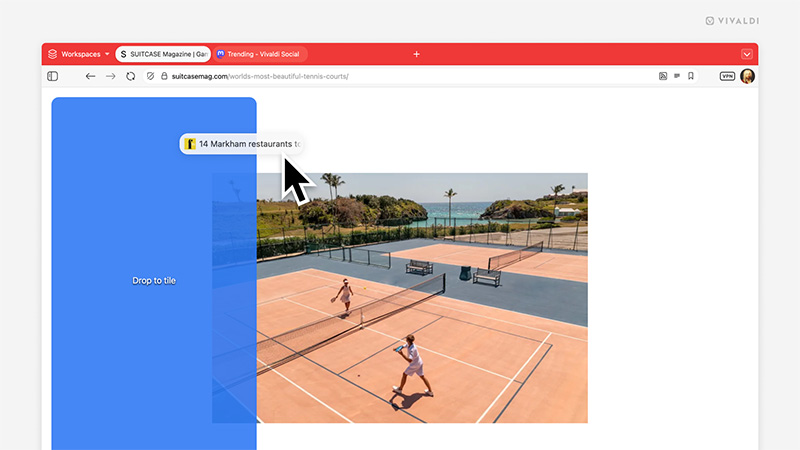
Upon releasing the mouse button, Vivaldi automatically arranges everything into a clean, resizable grid or split view.
There’s no preset limit to how many tabs can be tiled together; the only practical boundary is screen space and how much content remains legible.
This goes far beyond basic side-by-side splits.
Users can build complex custom configurations: three columns for research, a main document centered with reference materials stacked vertically, or even irregular grids where some sections take more space than others. Once tiles are set up, users retain full flexibility — drag tiled tabs to reorder them, pull them to new edges to reshape the grid on the fly, or keep adding more.
"This release puts Tab Tiling front and center, or on the left. Or the right. Or above. Or below. Tab Tiling now has faster interactions, smarter workflows, and new ways to work with multiple pages at once, without breaking your flow," Vivaldi said in the announcement.
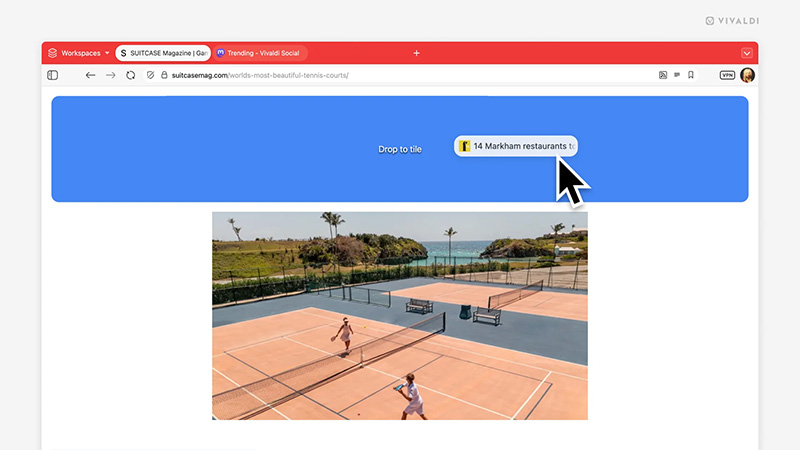
The system feels seamless, turning what once required menus or right-clicks into a fluid, mouse-driven workflow that keeps users focused on content rather than the interface.
Vivaldi pairs this with complementary shortcuts for even smoother multitasking.
Right-click any link and choose “Open Link as Tiled Tab” to spawn a new page directly beside the current view, anchoring the main content while pulling in comparisons, sources, or live updates without losing context. It’s ideal for cross-referencing prices, monitoring multiple news feeds or dashboards, drafting while viewing references, watching parallel streams, or juggling spreadsheets and documents at a glance.
The update emphasizes practicality over flash.
While the entire browser industry races to add AI features nobody asked for, we’re launching the most advanced tab multitasking system ever built.
You can check it out in Vivaldi 7.8, available now.
For the love of tabs and our users!https://t.co/7zuJQAaGlI— Vivaldi Browser (@vivaldibrowser) January 29, 2026
By making tab tiling feel like a natural extension of browsing rather than a tucked-away option, Vivaldi empowers users who value control and efficiency.
No AI hand-holding required. Just powerful, adaptable tools that match how people actually work with dozens of tabs open.
For users who constantly switch between tabs and feel slowed down by the process, or who have wished their browser window could function more like a customizable workspace, this enhancement delivers exactly that freedom. The result is a browsing experience that’s faster, less interrupted, and far more productive, all wrapped in Vivaldi’s commitment to customization and user empowerment.
This approach underscores Vivaldi’s philosophy of giving users powerful tools rather than relying on AI assistants.
Overall, reactions have been mixed. For heavy multitaskers, this is a welcome addition. For those prioritizing AI-powered productivity, the question remains whether Vivaldi’s performance and unique tab tiling are compelling enough to justify a switch.

















































































































































































































































































