
In the arena of web browsers—dominated by giants like Google Chrome, Microsoft Edge, and Mozilla Firefox—Opera quietly holds its ground as the perennial underdog.
While it doesn’t command the same market share as its rivals, Opera’s story is one of relentless innovation, daring to experiment where others play it safe. What sets it apart isn’t just that it’s another Chromium-based browser—it’s that Opera continuously brews fresh ideas to redefine how people experience the web.
From pioneering built-in VPN services and ad blockers to introducing native crypto wallets and AI-powered tools, Opera keeps pushing the envelope, determined to stay ahead by thinking differently.
This time, Opera has updated Opera One with a built-in webpage translator and improved split screen.
It also introduced a new interface for its password manager.
Together, these new features should help Opera raise the bar again—cutting through language barriers and elevating personalization with its bold new update.
Based on your feedback, we’ve added some new features to Opera One:
Built-in webpage translator is here
Smarter split screen
Password manager pop-up improvements pic.twitter.com/YfzHubhM61— Opera (@opera) July 3, 2025
First of, is the translator feature.
For users who often find themselves browsing foreign-language websites—whether they're working remotely abroad, living in another country, or simply trying to access international news—the process of copying and pasting text into a translation service can be tedious and disruptive.
Previously, Opera users could translate selected text by highlighting it and using the Aria AI assistant via the quick-search tooltip. While useful for short passages, this method wasn’t practical for full-page translations.
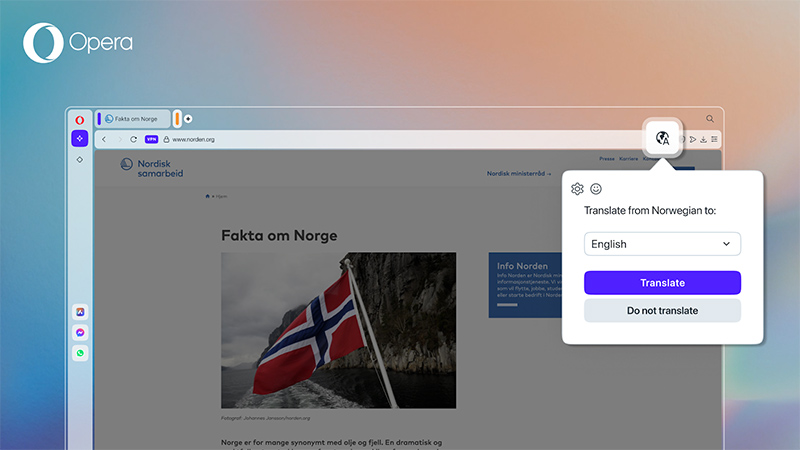
To address that limitation, Opera has now introduced Opera Translate—a built-in webpage translation feature that supports over 40 languages.
When a user lands on a webpage in a language different from their browser’s default, a small pop-up appears in the top-right corner, offering to translate the entire page. Users can choose to translate the page once or set Opera to always translate pages in that language. The feature also includes the option to revert to the original version via the toolbar icon.
Opera Translate is optional and can be turned off entirely in browser settings.
This feature was developed in collaboration with Lingvanex, a company whose translation solutions have been used in Opera's Android browser since 2023. The service is powered by AI-driven natural language processing and operates on Opera’s own European servers. Because of this, user data remains under strict privacy protections and isn’t shared with third parties.
Next, is improvements to its Split Screen feature, aimed at enhancing productivity for users who multitask—whether they’re working, studying, or simply comparing products online.
Since its introduction, Split Screen has become one of the more frequently used tools in the browser, and user feedback has played a key role in shaping its development. With the update, Opera now allows Split Screen tabs to function within Tab Islands, Opera’s context-based tab grouping system. Users can now open a split view between two tabs within the same Tab Island, and also move those tabs—together—from one Tab Island to another or remove them from a group entirely.
The behavior depends on the tabs selected:
If both tabs are already in the same Tab Island, Split Screen will open within that group.
If the tabs belong to different Tab Islands or only one is in a group, Split Screen will operate outside any Tab Island.
In addition to this, Opera has responded to requests for better toolbar integration in Split Screen mode. Now, the right tab in the split view will consistently display icons for account settings, Easy Setup, downloads, extensions, and the pinned player. Meanwhile, hovering over either the left or right tab will reveal context-sensitive tools such as Pinboards, Snapshot, Privacy Protections, Flow, and bookmarking—just as in regular browsing.
Note that certain toolbar icons may vary depending on the content of the webpage being viewed.
These updates are part of Opera’s continued effort to make browser multitasking more fluid and intuitive.

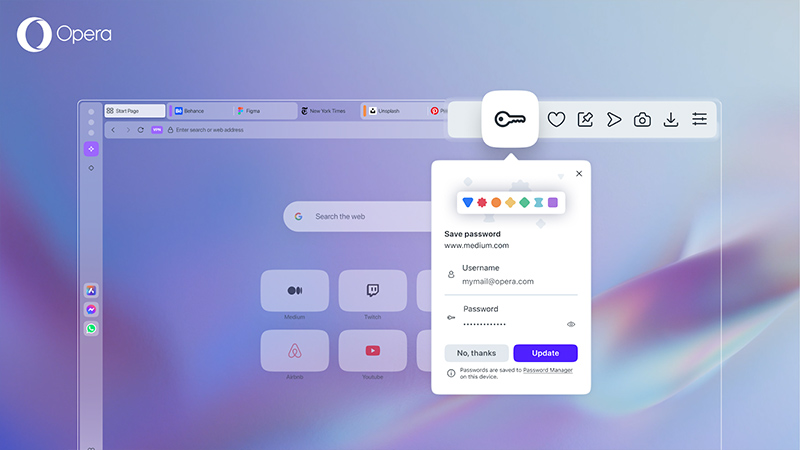
And lastly, is a design refresh for Opera’s password manager popup.
The new layout improves visibility and clarity when users save passwords for new websites or update login credentials on frequently visited ones.
The redesigned popup makes it easier to recognize when a password is being stored or modified, offering a more intuitive experience for managing credentials directly in the browser.
But being an underdog is a double-edged sword.
Without the vast resources or the sheer user base of the bigger players, Opera faces an uphill battle to attract users and stay relevant. The stakes are high, and the browser must keep evolving—not just to survive but to stand out.
This means embracing emerging technologies, responding swiftly to user needs, and taking calculated risks that others might shy away from. Whether it’s integrating AI assistants directly into the browser or reimagining privacy features for a new era of online threats, Opera’s commitment to innovation is its strongest currency.
For users tired of the same old browser experience, Opera remains relevant by offering a refreshing alternative.
But whether this underdog keep brewing new things fast enough to carve out a lasting niche in a crowded market remains a question.
Only time will tell, but one thing’s certain—Opera’s spirit of innovation is alive and kicking, daring to change the way people browse the web.

















































































































































































































































































