

Google has long dominated the world of online search, shaping how billions of people find information every day.
With Gemini, its most advanced AI model, the company has also positioned itself as a major player in generative artificial intelligence. Now, Google is taking another step to bring that power closer to everyday users by launching a dedicated desktop app for Windows. This move extends Google’s ecosystem beyond the browser and into the heart of users’ computing environments.
The idea is to offer seamless access to search, local files, and AI assistance without switching applications.
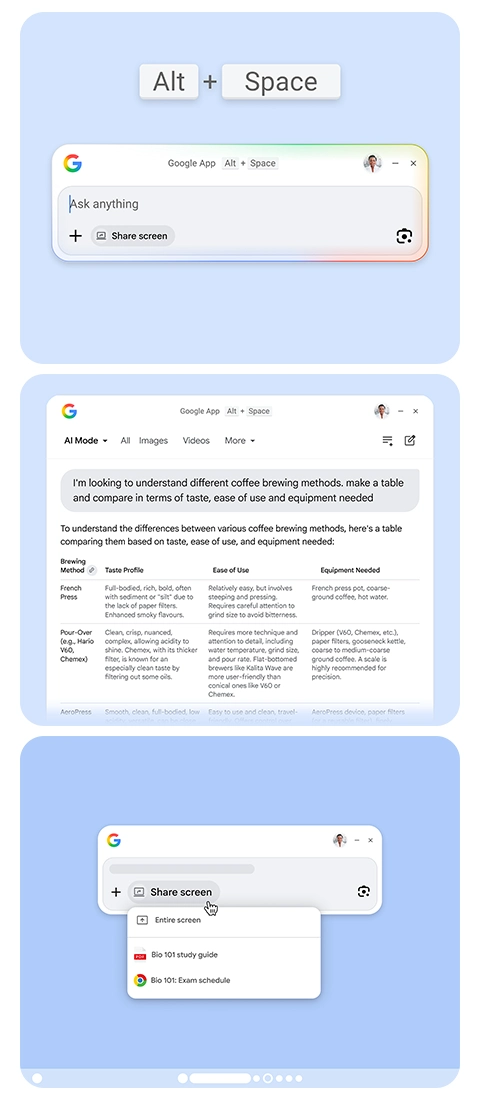
The Google app for desktop, now available globally in English for Windows 10 and newer, works similarly to Apple's Spotlight search on macOS.
Users can summon it instantly with the Alt + Space keyboard shortcut, which brings up a clean search bar. From there, the app can query the open web, scan files stored on the local computer, list installed applications, and pull results from Google Drive.
This unified search experience aims to reduce friction for people who often juggle multiple tools and tabs throughout their workday.
In a blog post, Google said that:
What sets the app apart is its deep integration with Gemini.
A dedicated AI Mode lets users ask conversational questions and receive detailed, context-aware responses complete with links back to source material. The floating results window keeps everything contained and non-intrusive, allowing follow-up questions without forcing users to open a full browser.
In addition, the app supports screen sharing, where users can choose to share their entire display or just a specific window, then ask Gemini questions about whatever content is visible.
This feature could prove useful for tasks ranging from analyzing a spreadsheet to getting help with code or documents.
Google Lens brings yet another capability into the mix. Users can select any text, image, or element on screen and use Lens to translate languages, solve math or homework problems, identify objects, or extract information. The interface mirrors the familiar mobile Google Search experience, making it intuitive for those already accustomed to Google’s apps on their phones.
This release marks a relatively rare foray by Google into native consumer desktop software on Windows.
While the company has offered tools like Google Drive for Desktop and Quick Share, most of its efforts have centered on the browser through Chrome and progressive web apps. The new app joins that small group of native Windows applications, signaling a willingness to meet users where they spend most of their time: on their desktop.
Overall, the Google desktop app represents a logical evolution in the company's strategy.

Google has long excelled when it comes to online tools and capabilities. It has an unmatched search engine, along with a powerful ecosystem of applications that support communication, productivity, and collaboration. Services like Google Docs, Google Sheets, and Google Drive allow users to create, store, and share content seamlessly across devices.
In addition, platforms such as Gmail and Google Meet make communication fast and efficient, whether for personal or professional use. Google’s integration across its services ensures a smooth user experience, enabling real-time collaboration and easy access to information from virtually anywhere.
However, when it comes to offline functionality and deep local system integration, Google has traditionally lagged behind more desktop-focused ecosystems like Microsoft Windows. This is why bringing its search engine and AI capabilities directly into Windows could be the missing piece: bridging the gap between powerful cloud intelligence and seamless local performance, and potentially redefining how users interact with their devices on a daily basis.
By combining traditional search strength with Gemini's reasoning abilities and convenient local integration, it offers Windows users a more direct path to Google's search and AI capabilities.