
Counting weeks to the end of the year? Google have updates, just in time before holiday photo sharing.
The first is showcasing the new PhotoScan app. What it is, is a standalone app from Google Photos. What it does is to scan just about any photos, for free and from anywhere.
Available on Android and iOS, PhotoScan can create digital copies of plain traditional photos. The app essentially detects photo edges to straighten the image in order to rotate it to the correct orientation. It also removes glares.
And because scanned photos become digitized, users can save the photos to Photos to be organized, searchable, shareable, or to just back them up to the clouds.
The next update comes from Photos itself. Google updates Photos with a new suite of editing tools. There are 12 new looks with drop down menus for its first two categories. This allows a more granular control over photo highlights, shadows, whites, blacks, saturations and more.
This feature should come in handy, like editing outdoor photos, for example. The "Deep Blue" and "Skin Tone" are basically selective saturation settings.
The Deep Blue allows users to edit the colors of the sky and bodies of water to be more vibrant while leaving other colors unchanged. Meanwhile the Skin Tone setting can change the saturation of skin colors, balancing it to make it more natural.
To use the editing tools, users need to open a photo and then tap the pencil icon to start editing.
And because Google has been more focused on machine learning, it has implemented AI to make Photos' filters smarter. The "Auto" settings for example, can automatically adjust exposure and white balance around the face, making the overall image more vibrant without making the subject look unnatural.
Along with the filters, Photos include "Looks" which also uses AI to adjust an image to look the best with a chosen filter. To make this happen, Google studies different kinds of images for inspiration.
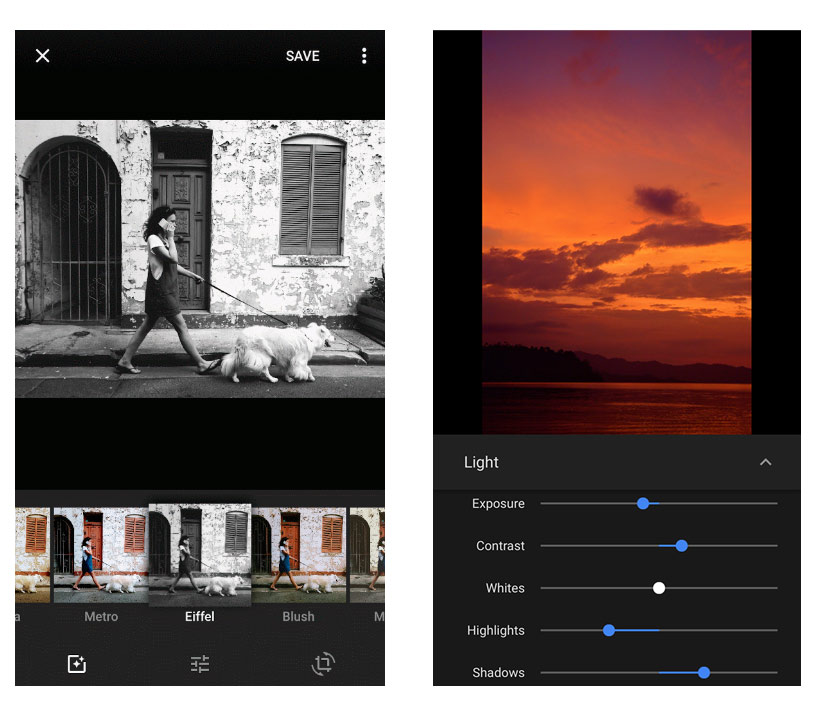
Google in updating Photos to have more features is certainly a welcome improvement. Previously, Photos only has very basic adjustments. By having more tools, users can edit photos accordingly and apply filters without needing to use a sophisticated photo-editing software.
At the moment of release, the tools only work on JPEG images. So users are still limited to photos taken straight from their mobile phones, not those that are imported from a DSLR camera. While Google is looking forward to make it able to edit RAW images, for now, the company recommends users to use Snapseed if they want to edit RAW images.
Besides having a huge update in Photos' photo category, Google is also making it smarter about making automated videos. Previously, Photos could only create films around specific dates or trips. With the update, Photos can now make images around specific themes. It can also create animations without having to connect to the internet.














































































































































































































































































