
Google's Play Store has more than 2 million apps users can pick from.
With that many to search and choose, discovery is a major challenge for users. And that is a concern to both Google and also app developers.
While searching for famous and popular app won't be that difficult, many others will stay down below the surface. Here is where artificial intelligence (AI) comes to work. By having neural network to aid the human touch, Google can figure out better which apps belong in which categories.
According to Google's AI researchers on November 8th, 2016:
AI with the technology called neural network, works by loosely mimicking how the human brains work. On the Play Store, Google processes the app names and their description, to then try to figure out which ones to show in the search result.
This is because AI can be designed to do a better job in sorting apps according to categories, especially when there are many of them to choose from. With the attempt, Google is focusing to balance new apps with popular standbys, take out malicious apps, and help developer to get their own apps to show up high in search results.

In order to make this happen, Google trains the system by creating very rough approximation of language-centric learning. The team trained the neural network to learn how language was used to describe apps. By using a Skip-gram model, the team can make the neural network predict the words around a given word. After that, the neural network encodes its knowledge as embeddings where they can be then used to train another model called classifiers to distinguish which topics apply to which apps.
While the architecture produced good results, it would sometimes overgeneralized. As the team explained, it might associate Facebook with "dating" or "educational games."
To produce more precise classifiers, the team needed a lot more data to train the system. Here is where humans take their role. The data that is funneled can be evaluated by human raters to get the classifier output, to then feed it back again to the system. The process allowed the team to bootstrap the existing system, giving them a way to improve classifier performance.
And because the AI solutions learn more about users' habits and preferences and make better recommendations than they currently do, Google allows people to assess how well the categorization worked and thus steer it toward even better results.
Redesigned Play Store
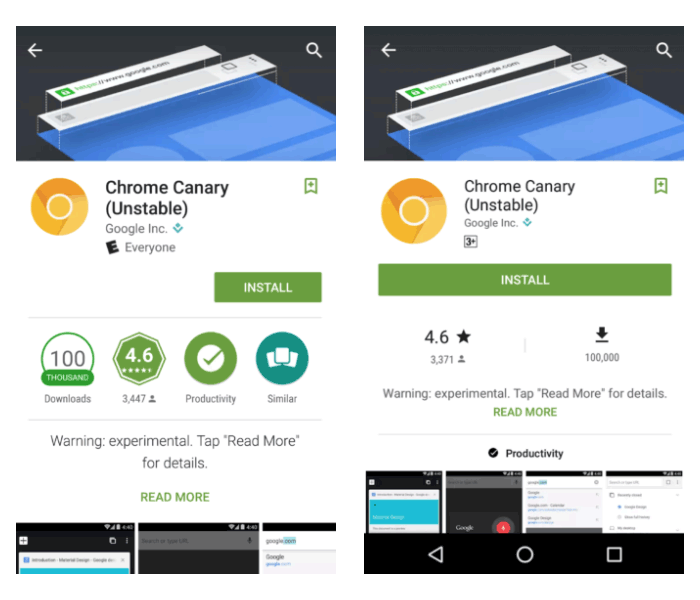
Besides putting AI into a good use by helping how the Play Store works, Google is also making some visual changes to the Play Store. So here changes behind the scene follows minor redesigns at the front.
The changes aren't drastic and are more cosmetics than an overhaul. The focus here is to make Play Store less cluttered.
At first, the green background has been given a darker shade, and each app's page has been given a larger install button and the app ratings are also made a lot more distinguishable. This should make call-to-action more prominent, putting engagement first before information.
Additional changes include the removal of the box which listed the appropriate age category for the app. Badge is also removed.
The new UI still shows the average stars received by the app by users, along with an approximate number of downloads. While these stats are no longer posted inside a badge, they remain displayed under the larger install button. Other changes include larger screenshots of the app, and a new position for the "Read More" link that expands the description of the app.
App carousel on the main Play Store page has been made a bit smaller, and the "More Information" page that was previously located at app description has been relocated above the developer's information.
The new UI was first spotted on Nexus devices running Android 7.1.1. At the moment, Google seems to be settled with the Play Store's current design. Adopting Material Design with colorful visuals, the minor adjustments are more based on user testing than its own willingness.
In addition to the above, Google also wants to expand Play Store's support to more payment methods, introducing numerous new tools aimed to help developers monetize their creations and expansion to Daydream, Android Wear 2.0, and more Chromebooks.
With all the above, Google is planning to help developers to cope with increased competition by expanding the Play Store ecosystem as a whole.














































































































































































































































































