
With Claude Code, Anthropic has changed how many developers and programmers work.
And now, with the introduction of 'agent view' in Claude Code, the company marks a significant shift in how developers interact with command line AI tools by moving away from isolated sessions toward a unified operations layer.
Previously, managing parallel tasks required a significant amount of manual overhead, often involving multiple terminal tabs, complex tmux configurations, or a mental ledger of which background process was at what stage.
This update provides a central dashboard that consolidates these independent threads into a single interface, allowing for the simultaneous management of bug fixes, pull request reviews, and long running codebase questions without the typical context switching costs. By centralizing these streams, the tool transforms the developer experience from managing one script at a time to orchestrating a fleet of active agents.
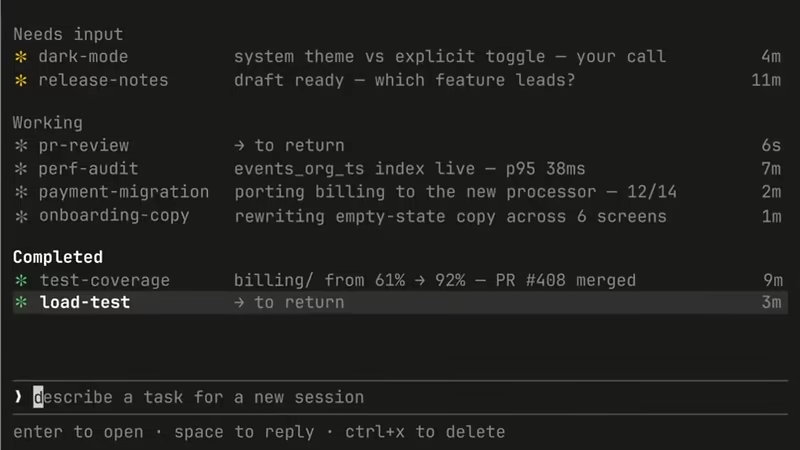
The core functionality is built around a persistent session roster accessible by running the claude agents command or simply pressing the left arrow from within an existing session.
New in Claude Code: agent view.
One list of all your sessions, available today as a research preview. pic.twitter.com/NnbsAQjSPW— Claude (@claudeai) May 11, 2026
Each row in this view provides immediate visibility into the status of a specific task, indicating whether an agent is actively working, idle, completed, or waiting for user intervention.
By providing this high level overview, the tool allows developers to maintain a broader scope of work, dispatching several tasks at once and only stepping back into the foreground when a specific decision or clarification is required.
This visual feedback loop ensures that no background task is lost in the shuffle of a busy development day, providing a safety net for developers who need to balance deep coding with administrative project oversight.
Interacting with these agents has been streamlined through a peek and reply system designed to keep the user within the dashboard as much as possible.
Instead of being forced to fully attach to a session just to see incremental progress, a user can select a row to view the most recent turn and even provide inline answers to prompts or clarifying questions.
If more depth is needed, the enter key or right arrow allows for a seamless transition into the full transcript of that specific session.
Run claude agents to start dispatching multiple sessions at once. Each one keeps running without taking up a terminal tab.
— Claude (@claudeai) May 11, 2026
This creates a more fluid workflow where backgrounding a task with the /bg command or launching a new one via claude --bg becomes a standard part of the development cycle rather than an occasional utility for long running jobs.
The system also introduces sophisticated management features such as the ability to terminate or resume sessions directly from the list.
This level of control is essential for maintaining system resources and keeping a clean workspace when dealing with dozens of micro tasks.
When an agent finishes a task or requires a human decision, the dashboard reflects the state change in real time, allowing for a reactive style of development where the human acts as the supervisor of multiple parallel workflows. This architecture acknowledges that modern software development is rarely a linear process and that developers often need to pivot between features while waiting for tests to run or code to index.
See what's running, what's waiting on you, and what's done at a glance. Reply inline to unblock, or jump in and out of any session without losing your place.
— Claude (@claudeai) May 11, 2026
Early adoption patterns show that this environment is particularly effective for scaling concurrent sessions and managing autonomous jobs like dashboard updates, documentation generation, or pull request monitoring.
Because status indicators and last activity timestamps are visible at a glance, the interface acts as a command center for multi step software engineering tasks that would otherwise require constant manual checking.
This release, currently available as a research preview for various plan tiers, reflects a broader move toward making AI agents more observable and easier to steer within the native terminal environment.
By focusing on observability and ease of navigation, the tool aims to reduce the cognitive load associated with using artificial intelligence in complex, high stakes coding environments.
Available on all paid plans.
Read more: https://t.co/nOrCwKwTwL— Claude (@claudeai) May 11, 2026