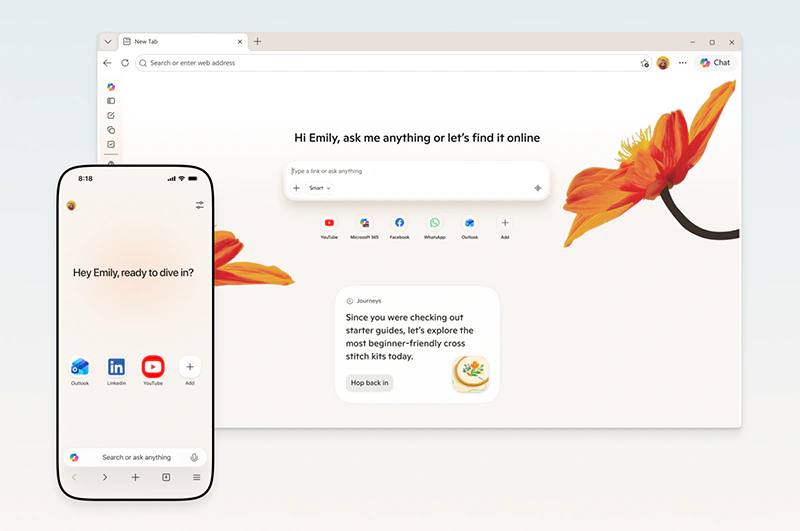
Microsoft is rolling out significant updates to its Edge browser, deepening the integration of Copilot AI across both desktop and mobile versions.
The changes make the assistant more proactive in helping users manage and extract value from their browsing sessions. One of the core new abilities lets Copilot reason across multiple open tabs at once.
Users can ask questions about content spread across pages, request comparisons between products or options, or ask for summaries that pull key details together without switching back and forth.
This feature, which started in testing on desktop, now works in the Edge mobile app as well, aiming to reduce the friction of juggling information on smaller screens.
The AI builds context from user activity when permitted.
With consent, Copilot can reference browsing history to offer more relevant suggestions, such as resuming a shopping session from days earlier or picking up research threads.
It also includes long-term memory that recalls details from previous conversations with the assistant. Microsoft stresses that these capabilities only activate with explicit user approval and that the system collects only the data required to deliver the requested experience.
The company still cautions users against sharing highly sensitive details like financial information or medical records when interacting with the AI.
Several productivity-oriented tools accompany these updates.
Users can now convert groups of open tabs into AI-generated podcasts for listening on the go, a feature particularly highlighted for English-speaking markets. Another addition is the Study and Learn mode, which turns viewed content into interactive quizzes or guided study sessions, potentially useful for students or anyone digesting complex material. A writing assistant also appears while users type on web pages, offering draft suggestions, rewrites for clarity, or tone adjustments in real time.
These features sit alongside a redesigned new tab page that combines chat access, search, and navigation in one view.
On mobile, additional capabilities enhance the experience.
Users can share their screen with Copilot and interact through voice, allowing hands-free queries about what appears on the display. Clear visual indicators show when the AI is listening, viewing, or taking action.
The Journeys feature, previously desktop-only, now appears in the mobile app too. It organizes browsing history into topic-based summaries with suggested next steps, helping users return to ongoing projects like trip planning or product research without starting over. Microsoft has retired the standalone Copilot Mode, integrating its former functions directly into the browser for a more seamless feel.
Users retain the ability to enable or disable specific AI experiences through settings.
In summary, as noted in coverage of the announcement, the retirement of Copilot Mode signals that its core abilities have become native parts of Edge on every platform.
The mobile version now supports tab-based reasoning for comparisons and analysis, Journeys for continuity across sessions, and screen sharing with voice and vision input. Productivity additions such as the Study and Learn mode for creating quizzes, the Writing Assistant for on-page composition help, and the tab-to-podcast conversion expand the browser's role beyond simple navigation.
Throughout these updates, Microsoft emphasizes user choice, allowing individuals to customize which Copilot functions they activate while aiming for a more contextual and helpful browsing environment.






















































































































































































































































































