
Every major Windows release brings new features, more modern UI layers, added security requirements, and increasingly complex background services.
As a result, each new version tends to be larger, heavier, and more demanding on hardware than the version before it. And Windows 11 is no exception. Its modern WinUI-based interface, deeper cloud integration, and expanded system processes all require more RAM and CPU overhead compared to Windows 10.
And nowhere is that difference more visible than in File Explorer, one of the most frequently used and increasingly scrutinized parts of the operating system.
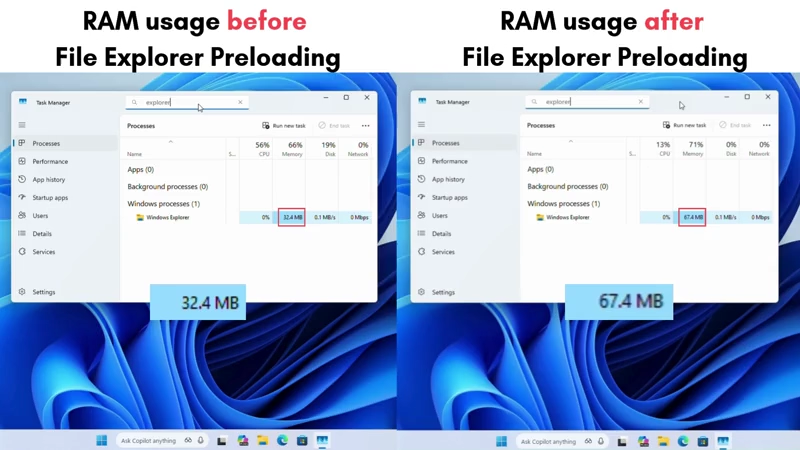
Microsoft recently rolled out a test for Windows 11 that preloads File Explorer in the background, in hopes that it will launch more quickly when you open it.
The idea is simple: instead of waiting for Explorer’s UI to build from scratch when you click to open it, Windows 11 will keep a lightweight version of it loaded and ready in RAM.
In theory, this should make the "cold-start" of File Explorer almost instant, especially on slower or lower-spec devices.
That promise is appealing because for years many users have complained that File Explorer in Windows 11 feels sluggish compared with the snappiness of Windows 10.
Early tests back this up, at least partially. According to Windows Latest, enabling preloading raises the memory footprint of File Explorer from about 32–35 MB at idle to around 67 MB once the preloaded UI is held in RAM.
By modern standards, that’s not a huge cost. The bigger question is whether the added memory usage translates into a noticeably faster experience.
The answer seems to be: only somewhat.
Under ideal conditions, like when only a few background apps are opened and during low system load, the preloaded version does open faster. But once the system is under typical real-world workloads (browsers open, background processes running), the improvement becomes subtle. In fact, reviewers noted that the difference is often only obvious when comparing both versions side-by-side in slow-motion footage.
More importantly, preloading only speeds up the initial window launch.
It does nothing to address the deeper, persistent performance issues that users have long complained about. Navigation delays, slow folder rendering, context-menu lag, and sluggish thumbnail loading all remain. Context menus, in particular, can still take a noticeable moment to appear.
This is exactly the problem that many users argue makes the overall UI feel unresponsive.
The underlying reason appears to be architectural.
While both Windows 11 and Windows 10 share the same Win32/COM shell foundation (explorer.exe, shell32), and that Microsoft never rewrote the core file‑management engine, Windows 10 uses the classic Win32 UI, while Windows 11 overlays this legacy core with modern WinUI/XAML elements.
The first interation of File Explorer on Windows 11 relied on private XAML Islands to host WinUI 2 controls inside the old app. And from 2023 onward, File Explorer began migrating to WinUI 3 via the Windows App SDK (WASDK). What this means, toolbars, context menus, title bars, and panes are all rendered with WinUI rather than native Win32 widgets.
Mixing Win32 with WinUI/XAML adds extra rendering layers, which is why Explorer in Windows 11 can feel slower than Windows 10's.
This hybrid design Windows 11's File Explorer introduces extra rendering stages and complexity, adding latency at multiple points within the UI stack.
In short, preloading File Explorer in Windows 11 is a small, surface-level improvement. It can reduce the time it takes for the window to appear, particularly on older hardware or from a cold boot. But it doesn’t fix the deeper sluggishness rooted in Explorer’s modern, layered architecture. Anyone expecting a dramatic, transformative performance boost will likely be disappointed.
Given how central File Explorer is to everyday computing, the real fix may require more substantial re-engineering, or a shift back to lighter UI foundations.






















































































































































































































































































