 WordPress is notably famous for being the Content Management System (CMS) of choice by millions of people. While the HTTPS (Secure Hypertext Transfer Protocol) version of the CMS is already available for those websites using .wordpress.com, the feature is also rolling out to those that are using custom domain names.
The move is seen as WordPress gets closer to embrace HTTPS as standards on its platform, in line with efforts being made with practically everyone else on the web.
What this does, is to ensure security on WordPress websites. With the update, any new WordPress sites created using a custom domain will have HTTPS applied immediately. And to those existing users, their sites are also being upgraded gradually.
After WordPress website owners update, WordPress will automatically redirect any requests that use HTTP to the new HTTPS version.
To help both WordPress and its users, WordPress has been working with the Let’s Encrypt project to help it automate the certification process for website owners that use its platform.
Using HTTPS For WordPress
To have HTTPS enabled, users need to have a SSL Certificate installed on the server. To have this, users need to purchase SSL certificate with proper documents, payments, etc.. Many web hosting companies have this feature available for request. If not, they may require to purchase it elsewhere.
After having the certificate, the next thing to observe is the backend of the system.
Usually for HTTP URLs, Port 80 of the web server is used. This is what normally opens after an installation on Apache2 and all web server software. HTTPS requires extra Apache Modules (mod_ssl) to be enabled, port 443 to be opened, properly configured, other settings including VirtualHost configuration to be properly configured.
With the update, WordPress will do all the necessary things, and users won't need any extra or special settings for WordPress at web server level to enable HTTPS. By default, WordPress is configured to use HTTPS if its properly configured.
To ensure HTTPS is the chosen, with the certificate installed, users will need to go to Settings > General to make sure that the WordPress Address (URL) and Site Address (URL) is "HTTPS".
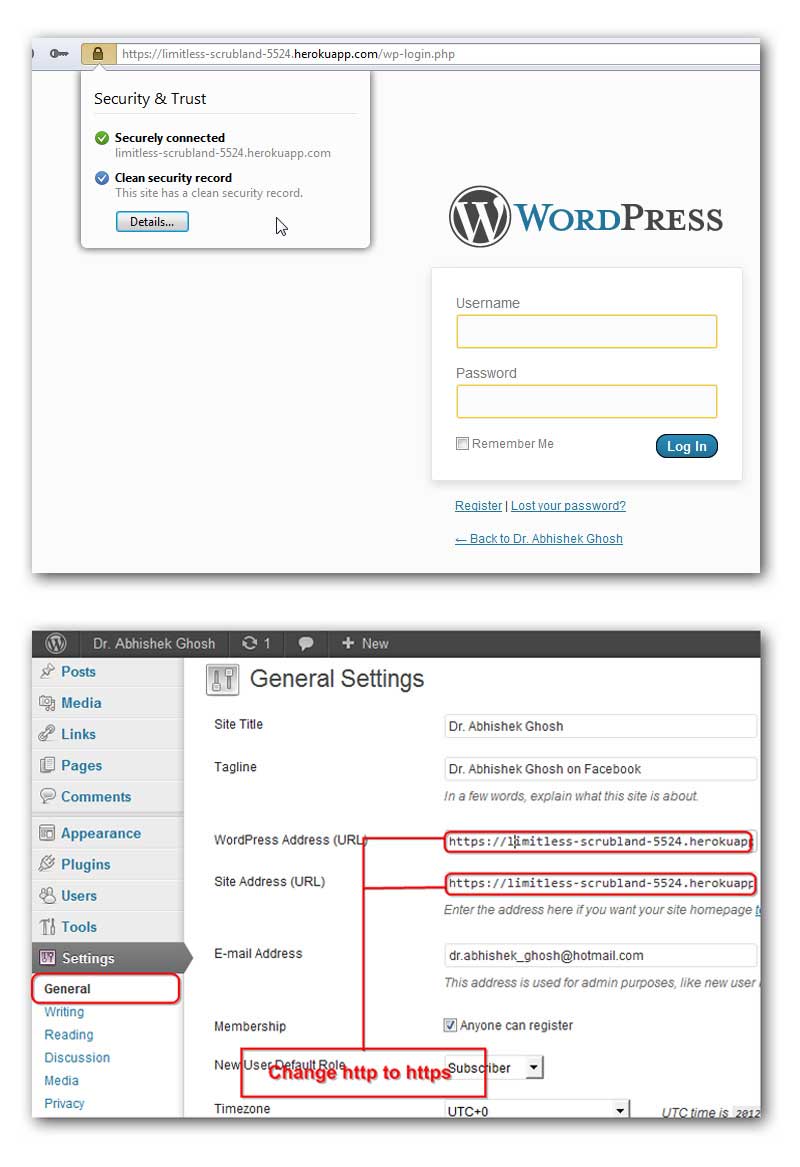
After the configuration is saved, WordPress will serve all the content of the website with HTTPS URL. While this is enabled by default, users that visit the site using its HTTP URL, will also be served the same page because those pages will work normally in parallel as both ports (used by HTTP and HTTPS) are different.
And because most websites won't need HTTPS on all of their pages, having a redirect on those HTTPS pages to HTTP using .htaccess can be made.
While HTTPS does good, it's known to slow down the loading time of web pages. The problem is not actually a problem: this is the nature of HTTPS that requires an increased of negotiation time of the server to authenticate the GET request. WordPress advised users to use WP Super Cache for caching, using any CDN which has valid SSL certificate, HyperDB for a scalable Database to optimize their pages' speed, and combining and minifying CSS and JavaScripts.
Becoming More Competitive
WordPress is popular to a margin, more than any other CMSs on the market. Powering over a quarter of all websites available on the internet, WordPress move to use HTTPS as default is its shift to a more secure internet.
While this indeed will secure users and the website using WordPress, HTTPS websites will also be more "visible" to search engines. Google as the most widely-used and popular search engine, is giving a greater favor on HTTPS-enabled websites than those than don't. This will ease SEO, making WordPress websites becoming more competitive.
To most small-to-medium websites, the upgrade is indeed necessary as it poses a lot more benefit. Like for example those that want to use WordPress as their business website, and those that have payment transactions with a third-party payment gateway from middle-ware service providers, will gain a lot of added credibility. But to larger websites, changing the protocol to them is more difficult, and may cause a sudden surge on both traffic and speed. Many media giants that rely on WordPress have been flagged for lacking HTTPS as standard, but with the ease for shifting, WordPress hopes that HTTPS will be the default for everyone.




















































































































































































































































































