The Blue Screen of Death, commonly known as BSOD, is a critical error screen in Microsoft Windows that appears when the operating system encounters a serious issue it cannot recover from.
When this happens, Windows halts all operations, displays a blue screen filled with diagnostic information, and typically forces a reboot. The BSOD is designed to protect the system from further damage and provide clues about what caused the problem.
Microsoft has been using BSOD to "torment" Windows users for several decades.
Now it's retiring it, the company announced in a blog post.
Microsoft is ditching the notorious feature that appears on Windows computers in the coming months, "streamlining the unexpected restart experience" with a new black-colored screen.
So, it's a goodbye to the old BSOD, and hello to the new BSOD.
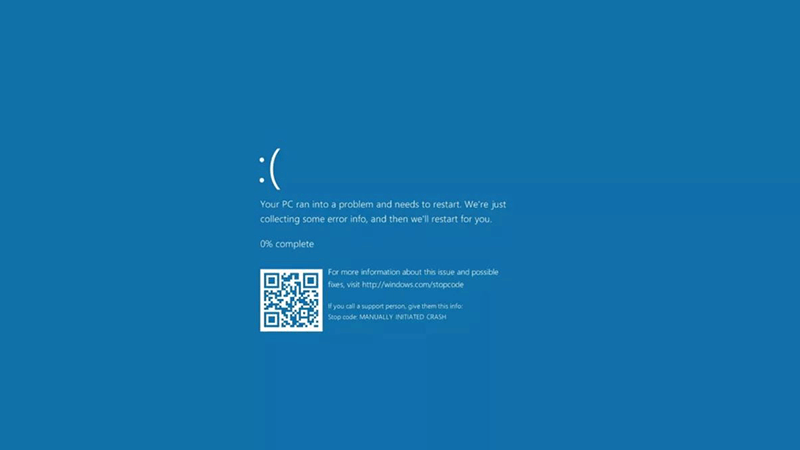
Microsoft has been using BSOD to indirectly instill panic, dread, exasperation, and rage across countless Windows users.
By retiring the old BSOD, Microsoft said that it's updating Windows 11 crash screen with a distinctly more minimalist vibe.
The revamp also ditches the sad face emoji and QR code.
All that remains is a single ominous sentence: "Your device ran into a problem and needs to restart," along with a stop code and details of the errant driver that contributed to the PC’s misfortune.
"We’re introducing a simplified user interface (UI) that pairs with the shortened experience. The updated UI improves readability and aligns better with Windows 11 design principles, while preserving the technical information on the screen for when it is needed," Microsoft said.
Microsoft explained that when devices experience repeated unexpected restarts, they can become stuck in the Windows Recovery Environment (Windows RE). This not only disrupts productivity but also forces IT teams to invest considerable time and effort into diagnosing and restoring the affected systems.
Quick Machine Recovery (QMR) is designed to address this challenge. In the event of a widespread issue preventing devices from starting correctly, Microsoft can deploy targeted fixes directly through Windows RE.
By automating the recovery process with QMR, devices can be restored quickly and efficiently—minimizing downtime and eliminating the need for complex, manual intervention from IT professionals.
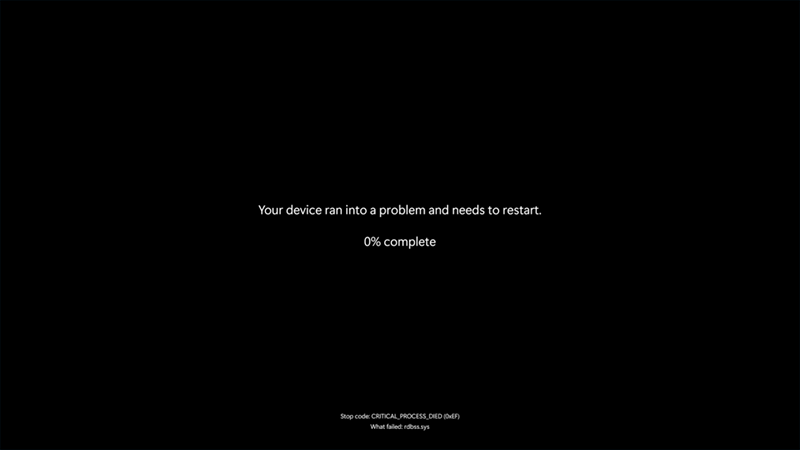
For decades, BSOD has haunted Windows users with its sudden, jarring appearance and cryptic error codes.
Most BSODs are caused by low-level issues such as faulty drivers, failing hardware components, or corrupted system files.
For instance, if a graphics driver crashes or a RAM module begins to malfunction, Windows may be unable to continue running safely. Other culprits include software bugs, especially in programs that operate close to the system kernel, as well as overclocking, malware, or power supply problems that affect stability.
When a BSOD appears, it usually displays a STOP code such as IRQL_NOT_LESS_OR_EQUAL or CRITICAL_PROCESS_DIED, which gives a hint about what went wrong. These codes can help identify whether the issue is related to hardware, drivers, or system processes. Sometimes, a QR code or a filename associated with the failure is shown, which can assist in narrowing down the exact source of the crash.
Troubleshooting a BSOD involves several steps. First, it's important to take note of the STOP code or any error message displayed. Booting into Safe Mode can help isolate the issue, especially if the system crashes during normal startup. From there, users can update or roll back drivers, uninstall recently added software, and run diagnostic tools for system file integrity or check disk for disk errors.
Hardware checks, such as memory diagnostics or temperature monitoring, can also be essential if hardware failure is suspected.
In persistent cases, restoring Windows to a previous restore point or performing a full system reset might be necessary. While BSODs may seem intimidating, they’re essentially the operating system’s way of waving a red flag—an urgent signal that something deep within the system needs attention.

As for why Microsoft is changing it this BSOD, is because Microsoft is just evolving it.
Much like the original BSOD, the redesign seems to have emerged organically from Microsoft’s ongoing UI simplification efforts. Interestingly, even the term “Blue Screen of Death” wasn’t coined by Microsoft. It likely morphed from earlier usage of “Black Screen of Death,” cringely in reference to Windows 3.1 network crashes.
Earlier versions of Windows used blue for various warnings and prompts, but not necessarily as a death sentence.
Windows 1 in 1985 displayed white-on-blue gibberish when it failed to recognize the correct DOS version.

Windows 3.1 leaned on blue backgrounds for system dialogues and its rudimentary task manager, but it still dumped users to DOS in critical failure situations—hardly a full stop. In those days, it was more of a “Blue Screen of Mild Inconvenience.”
The first BSOD to indicate a serious system error appeared in Windows NT 3.1, in the first version of the Windows NT family, released in 1993.

It wasn’t until Windows 95 that things began to feel truly terminal.
Instead of retreating to DOS, Windows began showing severe error screens in place. While users were still often given a chance to continue limping along, these screens marked a shift in tone—less forgiving, more final.
The BSOD, in all its forms, has been part of the Windows identity for decades. Its retirement marks not just a visual update but a symbolic one: a farewell to a relic of computing past, wrapped in nostalgia, frustration, and a surprising amount of cultural cachet.






















































































































































































































































































