
Google has taken a bold step toward solving one of the longest-standing frustrations in mobile: sharing files between Android and Apple devices.
After years of Android users resorting to third-party apps, cables, or cloud links to send photos and videos to iPhones and Macs, Google's latest Quick Share update now works directly with Apple's AirDrop. Starting on the Pixel 10 series, Android users can finally send and receive files from fellow iOS users, the official way.
This is because under the hood, this isn't some workaround where files hop through a server or third-party platform.
The connection is truly peer-to-peer: the data travels directly between devices over Wi-Fi (and with Bluetooth coordinating discovery), and nothing is routed through Google’s servers or logged centrally. Google emphasizes that this direct link preserves privacy and speed while still respecting each platform’s own security safeguards.
To make this happen, Google engineers extended Android's native Quick Share, the peer-to-peer file transfer service that has long used Bluetooth and Wi-Fi Direct, so that it can speak the same wireless language as AirDrop.
When an iPhone or Mac makes itself discoverable using AirDrop’s "Everyone for 10 minutes" mode, a Pixel 10 running the updated Quick Share can see it right in its share sheet, letting users send photos, videos, or documents with a tap, just like they normally would between two Apple devices.
The magic behind the trick is surprisingly simple, yet complex, since Google developed the method without Apple's help.
Sharing moments shouldn’t depend on the phone you have. Starting today with the Pixel 10 family, Quick Share now works with AirDrop, making secure file transfers between Android phones and iPhones more seamless. This builds on our commitment to cross-OS compatibility to bridge… pic.twitter.com/iNdZfjCYQ7
— Android (@Android) November 20, 2025
Before Google could make Quick Share talk to AirDrop, it first had to understand how Apple's system actually works.
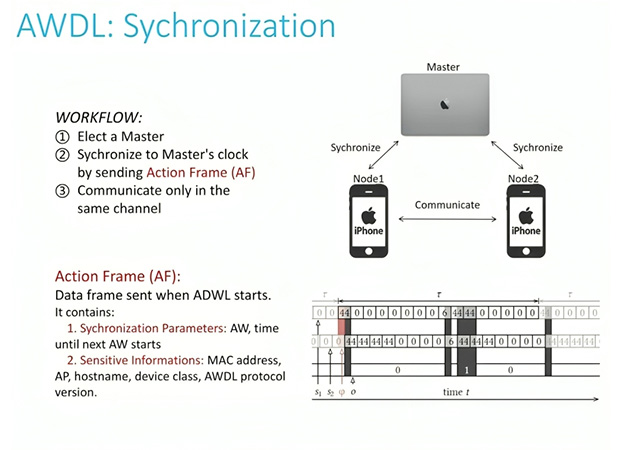
AirDrop begins with Bluetooth Low Energy (BLE), which broadcasts a lightweight signal that basically says, "I have something to send." Nearby Apple devices detect this broadcast and check the sender's identity hash, based on the receiver’s settings, either" Everyone for 10 minutes" or "Contacts Only". Once the device confirms the sender’s identity, the connection jumps to a high-speed wireless channel powered by Apple's private protocol, AWDL (Apple Wireless Direct Link).
AWDL is where the real magic happens.
It uses a rapid frequency-hopping technique to maintain a high-bandwidth TCP/UDP connection directly between devices, and it does this without interrupting the device's regular Wi-Fi connection. In other words: the phone stays online, but also creates a temporary, super-fast tunnel to the other device.
To keep that tunnel stable, every Apple device runs on a hidden AWDL "heartbeat." This heartbeat coordinates timing so that nearby iPhones, iPads, and Macs can switch to the same channel at the exact same moment, down to the millisecond, for authentication and data transfer.
AWDL even elects a master device, usually whichever has more performance or battery (often a Mac or iPad Pro), to act as the timekeeper for the cluster. This master broadcasts PSF frames, which contain timestamps and the schedule for the next communication window.
But even after devices line up on the same channel, they still don't start sending files immediately.
AirDrop has one last security step: exchanging Apple ID Validation Records.
These are digital certificates signed by Apple’s Root CA, containing encrypted Apple ID information. When the receiving device decrypts this certificate with its built-in public key, it checks whether the sender matches a saved contact.
If not, the request is ignored as noise, unless the user has manually enabled the "Everyone for 10 minutes” mode.
This is why AirDrop feels seamless for contacts but invisible to strangers.
Google’s work was to replicate enough of this behavior to connect without breaking Apple’s rules. To avoid security pitfalls, the company rebuilt key pieces using Rust, a language designed to prevent memory vulnerabilities like buffer overflows. The result is a hardened, peer-to-peer foundation that independent auditors also evaluated before rollout.
The biggest issue however, is AirDrop's more secure "Contacts Only" mode that still relies on private Apple ID signatures that Google cannot access without Apple cooperation.
Because Google doesn’t have access to Apple ID certificates, the current solution requires permissive discovery settings: iPhones must be set to "Everyone for 10 Minutes," and Android devices must make Quick Share visible to everyone or use "Receive mode."
Once discovered, the interaction feels almost identical to native AirDrop. The sender taps the target device, the receiver approves, and the file transfers directly over Wi-Fi. No servers, no relays, no cloud middlemen.
And importantly, it works both ways.
It’s not perfect yet, but it’s the closest any non-Apple device has ever come to playing inside Apple's walled garden without permission.
Google says it would welcome working with Apple to enable Contacts-Only interoperability in the future, which would make the experience feel more seamless and secure from a privacy perspective.
For now, the rollout is limited to the Pixel 10 family, but Google and partners like Snapdragon have hinted this capability may expand to more Android devices in the future as the Quick Share framework evolves.
In practical terms, this change cracks one of Apple’s long-held walled-garden experiences open without Apple’s direct involvement.
This is a milestone in cross-platform sharing that could reshape user expectations about how easy it should be to share moments regardless of their device.






















































































































































































































































































