Software needs to change fast. But sometimes, the changes can introduce things that are more confusing than what they replaced.
YouTube is the streaming giant of the web. This time, it made some changes to its apps, in order to make things easier for users to select the playback resolution of the video they are seeing. But the thing is, YouTube in introducing an updated video-quality control that can be confusing to some.
YouTube has replaced the option to individually select the streaming quality of the videos they are watching, with some generic options.
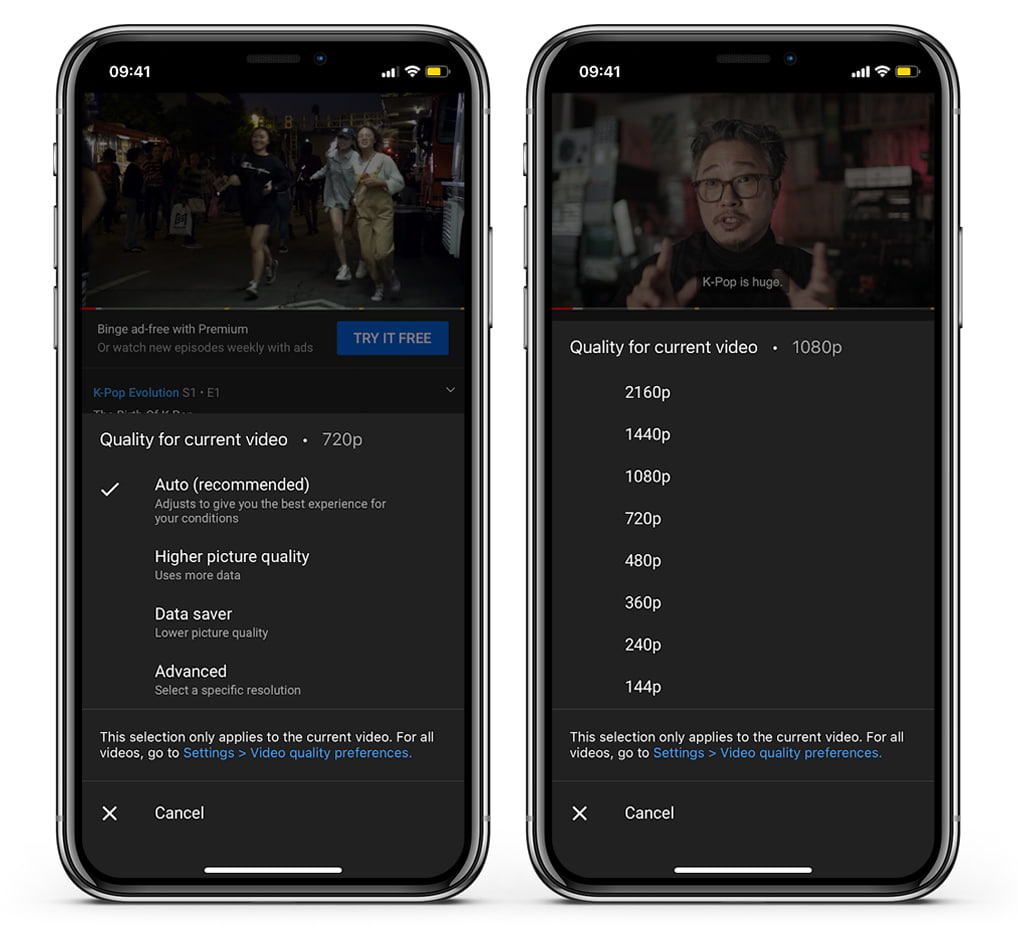
For example, instead of having to option to choose between 720p, 1080p, or 4K resolution, users are given other options that are supposed to be more “friendly” for non-tech-savvy: higher picture quality (uses more data), data saver (lower picture quality).
The updated video quality controls are separated for mobile data and Wi-Fi, so users can select their preferences in different scenarios.
However, none of the options indicate the streaming resolution of the videos
What YouTube is trying to do here, is expanding its apps' number of video quality options at users' disposal.
The "higher picture quality" setting will essentially make videos look as sharp and crisp as possible, as it can max at 720p. However, choosing this setting will consume a lot more data than other options. On the other hand, the "data saver" setting should help users stretch out their data allowance, but with the tradeoff of poorer visual quality.
This is because the setting caps out at 480p, and can drop as low as the very lowest 144p resolution offered.
Interestingly, these updated options come with a couple of existing ones.
The "Auto" setting for example, remains. This setting can automatically adjusts video quality depending on how good users' internet connection is. The second setting that remains, is the 4K HDR.
It should be noted though, that users can always use the “Advanced” tab to choose a specific video playback resolution – from 144p all the way up to 4K UHD.
And another thing, changing the setting only affects the current video the users are watching. To make the change global, users must set the resolution they want at the "Video quality preferences" settings.
This update is a server-side update, meaning that users don't have to download or install the latest version of the YouTube app to access them.