In the glittering age of smartphones, people like to think that they’re in control of their device.
The way they touch, swipe, tap their glassy companions, they see how these devices obey to their every command. But beneath the surface of that screen, something brews. The hardware that runs to make everything work, work tirelessly and endlessly.
And all they do, is to to put an end to the storage.
From usage trackers that act like a phantom menace, to the endless app temptation. Not to mention the bloatware that couldn't be killed.
Android, the popular mobile operating system, tries to end the latter, once and for all.
Smartphone storage limitations continue to frustrate millions of users around the world.
For more than often, this leads to tough choices—like which cherished photos to delete, offloading videos, or picking which essential apps to uninstall.
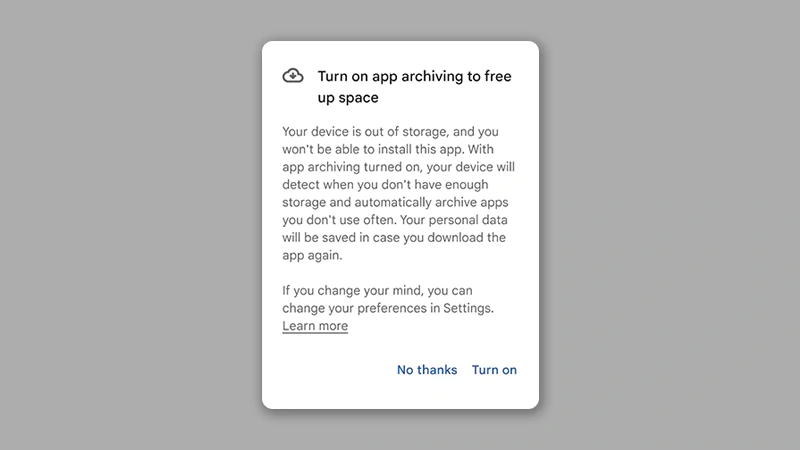
Recognizing this ongoing struggle, Google has introduced a smart and user-friendly solution in the latest Android 15 update. Through an app archiving feature, Google wants to redefine how Android manages storage, offering a thoughtful compromise between keeping apps installed and removing them entirely.
With Android 15, users can archive apps instead of removing them completely.
By archiving, the Android operating system would clear the selected app’s primary files from the device while keeping all user data intact.
What makes this feature stand out is that everything tied to the app—like user settings, account credentials, and in-app preferences—are preserved in users' Google account.
When apps are archived, they are never truly gone. They stay on users' device, visually distinguishable only by a subtle download icon. To bring one back, all it takes is a single tap. Android then re-downloads only what’s needed and restores the app with all its original data.
What this means, when users decide to use the app again, it comes back exactly the way they left it, eliminating the need to log in or reconfigure anything.
This provides a stress-free way to free up space without sacrificing usability.
According to Google in a dedicated help page, this archiving feature only works on Android 15, and only on devices with supporting hardware.
Long story short, Google wants to end that frustrated feeling when that dreaded “storage full” alert pops up.
With this archiving feature, users can make thoughtful adjustments without losing anything important.
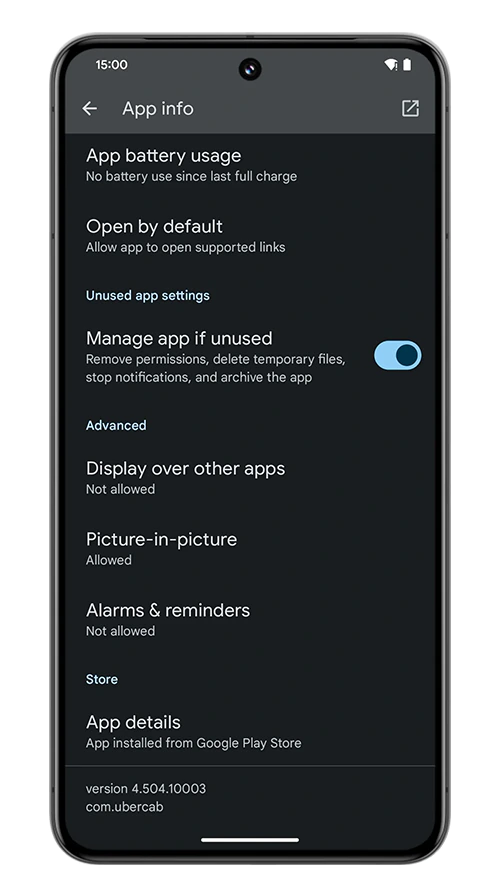
The first is the manual archiving method, which should be ideal for apps users only need occasionally—say, a travel app they only use during vacations or an event-based app for a specific season. The second method is the automatic archiving, which offers a hands-free experience.
Automatic archiving allows Android to automatically select pre-approved apps to archive when storage space dips below a certain threshold. Users can decide which apps are eligible by enabling the “Manage app if unused” option from the same app info menu.
This dual-mode system means that users have more control over the feature.
More importantly, it shows how operating systems are evolving to be more human-centric. Storage isn’t just about numbers; it’s about continuity, comfort, and control. By creating this middle ground between installed and uninstalled, Google has introduced a more elegant way to handle digital clutter.




















































































































































































































































































