
Advertisers may wonder about their brand campaigns performing against their non-brand campaigns.
They may want to know about experimental keywords and promotional ad copy, as well as different bidding rules.
To manage all that, Bing Ads introduce labels for them.
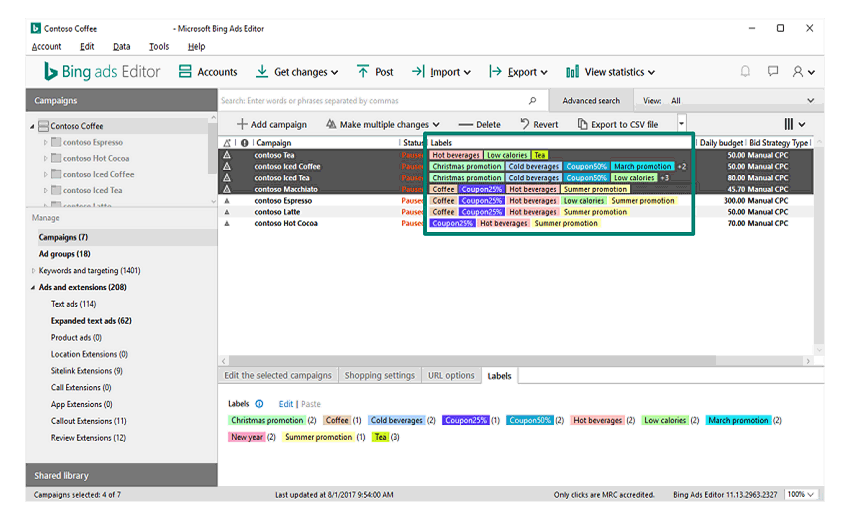
The labels are a simple but can ease advertisers in managing those situations. And what's more, advertisers can also create customized tabs that can be associated with their campaigns, ad groups, ads or keywords.
With the labels, advertisers can simply add more details and colors to their reporting data. Any item can have as many as 50 labels associated with it.

Users can add and edit labels from a the labels menu that appears in the various levels in their accounts in the web interface. There are four label reports: campaign labels, ad group labels, ad labels and keyword labels in the Dimensions tab.
There is also a Shared Library for labels from which users can quickly apply labels to multiple campaigns or other entities.
For users from Google AdWords, Bing is also easing the process of migrating.
"If you’ve already taken the time to meticulously label your data in Google AdWords," said Bing on its blog post. "You’ll also be able to bring in your labels whenever you import your campaigns from Google. No need to manually set them up again."
Alongside that, Bing is also introducing support for managing labels in the Bing Ads Campaign Management Service and Bulk Service using Bing Ads API.
The support for labels is initially rolling out to Bing Ads Editor for Windows (version 11.13). With it, users can manage labels for campaigns, ad groups, Expanded Text Ads and keywords.