As people browse the web, a web browser has become one of the center piece software on their device. Google Chrome is one of the most popular web browser in the market, and an update is rolling out to WIndows, Mac, Linux, as well as Android.
Chrome 58 introduces the usual performance enhancements and bug fixes that come standard. It also introduces some new features that should come in handy for users.
The first thing users should notice, is the dedicated browser history page in Chrome 58. It has been redesigned to have a cleaner look with more intuitive layout. This can be useful for Android devices that have small screens.
The next is the option to open new links in a new tab by long-pressing the links. There is an improved Custom Tabs to ease navigation. While these aren't game-changing features or anything, they're improvement to the existing features.
Chrome 58 for Android also brings an easier way to see and manage downloads in a new section. This is a convenience as the feature is already available on Google Chrome for desktop.
Chrome 58 renames 'Autofill' with 'Autofill and Payments'. Again for convenience, this feature that was already available on previous Chrome versions has a new name so users can find it easily. The feature enables users to store credit card details for easy authorization for mobile web payments.
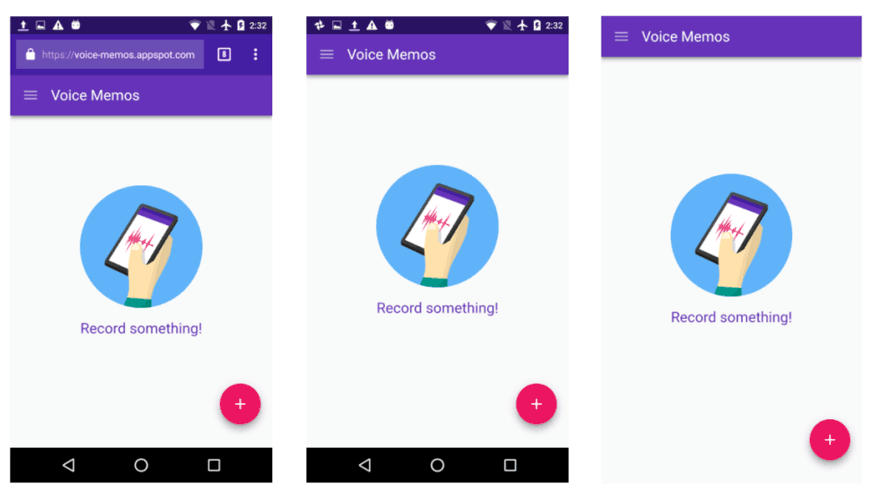
For Chrome 58 on Android, Google has been working on Progressive Web Apps (PWA). This allows Chrome to offer a better experience by hiding the status bar and navigation. This feature allows a web page to take advantage of the screen in a much more efficient way, occupying the entire screen by hiding the top status bar, the Chrome banner, the web URL and tabs, as well as the navigation bar with the three main buttons at the bottom.
This enables users to have a more immersive experience while browsing the web, play games or playing videos.
In addition to the above, Chrome 58 has implemented full support for IndexDB 2.0. This way, Chrome can work better with large amounts of data at a time. Version 2.0 features new schema management, bulk action methods, and more standardized handling of failures. To simplify updates of a site’s database, object stores and indexes can be renamed in-place after a refactoring; and for better performance, websites can use binary keys, which allow them to compact representations for custom keys.
New methods include getKey() and openKeyCursor() for better performance when only a database key is needed, continuePrimaryKey() to divide large data access across transactions and page loads, and getAll() and getAllKeys() for bulk recovery of entire datasets without the need for a cursor.
Chrome also now supports the new iframe sandbox keyword allow-top-navigation-by-user-activation. This keyword gives sandboxed iframes, the ability for users to navigate the top-level page when triggered by interaction, while still blocking auto-redirects. This way, Chrome can still eliminate third-party content that automatically redirects users to another page while allowing developers to put third-party content inside sandboxed iframes.
Especially for Mac users, Chrome 58 supports Touch Bar, allowing the browser to make use of the Apple feature. The Touch Bar is disabled by default and users must activate it manually.
As for security, Chrome 58 has 29 security patches, fixes 12 vulnerabilities which have been discovered by external investigators - 3 of the which have even been considered critical.
Google Chrome is one of the most widely used web browser in the world. Chrome 58 doesn't bring any important changes or big news. Instead, Google focused on implementing a series of settings and tweaks to improve experience.
Although the update isn't the biggest or the most notable, it certainly aims for better security and performance that will allow Google to continue its reign in the browser market.




















































































































































































































































































