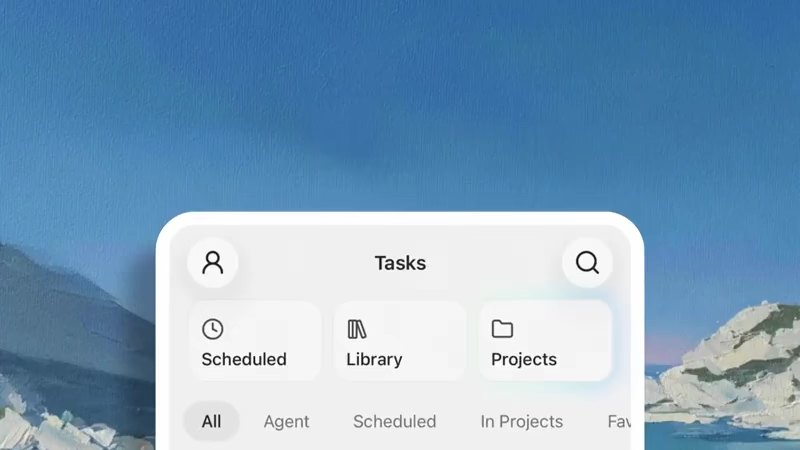
Manus AI has rolled out an update that brings its 'Projects' feature to mobile devices.
What this means, users no longer have to rely solely on desktop or web interfaces to manage structured work. Instead, they can handle everything from basic task lists to more involved setups directly from a phone. This arrives roughly six months after Projects first launched in December of 2025, when the platform introduced dedicated workspaces for recurring activities.
Manus itself operates as a general AI agent developed originally by a startup and later integrated into Meta.
It functions in a controlled environment where it can plan steps, use tools, process files, and produce complete outputs rather than stopping at text responses.
Projects go beyond simple organization.
Each one acts as a self contained workspace built around a master set of instructions that apply automatically to every new task created inside it. Users upload files to form a shared knowledge base, such as brand guidelines, research notes, or reference documents, so the agent pulls from them without repeated uploads.
They can also add project specific skills, set up connectors in an isolated manner to link external services without affecting other areas, and schedule tasks for workflows that run on repeat.
New: Projects are now available on mobile.
We’ve updated the experience so you can organize project-based work wherever you are, from simple task management to more advanced workflows that rely on shared files, instructions, skills, and connectors. pic.twitter.com/KX3kEyLJEO— Manus (@ManusAI) May 25, 2026
The result is a system where the same configuration does not have to be rebuilt for similar jobs.
Updates to instructions or files carry forward to future tasks while leaving existing ones unchanged, which keeps things stable during ongoing work.
And here, the mobile version extends this full capability into the app.
A brief demonstration video shows the interface in action starting from the main Tasks screen. Tabs for Scheduled, Library, and Projects sit at the top alongside filters like All, Agent, and In Projects. Selecting Projects opens a list that includes entries such as Advertising, with options to create new ones via a plus icon.
Tapping into a project like Advertising reveals tabs for Instructions, Files, and Skills. Under Instructions appears a customizable prompt template for Instagram content, complete with details on analyzing successful posts from brands and generating engaging material.
The Files section displays attached items ranging from zip archives and video clips to markdown guides and image screenshots, all ready for the agent to reference.
Navigation stays clean, with back buttons and quick access to connectors indicated by icons, allowing adjustments without switching devices.
This availability on mobile addresses a practical gap for people whose work happens away from a desk.
Projects are more than folders. Teach Manus how you want work done.
> Shared instructions
> Shared files
> Project-specific skills
> Isolated connector setup
> Scheduled tasks for reusable workflows for repeat work
Projects on mobile make it more seamless to use Manus where…— Manus (@ManusAI) May 25, 2026
Many already use Manus for ongoing processes like content pipelines or campaign planning, and the update supports continuity when moving between phone and computer.
For instance, someone handling marketing might maintain an Advertising project with pre loaded templates and assets, then review or launch a new task while commuting or between meetings. Developers could keep code review standards in one workspace, while product teams store report templates in another. The setup encourages consistency because the agent starts each session with the same context, reducing the chance of variations that creep in when setups are recreated manually.
User reactions to the release reflect a range of experiences.
Several posts highlight the convenience of accessing complex workflows on the go, noting how it turns the phone into a portable hub for automation without trimming down features. Comments mention the value for multi step processes that previously required desktop sessions, and some express relief at finally having full project management in their pocket.
At the same time, others point out ongoing considerations around credit consumption, especially for heavier tasks, and occasional frustrations with billing or support responsiveness that predate this update.
These observations align with the broader reality of agent based tools, where outcomes depend heavily on configuration quality and available resources rather than the interface alone.
In practice, Projects on mobile integrate with other recent capabilities in the platform.
Manus has expanded into areas like no code app building and visual design tools in updates such as version 1.6, but the Projects structure provides the organizational layer that makes those features repeatable rather than one off.




















































































































































































































































































