 The social giant Facebook announced on April 17th, 2014, that the company is starting to roll out a new feature called Nearby Friends to iOS and Android mobile devices. The feature allows users to share their positions with their friends and helps them to discover friends that are nearby or on the go.
The new feature is a push from Facebook to encourage more users to connect offline. You can turn on Nearby Friends by first clicking on the chat menu in the app's upper right-hand corner above the list of online friends. When you see your friends that you want to share you location with, you can click the directional-arrow button to the right of their names.
When your friend shares their location with you, you'll receive a notification alert when they're nearby. When you click the notification, you will now see a map with a pin marking your friend's exact location with distance and the time it was last updated. Your friend's location will continue to update as long as he or she is sharing it with you in real-time on the map.
Nearby Friends is an optional feature and its turned off by default. When you turn the feature on, you can choose who can see you when you're nearby, and see notifications when your selected friends are near you.
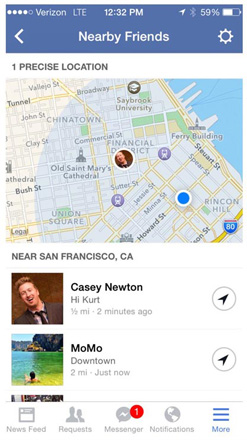
Nearby Friends works both ways - you and your friend should turn on the feature and choose to share with each other. You will only appear on a map when you choose to share your exact location. The same goes with your friends.
You can choose to share with "friends" and not with the "public" or "friends of friends". But you can also get specific option if you have previous groups saved on Facebook.
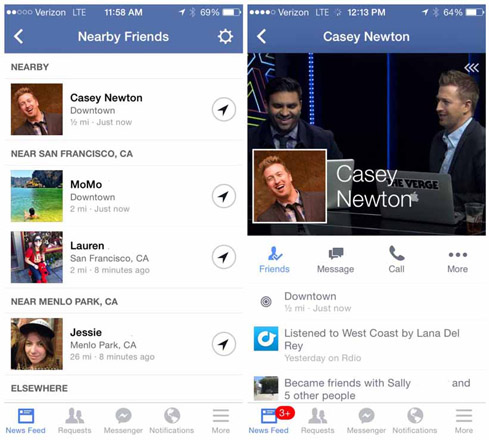
If you want to see more about your friends that are nearby, you can click on their names within the list to see a small compact version of their profile pages. Here you can send them a message or give them a call.
Once you turn it on, the feature is actively broadcasting your position to your selected friends. You can turn Nearby Friends off anytime you want by clicking on the directional-arrow once again, and select "Stop Sharing This."
(further reading: Geolocation, Social Media and the Internet Detectives)
Despite the name "Nearby Friends", you can also see friends from the other side of the globe. Facebook creates a list of people that are nearby, sorting them from the closest to the furthest. When you scroll down the list, the further away those friends are.
Privacy on the Go
Facebook doesn't log off users' position from Nearby Friends automatically. After Nearby Friends is activated, Facebook keeps a record of your shared positions in a history log called Location History on its servers, even when you're not using the app.
There are pros and cons to deleting your Location History. As the feature gets to know you better, it will refrain from sending notifications when you are at places you frequently go, such as home and work. Deleting your history erases that knowledge, so you will get more notifications. Not deleting you history means that Facebook knows where you spend most of your time and can track you whenever it wants. Although the company claims that the data is only used for Nearby Friends, some people aren't comfortable in having others holding that type of information.
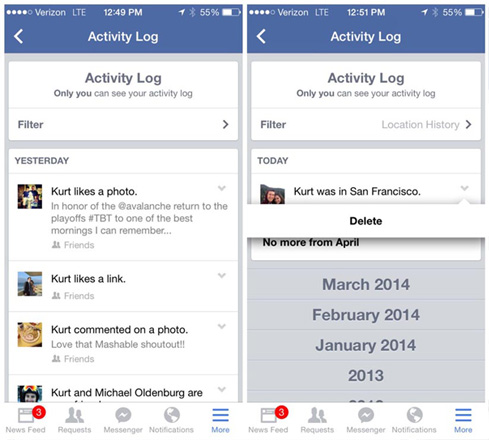
If you want to delete your data, you can click on the "More" button in the lower right-hand corner of the app while using Nearby Friends. Scroll down and click on "Activity Log" and then "Filter." Now you need to scroll to the very bottom, and select "Location History." From here you can delete your records from single days or months, or all.
The Location History can be used by Facebook to deliver targeted ads and improve News Feed. But since Nearby Friends is off by default and users have to actively turn it on, Facebook may have problems in making people to use the app. And the realization that Location History will be used for ad targeting could scare some people away. The social giant has anticipated this, and plans to use News Feed teaser stories to try to coax users into turning on Nearby Friends.
With privacy on the internet has become a high concern, Facebook has to demonstrate that this new feature will make its users' social life better or they won't be willing to use it and give up their data.






















































































































































































































































































