
Mozilla, long known for its open-source and privacy-first philosophy, kept AI low-key for years.
While rivals like Google Chrome and Microsoft Edge chased more aggressive integrations, Mozilla with its Firefox web browser prioritized user control, decentralization, and anti-tracking tech. But still, it dabbled in AI quietly, with Firefox Suggest, and its Pocket integration, for example.
This time, it ramps things up a bit with the release of Firefox 139, which brings an AI-based feature that is accessible by pressing a keyboard shortcut.
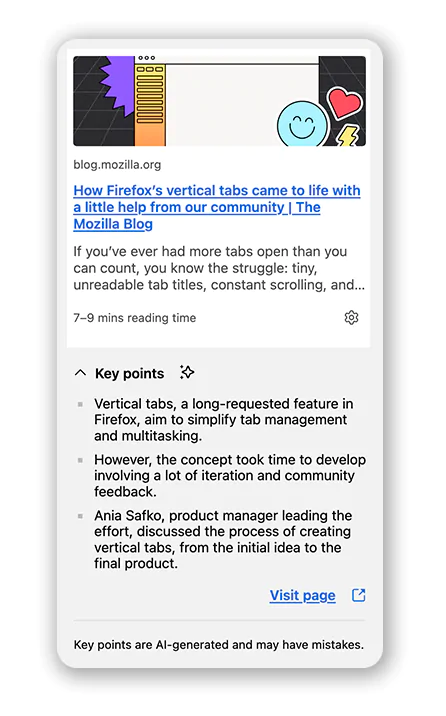
Calling it 'Link Previews,' interacting with it will have the browser open a small pop-up with a preview of a link’s content.
First announced as part of Firefox Labs 138, Mozilla is making the AI-powered too more widely available in Firefox 139.
As Mozilla explains it in a release note:
As AI starts reshaping how people search, read, and interact online, web browsers are rapidly evolving into the next competitive battleground.
While Chrome and Edge charge ahead with deeply integrated AIs, and ambitious startups like Perplexity tease futuristic ideas with the upcoming Comet browser, others are joining the reinvention race—The Browser Company with its minimalist Arc and now Dia, and Opera resurrecting visual flair through its experimental Neon.
Amid all this, Mozilla’s approach with Firefox feels comparatively more restrained, opting for modest, privacy-focused innovations rather than flashy overhauls.
Link Previews, which marks Mozilla Firefox's first major AI-centric upgrade aimed at everyday users, is able to show a preview of the target page and its source domain, provide a brief summary, and create a list of AI-generated key points pulled from the page’s content.
To do this, Mozilla uses a lightweight, on-device model called SmolLM2-360M from Hugging Face.
SmolLM2, which is a family of compact language models available in three size: 135M, 360M, and 1.7B parameters, is capable of solving a wide range of tasks while being lightweight enough to run on-device. And the 360M model was trained on 4 trillion tokens.
The model works with Firefox's Reader View to summarize content while maintaining strict user privacy—no cloud syncing or data harvesting involved.

Besides the AI-powered feature, Firefox 139 also introduces a way for users to customize their New Tab page by uploading personal images or selecting custom colors, including new additions like the "Celestial" category.
"The New Tab custom wallpaper (and colors) option is now available! Your own image can be uploaded as your New Tab wallpaper or any custom color can be selected - from the brightest pink to dark gray," said Firefox.
This feature is gradually rolling out but can be enabled immediately via Firefox Labs.
Firefox 139 also supports full-page translations within extension pages using the moz-extension:// URL scheme. This enhancement allows users to translate content within their installed extensions, broadening accessibility.




















































































































































































































































































