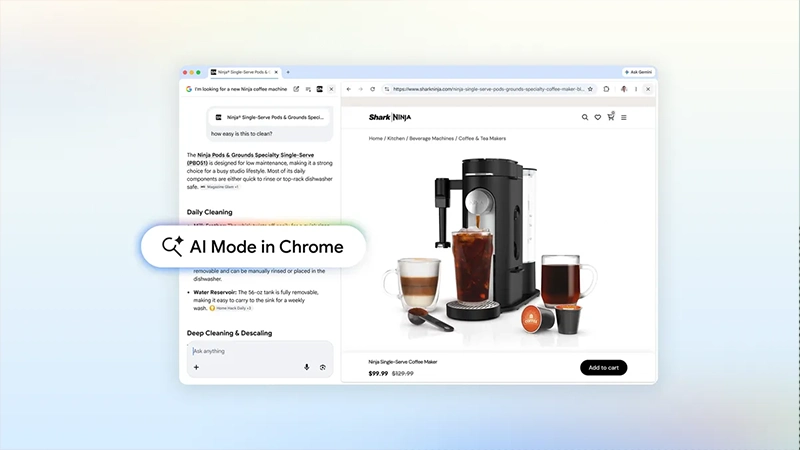
Google's AI Mode is a conversational AI-powered search experience that Google first introduced in early 2025 as an evolution of its AI Overviews feature.
Originally launched in experimental form through Search Labs and later rolled out more widely, it was designed to go beyond traditional keyword-based search results. Instead of presenting a list of links, AI Mode allows users to ask complex, multi-part questions in natural language and receive detailed, synthesized responses generated with the help of Google's Gemini models.
These responses combine advanced reasoning, contextual understanding, and information drawn from the web, while still including citations and links for further reading.
The mode supports follow-up questions within the same conversation, enabling a more interactive and continuous dialogue rather than isolated searches.
From the beginning, AI Mode aimed to handle nuanced or layered inquiries that would typically require multiple searches and tab-switching. And now, the feature is baked right into Chrome.
These updates to AI Mode in Chrome are now available in the U.S., and we’ll expand soon to more places around the world. Learn more ↓ https://t.co/JEkKMGKeqF
— Google (@Google) April 16, 2026
In a blog post:
Our new Search experience in Chrome can change that
According to Google, the enhanced AI Mode within Chrome to make the experience even more seamless during web browsing.
The most notable change is the ability to open source links from AI responses without fully leaving the conversation. On desktop, clicking a link now opens the webpage in a side-by-side view next to the AI Mode panel, keeping the chat visible so users can reference the content and ask follow-up questions in real time.
This reduces disruption compared to the previous behavior of spawning new tabs.
The update also expands context awareness significantly.
When you open a link in AI Mode in Chrome on your computer, the webpage opens side-by-side with your search.
Want to learn more about how the McLaren Racing team trains? Search with AI Mode and ask follow-ups as you dig deeper into relevant websites without switching tabs. pic.twitter.com/sxcoH9PPC1— Chrome (@googlechrome) April 16, 2026
Users can now incorporate specific open tabs, uploaded images, PDFs, or other files directly into their queries through a "plus" menu in the interface.
This allows the AI to draw on multiple sources at once, supporting more personalized and complex interactions that combine text, visuals, and active browsing sessions. Multimodal capabilities help the system better understand detailed questions involving different types of input.
Access has been further streamlined across platforms.
On desktop, an AI Mode button appears on the new tab page, and the address bar can serve as a prompt entry point with options for model selection or additional features. Similar improvements on Android and iOS versions of Chrome include easier entry points and cross-tab referencing. The rollout started in the United States, with expansion to other regions planned over time.
These refinements build on AI Mode’s original foundation as a more fluid alternative to conventional search, aiming to keep users engaged in a single, continuous workflow rather than fragmenting their attention across tabs and windows. The feature remains available through standard Chrome updates for users in supported areas.
Use open tabs, images and files as inputs for your search with AI Mode in Chrome on your phone.
Looking for a kid-friendly hike recommendation for an upcoming trip? Add open tabs like sites for previous hikes you liked as context for your search in AI Mode, and get recommended… pic.twitter.com/KK3rjPtnBi— Chrome (@googlechrome) April 16, 2026
Overall, these updates represent a continued effort by Google to integrate conversational AI more naturally into the everyday browsing experience.
By allowing users to maintain context across conversations, open pages, and uploaded materials without constant tab-switching, AI Mode in Chrome aims to reduce friction in information gathering and multi-step research.
Whether exploring a complex topic, comparing options, or simply following up on details from a webpage, the enhanced AI Mode seeks to create a more fluid workflow.
As the feature continues to roll out beyond the United States, users with access can experience these improvements, where the boundary between search, browsing, and conversation becomes increasingly seamless.




















































































































































































































































































