Google and Apple have different taste in design. While Apple opts for "dull" but useful design interactions, the former likes splashy colors and attractive visual cues.
To push more of its design language forward into Apple, Google revamps its Gmail in what it calls "the biggest overhaul of the app in nearly four years."
"When you get the next Gmail iOS app update, you’ll notice some exciting changes," said Google on its November 7th, 2016 blog post.
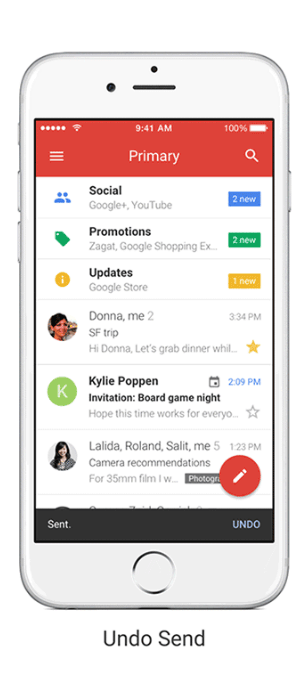
The first up is the new looks. Gmail for iOS now looks a lot more like its Android counterpart: Material Design with a red-colored bar up on its display. By having more of its Material Design-oriented products running on Apple, Google is further pushing its brand influence to the faithful competitor.
While most of the changes are just plain aesthetic, Google also introduces some new features.
And as for the new features, the first is the Undo Send. This feature should come in handy when users realized that they've made a mistake soon after sending an email. Almost immediately to a few seconds after sending a message, users can tap "Undo" at the bottom of the screen. With this, users can prevent embarrassing moments when sending wrong emails to the wrong person.
In the meantime, Gmail for Android has yet to have this feature while Google' own Inbox app already does.
The next is the speed. Google said that it sped up its search with 'instant' results, and also provides suggestion while the user type. And for last, users can also swipe to the side to see archive and deleted emails.
According to Google, these can make the overall user interactions with the app a lot faster.
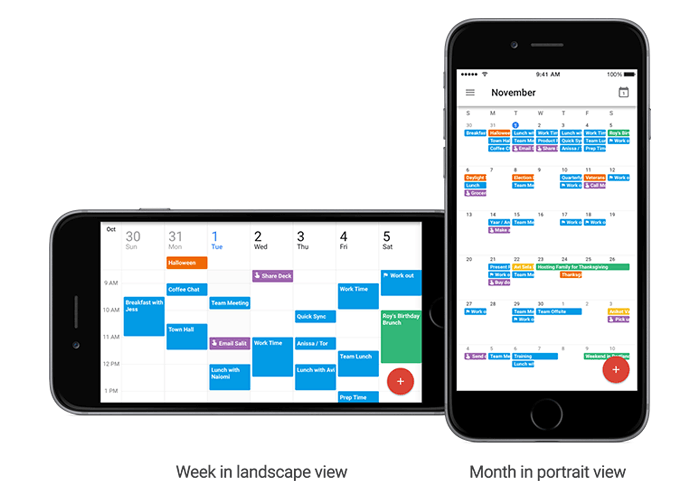
And not just Gmail. Google also makes a few update to its Calendar app based on users' feedback.
- Users can now see month and week view in landscape mode.
- The ability to set up alternate calendars (non-Gregorian calendars - like Lunar, Islamic or Hindu).
- Users can now search for things like events, reminders and goals, straight within Apple' Spotlight Search.