In the latest chapter of the AI arms race, where every leading lab vies for the most intuitive and powerful tools, Google has been working hard to keep pace with rivals like OpenAI.
After OpenAI released ChatGPT and sent shivers down its spine, Google has been working hard to match, or even surpass its main rival. And after the splashy release of Gemini 3 and its cutting-edge Nano Banana Pro image generation model, the events pushed Google back into the spotlight.
With studio-level control, improved text fidelity in images, and advanced real-world reasoning, Google has again cemented its place at the peak of generative AI virality.
And now, Google is taking things a step further by reshaping how users interact with images in Gemini.
Traditionally, AI image editing has relied on text prompts, where users must describe what they want, to then tweak things until it's right.
That approach works, but it can be frustrating when users are trying to explain subtle visual changes.
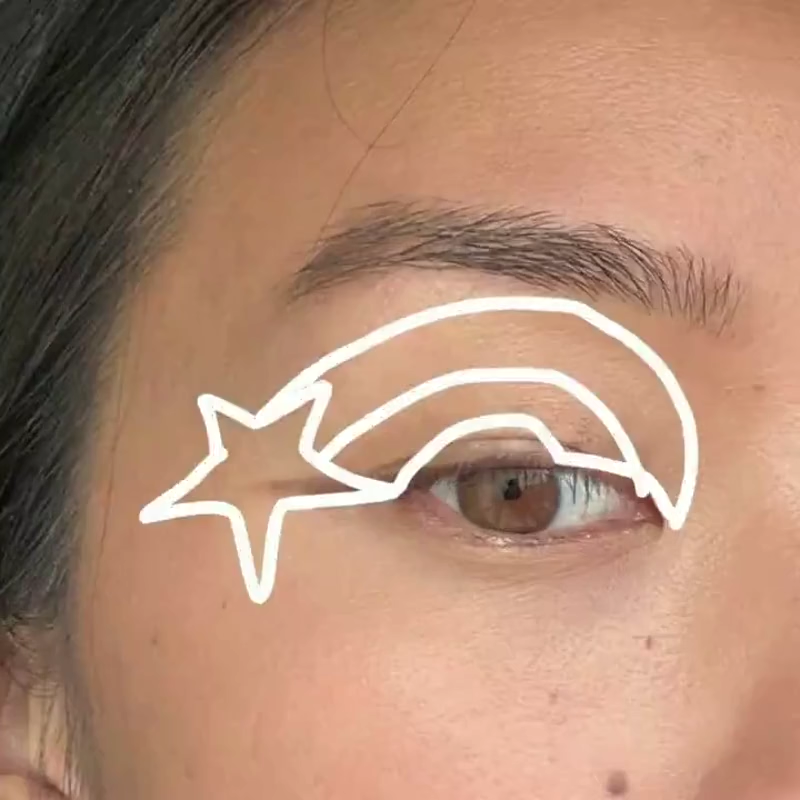
The newest rollout flips that dynamic: instead of explaining vision in words, users can literally draw it.
There’s a whole new way to prompt with Nano Banana.
Now you can tell Gemini exactly where and how to apply your edits by drawing on or annotating your images right in the Gemini app, making it easier to get the final look you want.— G3mini (@GeminiApp) December 18, 2025
Users who receive the update in their Google app (version 16.49.59), can add an image to a Gemini conversation and then tap it to bring up a markup toolbar with colors and tools that let them circle, highlight, or scribble directly on the image to show the AI exactly where changes should be made.
There's even a text-on-image option, so you can add written instructions right where it matters.
This feature is also available in the desktop/web version of Gemini. What this means, the same editing capabilities are accessible whether users are on their phone, tablet, or computer, bringing consistency to the cross-platform experience.
The new markup tool aims to simplify two major tasks at once: editing and understanding images.
New in @GeminiApp: Edit images with just a doodle
Just click into your image, draw the edits you want, and tell Gemini what to do.
Prompt: Add a crown and a royal looking cape to my pet’s photo. pic.twitter.com/TTLRe8WBtm— Google (@Google) December 18, 2025
By drawing on a photo, a user can indicate a specific detail they want modified. For instance, circling a background element to remove it or highlighting uneven lighting to adjust it, without relying solely on textual prompts. Early demos show that this approach helps tailor edits more precisely, though it's not perfect yet and can misidentify objects or people at times.
At its core, this feature embodies a shift toward visual prompting, where a user's finger, not just their words, drives the AI's understanding.
Instead of typing "brighten the sky on the left," users can simplu circle that part of the photo and let Gemini figure out the rest. This makes AI edits feel more direct and intuitive, especially for casual users who might struggle with crafting detailed text instructions.
Here’s how to give it a try:
1. Open the Gemini app or https://t.co/382WL5xSvc
2. Select “Create image”
3. Upload the image you want to edit, tap on it, and draw or annotate your suggestions directly on the image. (No prompt necessary, but you can always add one if you’d like!)…— G3mini (@GeminiApp) December 18, 2025
This intuitive image annotation feature is currently rolling out to select users globally.
In practice, this visual markup functionality could transform common creative tasks: pinpointing lighting adjustments in headshots, adding or removing elements in product photos, tidying up visuals for social media, or even whipping up quick memes. It's a move that lowers the barrier to precision editing, making powerful AI tools more approachable for everyone, from casual creators to professionals, without demanding Photoshop skills or verbose prompts.
Ultimately, Google’s new image annotation rollout reinforces the broader trend in generative AI: tools that adapt to human intuition rather than forcing humans to adapt to AI workflows.
In the ongoing competition with other major players, this kind of natural, visual control could become a defining feature of the next era of AI creativity.
On top of that, Google also announces that Gemini can now spot deepfakes in videos.
Read: Google's New Reality Check: Using Gemini 3 To Fix The Deepfake Problem It Helped Fuel
This newest update also gives you context on whether the audio or the visual track on a video contain elements created with Google AI, along with specific time segments.
For example, it might say: “SynthID detected within the audio between 10-20 secs. No SynthID detected in the…— G3mini (@GeminiApp) December 18, 2025
Behind this ability, is SynthID, which is Google’s invisible watermark woven directly into the pixels of any images and videos created by its models. SynthID shows no visible mark and no metadata. It can survive compression, resizing, and even heavy edits. In that narrow domain, detecting Google-made images,Gemini is surprisingly reliable.
It can even flag cases where only parts of a media that have been manipulated, which matters now that AI editing tools can surgically alter segments of an image or video while leaving the rest untouched.
And with this newest update, Gemin ican also give users context on whether the audio or the visual track on a video contain elements created with Google AI, along with specific time segments.
But again, at least at this time, the scope of this feature is quite limited.
Just like previously said, Gemini's ability to detect deepfakes or manipulated media is based on Google's ability detect SynthID patterns.
What this means, when a media comes from any other generator, like Midjourney, DALL-E, Stable Diffusion, or any others that don't come with SynthID, Gemini may reverts to guesswork.
In other words, sometimes it catches them. Sometimes it doesn’t.




















































































































































































































































































