Video calls over the web burst onto the scene in the early 2000s and quickly became a game-changer in how people connected through computers.
Services like Skype, launched in 2003, made it simple for anyone with a decent internet connection and a webcam to see and hear loved ones across continents in real time, shrinking the world in ways that email or phone calls never could. Yahoo Messenger followed a similar trajectory but with an earlier start and a more abrupt end.
What started as a novelty for tech enthusiasts soon transformed everyday communication: families separated by oceans could watch grandchildren take their first steps, business meetings shifted from conference rooms to screens, and long-distance relationships felt far less distant.
This shift marked the beginning of a more visual, immediate era of digital interaction, where text alone no longer sufficed and face-to-face conversations migrated online, paving the way for the always-connected lifestyles we take for granted today.
Over the years, video calling evolved from dedicated apps to seamless integrations across platforms, with mobile apps like WhatsApp leading the charge after adding voice calls in 2015 and video shortly after. WhatsApp's strength has always been its massive reach, end-to-end encryption via the Signal protocol, and cross-platform reliability, making it a go-to for billions.
Yet one piece remained missing for many desktop users: full calling support directly in the browser-based WhatsApp Web experience.
Now, that feature finally arrived.
For years, the web version handled messaging brilliantly but redirected users to install a separate desktop app for voice or video calls, creating a frustrating hurdle, especially on systems like Linux where no official desktop client exists.
That limitation is finally fading away.
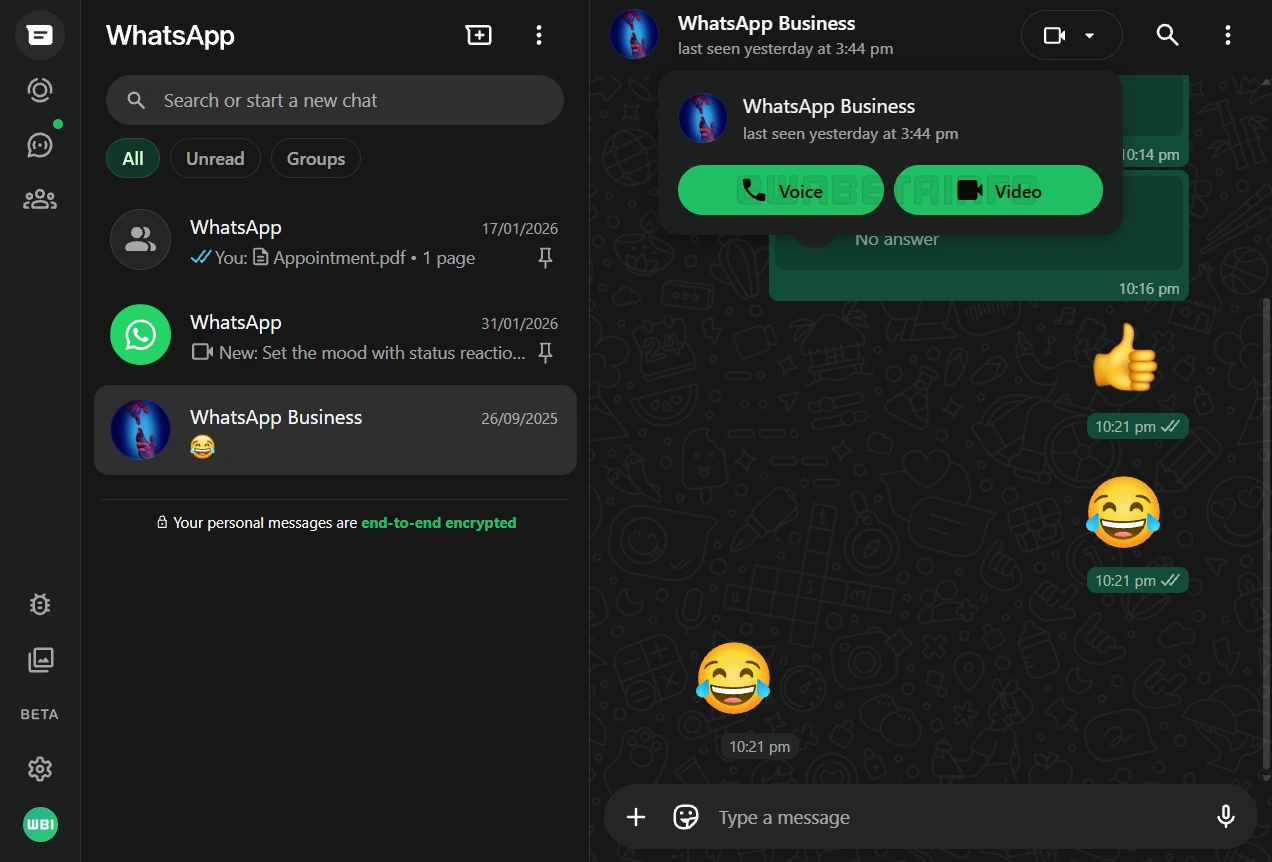
As of February 2026, according to WABetaInfoWhatsApp has begun rolling out native voice and video call support directly to its web client, allowing users to initiate and receive calls right from their browser without needing any additional software. The feature, which has been in development for roughly a year, first appeared for some users enrolled in the WhatsApp Web beta program.
To use it, simply open an individual chat and tap the call button in the top right corner to choose between a voice or video call.
Video calls even include screen sharing, mirroring the capabilities long available in the desktop apps.
The calls remain fully protected with WhatsApp's signature end-to-end encryption, ensuring privacy just as on mobile devices.
This update is particularly welcome for Linux users and anyone who prefers the lightweight, no-install convenience of WhatsApp Web.
It eliminates the need to switch devices or download extra apps just to hop on a quick call, making browser-based communication even more fluid and accessible.
While the addition brings WhatsApp Web much closer to full feature parity with its mobile and desktop counterparts, it's worth noting a few current limitations. For example, for now, the support is limited to one-on-one conversations, with group calling, along with features like call links and scheduling, are still in the works and expected to arrive in a later phase.
Early testers have also reported that video quality can feel noticeably softer and more compressed compared to dedicated apps like Zoom, Google Meet, or even WhatsApp's own desktop client, with a smaller window and potential for lower performance depending on browser and hardware. Screen sharing, while included during video calls, requires caution to avoid exposing sensitive information unintentionally.
Regardless, the update should bring WhatsApp on the webcloser to parity with its mobile and desktop counterparts.






















































































































































































































































































