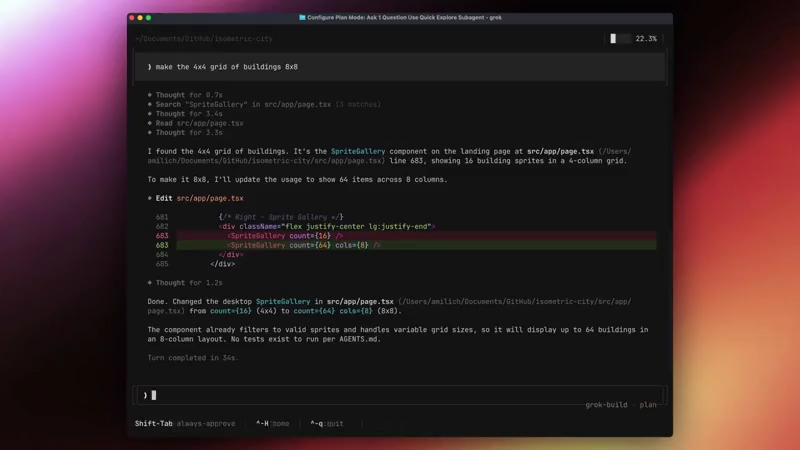
Developers and programmers have long favored the command line interface.
It delivers direct control through text based commands and allows users to maintain concentration without the interruptions common in graphical environments. Many developers report greater fluency with typing instructions than with mouse driven menus or visual layouts. The terminal has served as a reliable workspace for decades where scripts run efficiently and outputs appear in predictable formats.
This preference persists even as software projects grow more complex and involve larger codebases or multiple collaborating components.Recent advancements in artificial intelligence have introduced agents capable of handling coding tasks research and automation.
These agents often operate within chat interfaces or dedicated applications that can require frequent context switching.
Developers working with several agents simultaneously sometimes encounter visual disruptions such as screen redraws or layout shifts that interrupt focus. Tools designed for terminal use have begun to address these challenges by incorporating features that respect established command line workflows while adding capabilities for agent coordination.
xAI announced an early beta of 'Grok Build,' a tool described as an agentic command line interface intended for professional software engineering complex coding projects and workflow automation.
Try this early Grok Build (anything) beta and let us know what to improve.
Much appreciated! https://t.co/1GgGEQzv3E— Elon Musk (@elonmusk) May 14, 2026
It operates directly within the terminal and is currently available only to SuperGrok Heavy subscribers.
The beta phase allows xAI to gather feedback and refine both the underlying models and the product based on real usage.Installation follows a straightforward process. Users run a single command curl -fsSL https://x.ai/cli/install.sh | bash to add the binary to the system.
After installation developers navigate to a project directory and launch an interactive session by typing grok.
The first launch typically opens a browser window for authentication using the SuperGrok Heavy account.
In environments without browser access users can set an environment variable with an API key obtained from the xAI console.
Syntax highlighting,, plan mode, clickable interface in Grok Build https://t.co/thwVY9auFq pic.twitter.com/gYQKJd0jAm
— Andrew Milich (@milichab) May 14, 2026
The tool then connects to the project files and prepares for natural language prompts.The interface takes the form of a terminal user interface that supports mouse interactions.
Users can click to navigate between plans subagents and parallel tasks.
The design maintains stable panes that avoid flickering or unexpected redraws during operation. This stability becomes relevant when coordinating multiple agents at once as developers can switch between reviewing implementation plans inspecting subagent outputs or selecting skills without visual interruptions. Keyboard shortcuts remain available including enter to send prompts shift tab to return to normal mode control h to return to the home view and control q to quit the session.
Grok Build coordinates subagents that handle distinct aspects of a workflow.
These subagents can run in parallel to perform tasks such as researching codebases proposing code changes executing shell commands managing dependencies or generating diffs for review. Before any modifications occur the system presents an implementation plan that users can examine and adjust.
this is an early beta. we still have much to improve, which is why its so exciting for people to start trying.
the goal is for Grok Build to be the best coding agent when it comes to solving real and difficult engineering problems. https://t.co/DHGzLSOMDN— Jason Ginsberg (@JasonBud) May 14, 2026
The tool draws on Grok models to interpret natural language instructions and interact directly with local project files.
It supports validation of code edits to specific files and can ask clarifying questions to refine details during the process.Extensibility forms another aspect of the design.
Users can define custom skills plugins or extensions to adapt the tool to specific preferences or team requirements. A marketplace feature enables sharing of capabilities across projects or teams. The system also includes support for headless operation which allows integration into scripts bots or larger automation pipelines without relying on the interactive view.
Grok Build https://t.co/uWixUwweB3
— Elon Musk (@elonmusk) May 14, 2026
Through the Agent Client Protocol developers can build custom agents or incorporate Grok Build into other applications.
The early beta status indicates that xAI expects ongoing adjustments based on input from subscribers.
Within the CLI users can submit feedback directly using a designated command. Documentation outlines basic usage scenarios such as explaining a repository structure or guiding the agent through stepwise project development.
The release provides terminal based support for agent orchestration in coding and automation tasks. It reflects an approach that combines traditional command line efficiency with structured support for parallel agent work and interactive navigation.






















































































































































































































































































