The dream of truly hands-on AI has always felt just out of reach.
For years, powerful agents like Manus lived entirely in the cloud, equipped with browsers, command lines, and sandboxes to tackle tasks, yet they remained separated from the one place where most of our real work happens: our own computers. Files sat untouched on local drives, applications waited to be launched manually, and idle GPUs hummed quietly without contributing to anything meaningful. That separation created a fundamental limitation.
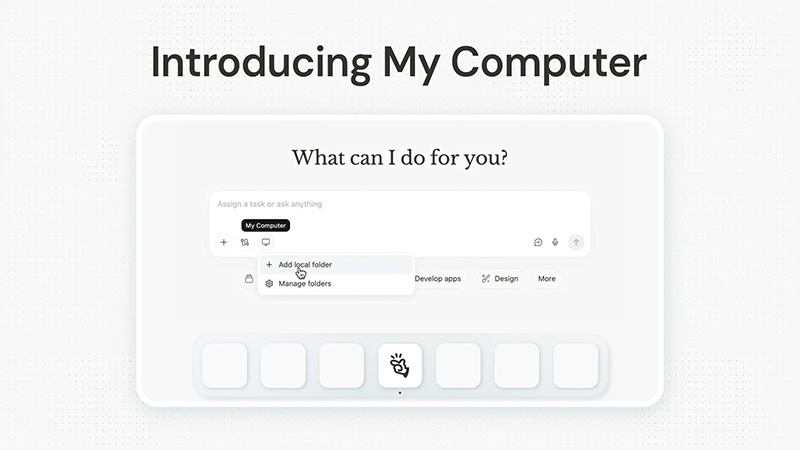
Manus wants to change that with a feature it calls 'My Computer.'
The idea is to close the gap, and by releasing Manus Desktop app, the agent steps out of its remote environment and directly into users' machine.
It doesn't require exotic permissions or risky deep integrations; instead, it works elegantly through your existing terminal, executing command-line instructions with your explicit approval every step of the way.
Users stay firmly in control, choosing "Allow Once" for one-off actions or "Always Allow" for trusted routines, while Manus handles the execution.
Today, we're taking Manus out of the cloud and putting it on your desktop.
Introducing My Computer, the core feature of the new Manus Desktop app. It’s your AI agent, now on your local machine. pic.twitter.com/OaWU4imk3Q— Manus (@ManusAI) March 16, 2026
At its core, the idea is to create an agent that functions like an action engine, and not just a conversational companion.
"We have always believed that an AI agent should be an action engine, not just a chat assistant. The cloud sandbox gave Manus its own workspace. My Computer brings Manus into yours," said Manus in the announcement.
My Computer is able to run locally, and executes tasks across every resource on the computer, like files, terminals, installed software, and spare compute cycles. Here, users are the commander, and Manus is the executor.
To use My Computer, which is initially available for macOS and Windows users, users can simply head to the official site, download the Desktop app, sign in to their Manus account.
They can then navigate to the My Computer section, and authorize the specific folders they want the agent to access. From there, it integrates seamlessly with users' existing Projects, Agents, and Scheduled Tasks, letting you automate recurring local routines like daily Downloads cleanup or weekly report generation.
The potential feels boundless. Whether users just want to tidy up creative assets, accelerating development, unlocking forgotten hardware, or bridging local and cloud worlds in unexpected ways.
My Computer in action:
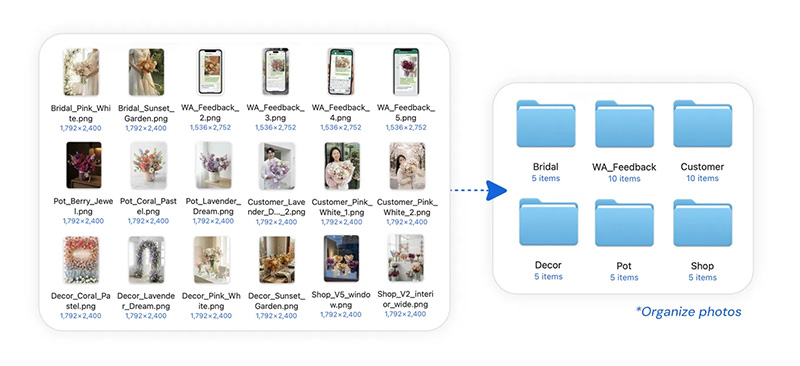
Organizing thousands of unsorted photos
Renaming hundreds of invoices
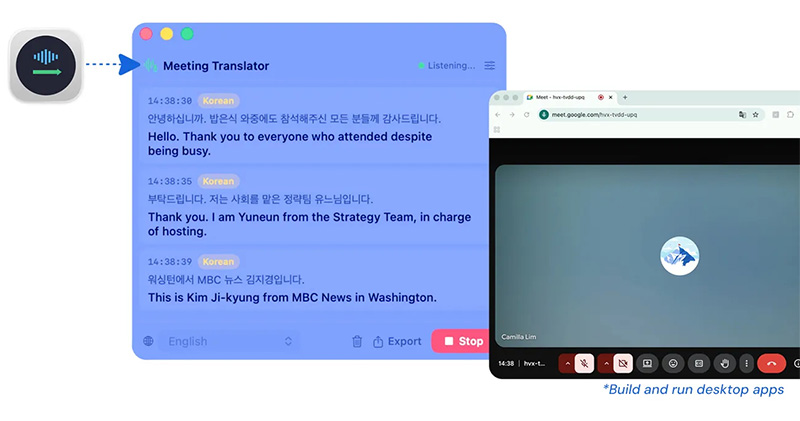
Build desktop apps in swift, entirely on your computer. No code written manually.
Combine with existing Connectors to create seamless automated workflows.
Create local…— Manus (@ManusAI) March 16, 2026
The possibilities unfold immediately in everyday scenarios.
Picture a florist staring at thousands of unsorted photos from the shop: bouquets in every color, potted plants arranged haphazardly, customer events captured in a single chaotic folder.
A simple instruction, like "organize my flower shop photos" will send Manus to work. In this case, it can scan It scans each image, understands the content, creates sensible subfolders by type or occasion, and sorts everything neatly in minutes, turning disorder into a structured library ready for use.
Similarly, an accountant drowning in hundreds of invoices can watch Manus rename them all to a consistent, professional format, sparing hours of tedious manual work.

Manus that can tap into users' local development tools, can build a complete real-time meeting translation app with subtitles, written entirely in Swift for macOS.
Without ever opening Xcode or typing a single line of code, Manus My Computer can create the project via terminal commands, wrote the necessary code, debugged issues, and packaged the final app, all in about twenty minutes. It leveraged the tools already installed on the machine, proving that a general AI agent can now handle full software creation workflows using nothing but your existing setup.
The idea of AI moving beyond chat and into real-world action has been gaining momentum for a while, and Manus isn't the only fish in the sea.
OpenClaw represents the most direct and arguably most powerful model of this idea. It runs locally on users' machine, giving the agent deep access to users' file system, terminal, APIs, and applications. This makes it extremely flexible and capable of full-system automation, from managing repositories to executing complex workflows across tools.
But that same level of access is also what makes it risky. Because it operates directly on users' environment, mistakes or misaligned actions can have real consequences, and setup often requires technical knowledge and careful configuration.
Initially, Manus operated entirely in the cloud through what it called a sandbox: a fully equipped virtual computer where the AI could browse the web, write code, manipulate files, and complete multi-step workflows independently. This approach allowed the system to run continuously, even when users were offline, but it also created a clear limitation: most meaningful work (documents, applications, development environments) still lived on the user’s actual device.
The My Computer feature is designed to bridge that gap by bringing the AI agent directly onto the user’s local machine. Instead of working in isolation, Manus can now interact with a real desktop environment through its dedicated app, effectively turning the AI into something closer to an on-device operator.
With the right permissions, Manus can launch and interact with software installed on the computer, extending its capabilities beyond file handling into broader task automation. This means workflows that previously required manual coordination, like compiling reports, transforming datasets, or preparing development outputs, can be delegated more fully to the agent.
Available now for all macOS and Windows users.
Your ideas. Manus's execution with every resource on your computer.https://t.co/nYpSJyK3Ht— Manus (@ManusAI) March 16, 2026
The feature extends even further by making use of resources that would otherwise sit idle.
Comparing OpenClaw to Manus My Computer and others, reflect a broader tension in the evolution of AI agents. The more power is given to an AI, the more useful it becomes, but also the more trust it requires. Systems like OpenClaw lean into capability, while Perplexity leans into guardrails, and Manus experiments with blending autonomy and access.
None of these approaches has fully "won" yet, because the ideal balance between usefulness, safety, and control is still being defined in real time.

















































































































































































































































































