
On iOS, an Apple iCloud email address is the primary email linked to a user's Apple ID.
Therefore, users' primary email address that is registered to a device plays a key role in various Apple services users use, or would use, such as iCloud storage, iMessage, FaceTime, and iTunes purchases. This is why on Apple's mobile devices, it's one email to rule them all.
Starting with iOS 18.1, Apple is finally allowing users to fully change their primary iCloud email address, a feature that wasn’t available before. Previously, users could only create an alias to send emails from, but the original iCloud email couldn’t be changed or removed.
If users wanted to update their primary email address, they had to first delete any other emails associated with their account.
There was no straightforward option to simply switch the primary Apple Account email.
This is changing.
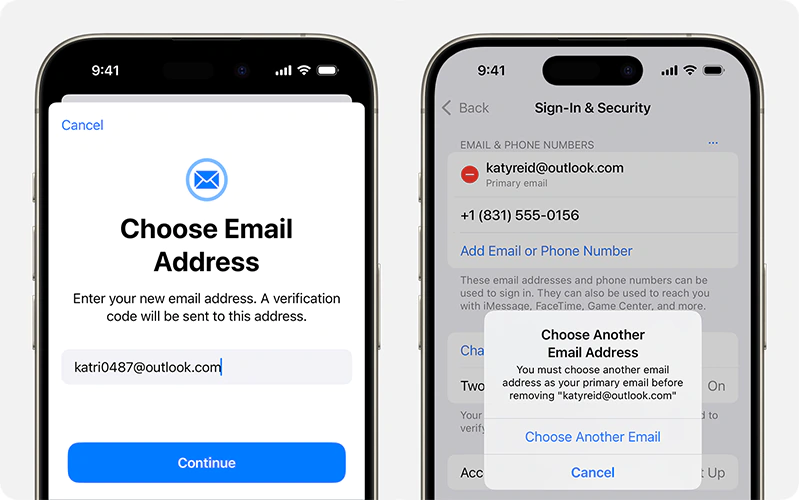
According to Apple in a dedicated support page, to change an iPhone iCloud email on iOS 18.1 and later, users can:
- Go to Settings, then tap on their name.
- Tap Sign In & Security.
- Next to Email & Phone Numbers, tap Edit.
- Tap the Remove button next to the primary email address, then tap Delete.
- Tap Choose Another Email and enter the device passcode, if asked.
- Follow the onscreen steps to enter and verify their new primary email address.
Then, the user will see a button labeled Change Email Address, allowing them to update their iCloud email to a new one.
This way, users can finally change their primary email address right from their devices.
This includes those with iCloud.com, mac.com, or me.com email addresses.
This change is a significant departure from Apple's previous policy, and gives users more flexibility in managing their Apple accounts.
This update is especially helpful for users who set up their Apple Account years ago and no longer like the email they initially chose.
While aliases previously offered a workaround, this time, users have full control over their primary Apple Account email, avoiding any exposure when collaborating on iCloud documents.
It's worth noting that once a user has changed the primary email of their phone, any emails sent to their old address will no longer be received. That email address will also no longer be used for FaceTime or iMessage.
The user however, can still use an iCloud alias to continue receiving messages if needed.






















































































































































































































































































