The intensifying competition among large language models has pushed tech giants into a fierce battle for user attention across every platform imaginable.
As OpenAI, Anthropic, and others rolled out polished desktop applications, Google found itself playing catch-up on the desktop front despite Gemini's strong presence on mobile and in the browser. In a clear bid to strengthen its foothold among desktop users, Google has now launched a native Gemini app for macOS, following a similar move on Windows.
This expansion reflects a broader strategy to make the AI more embedded in daily workflows, moving beyond browser tabs and occasional prompts to something always within easy reach.
One challenge Google has acknowledged in recent months is prompt fatigue, the growing tedium of repeatedly typing similar instructions to Gemini across different contexts.
As highlighted in discussions around Gemini's Chrome integration, users often find themselves re-entering the same prompts when working on recipes, code, documents, or research. Google has begun addressing this with features like Skills in Chrome, which allow saving and reusing effective prompts with a single click.
The new Mac app builds on this thinking by offering deeper system-level integration that aims to reduce friction and make interactions feel more natural and contextual.
The Gemini app is now on Mac.
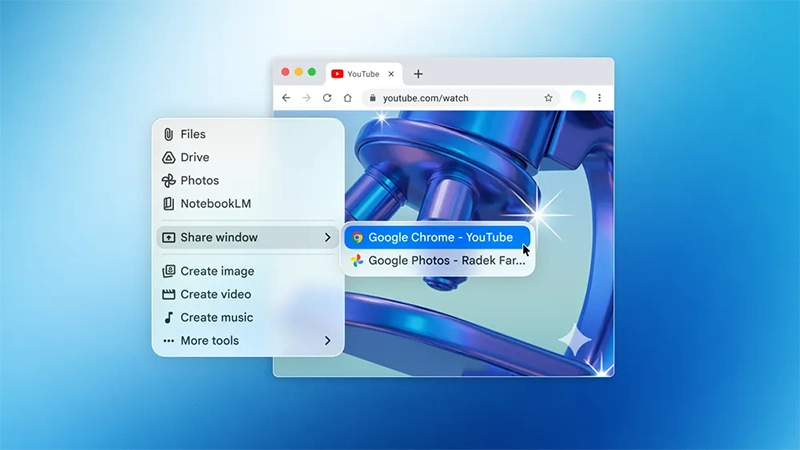
With this new desktop app, you can access Gemini from any screen with Option + Space and share your window to get answers based on the documents, code, or data you're working on.— Google Gemini (@GeminiApp) April 15, 2026
The Gemini app requires macOS 15 Sequoia or later and is available as a free download directly from Google.
Once installed, it lives outside the traditional browser environment, providing two quick-access methods: the default Option + Space shortcut summons a compact floating chat window for brief queries, while Option + Shift + Space opens the full interface.
Both can be customized, allowing users to tailor the experience to their preferences.
This keyboard-driven access mirrors the convenience of Spotlight on Mac or similar tools on other platforms, positioning Gemini as an on-demand assistant rather than something that requires switching applications.
Introducing Gemini on Mac.
It’s the first time we’re bringing the @Geminiapp to desktop. The team built this initial release with @Antigravity, and it went from an idea to a native Swift app prototype in a few days.
More features on the way! pic.twitter.com/YRy0Pqq6zo— Sundar Pichai (@sundarpichai) April 15, 2026
A standout feature is the ability to share the current screen or specific window with Gemini.
After granting permission, the AI can view and analyze whatever is displayed. Whether it is a document, spreadsheet, code editor, or even local files, Gemini can respond with relevant summaries, suggestions, or solutions.
This goes beyond simple web-page sharing, enabling more practical assistance during real work sessions. Users can upload images, files from their Mac, or content from Google Drive, and continue conversations that sync across devices via their Google account.
Creative capabilities remain intact as well, with support for image generation through Nano Banana and video creation using Veo.
Available to Gemini users on macOS versions 15 and up, globally, at no cost.
Download the Gemini app for Mac today https://t.co/xc5GjdQmYX— Google (@Google) April 15, 2026
By releasing dedicated apps for both Windows and now macOS in quick succession, Google is signaling a serious intent to compete in the desktop AI space.
While the current version functions primarily as an enhanced interface for chatting with Gemini, it lays the groundwork for more ambitious future updates. The company has hinted at evolving the app toward proactive assistance, potentially handling more complex desktop tasks over time. This move comes amid a crowded field where rivals already offer their own native experiences, making seamless availability a key differentiator in winning over professional and power users who spend most of their time on laptops and desktops.
For many, the shift from browser-based AI to a native desktop application represents a meaningful improvement in convenience and speed. It reduces the mental overhead of managing tabs and logins while keeping the powerful reasoning and generative abilities of Gemini close at hand.
As the LLM landscape continues to mature, Google's desktop push may prove crucial in its efforts to maintain relevance and grow adoption among users who value tight integration with their primary computing environment.




















































































































































































































































































