
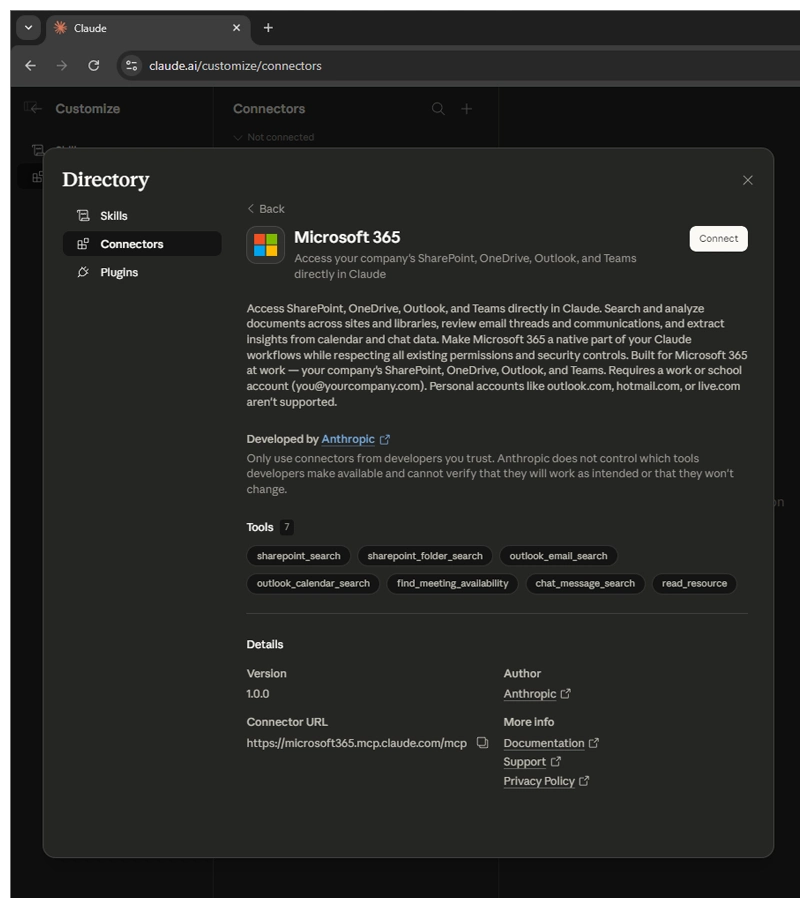
Anthropic recently rolled out its Microsoft 365 connector for Claude, making it possible to link directly to Outlook, OneDrive, and SharePoint.
The move opens up a smoother way to work with the stuff most people already have scattered across their Microsoft tools. Instead of copying text from emails or downloading files to upload them manually, users can now ask Claude to pull in relevant information right from those sources during a conversation.
Once connected, Claude can search through documents stored in SharePoint sites or users' OneDrive libraries, dig into Outlook email threads to spot patterns or pull out key details like decisions and timelines, and even glance at calendar events or meeting notes if they're accessible.
It stays read-only, meaning it only sees what users' own account already has permission to view, no extra rights are handed over.
When Claude uses something from users' Microsoft 365 data, it usually points back to the source so users can check it themselves.
Microsoft 365 connectors are now available on every Claude plan.
Connect Outlook, OneDrive, and SharePoint to bring your email, docs, and files into the conversation.
Get started here: https://t.co/EdoQeT8BBN pic.twitter.com/sOrigP41FJ— Claude (@claudeai) April 3, 2026
Getting it set up involves a work Microsoft 365 account tied to an Entra ID tenant (personal Outlook or Hotmail accounts don't work).
A Global Administrator typically gives one-time consent for the tenant, after which individual users can authenticate through Claude's settings under Customize > Connectors. For bigger Team or Enterprise setups, admins control whether the feature is turned on at the organization level. Users can always review or revoke permissions later in the Microsoft Entra admin center.
In everyday use, this connector cuts down on a lot of the usual back-and-forth.
Users may ask Claude to summarize a long email chain about a project, pull together insights from documents spread across different SharePoint folders, or help track follow-ups from recent communications.
It respects all users' existing access rules, so sensitive sites or folders stay off-limits if they're not already open to them.
But users must keep in mind that very new files might take a little time to show up in searches, and broad questions sometimes need a more specific prompt to zero in on the right spot.
The connector is now available across all Claude plans, including free ones, though organizations still decide whether to allow it tenant-wide.
For anyone whose workday revolves around Microsoft 365, it feels like a practical step that keeps users inside Claude while giving it better awareness of their actual work materials.
No more constant switching tabs or losing context, just clearer, more grounded responses based on the files and messages users already rely on.
In the bigger picture, this kind of integration signals where AI tools are heading: less about isolated chat experiences and more about becoming embedded within the systems people already use.
By tapping directly into emails, documents, and collaboration spaces, Claude becomes less of a separate assistant and more of an extension of everyday work. The real value isn't just access to data, but the ability to turn that data into context-aware insights without extra steps.
At its core, Claude Connectors are meant to cut down friction, and its integration with Microsoft 365 just levels productivity, allowing enterprise focus on decision-making and execution.

















































































































































































































































































