Clearing a browser’s stored data has always been possible, just not especially convenient.
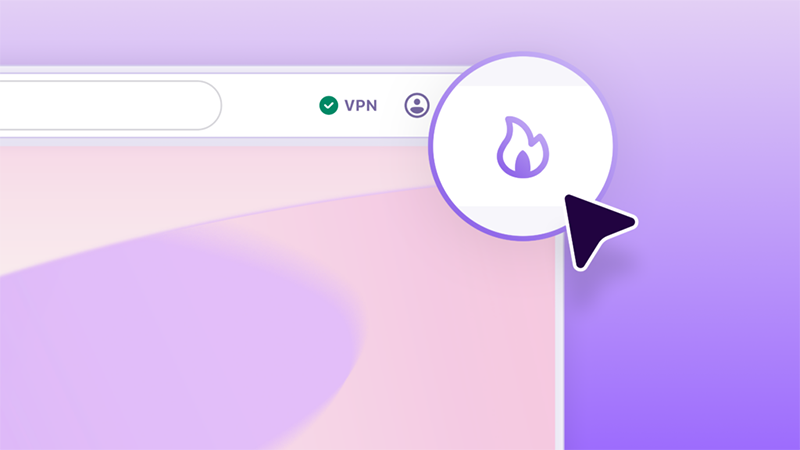
Most people leave history, cookies, and form entries alone until something forces a cleanup, usually because the option sits several clicks deep in a settings menu. Firefox 161, released on 24 November 2026, puts a more direct control on the desktop toolbar.
The new 'Fire button' appears in ordinary Classic windows.
A similar control already existed in private browsing sessions, where it mainly closed the session and started another. In regular windows the same flame icon now opens a choice of what to remove: browsing history, download history, cookies and site data, temporary files, saved form information, and website permissions.
According to the announcement:
Anyone who shares a computer with family knows the risk: one stray autofill suggestion or search history entry, and the gift you spent weeks planning and searching for is no longer a surprise. Before you hand the computer over to the next person, press the 🔥 button in your desktop toolbar in Classic Window to help keep your gifts a secret until the big day.
The idea is not new. DuckDuckGo, for example, has offered a Fire button in its own browser for years, both on mobile and desktop.
Firefox’s version arrives later and works differently in regular windows, giving a menu of data types rather than a single all-or-nothing action.
Mozilla’s own example focuses on shared computers: someone can remove recent searches and autofill suggestions before handing the machine to another person. The same control works for any case where you want recent activity gone without hunting through menus.
The rest of the Firefox 161 update is smaller.
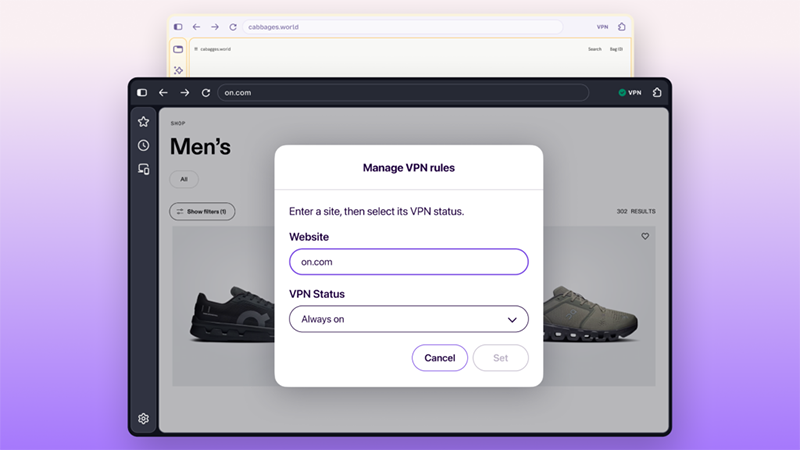
On desktop the built-in VPN now accepts per-site rules.
From the VPN panel or the privacy settings you can mark individual sites as always on or always off, so the connection no longer needs manual switching on every visit.
On Android, Reader View can read pages aloud. After opening Reader View you get play, pause, rewind, speed, and voice controls. Audio continues with the screen off and uses only on-device voices. A keyboard shortcut for copying the current tab’s URL is also included.
Separately, Firefox can now be installed from Google Play on cars that support Google built-in. Browsing history is not shared with the car manufacturer.
The Fire button is the change most people will notice first simply because it sits in the toolbar. The other additions are useful in specific situations, but none of them change the everyday flow of browsing as directly as a one-click clear from the main interface.