The world is know witnessing a defining moment in the tech sphere: the large language model (LLM) war.
When OpenAI introduced ChatGPT and others followed suit, it was a war where tech companies are neck-and-neck, and trying to develop faster and more powerful LLMs at neck breaking speed. But now, the war is shifting quite a bit. Now, leading players race not just to build bigger or better-performing models, but to embed their systems deeply into business workflows, product ecosystems, and workplace tools.
Enterprises are no longer satisfied with AI that simply answers generic questions; they want AI that understands their internal data, connects to their apps, and becomes part of the daily fabric of work.
In this environment, companies are doing two things in parallel: integrating AI into their own product stacks, and also leveraging external models to accelerate capability without reinventing everything.
The question is not only "which model is best?" but "which model is most useful in context."
Into this environment steps OpenAI with a bold enterprise-move: its 'Company Knowledge' feature in ChatGPT is purposefully built GPT-5 trained to look across multiple sources to give more comprehensive and accurate answers.
We're shipping company knowledge for ChatGPT Business, Enterprise, and Edu: it brings all the context from your apps (Slack, Google Drive, GitHub, etc) together in ChatGPT so you can get answers that are specific to your business. https://t.co/zMJWM5pqpE
— Fidji Simo (@fidjissimo) October 23, 2025
What this signals is more than just a new feature. The introduction of Company Knowledge is a conscious shift into enterprise knowledge management territory.
Historically, internal company knowledge has been scattered across chats, documents, drives, tickets, spreadsheets and email threads. In other words, they were siloed. The promise here is that instead of toggling between Slack channels, Google Drive folders, ticket systems and spreadsheets, users can simply ask ChatGPT: “What’s the status of client X? What are the open issues for project Y? What did we decide in that last meeting?”
ChatGPT then dives across connected apps to synthesize the answer.
For example, it can pull from Slack for messages, Google Docs for meeting notes, HubSpot for deal information, and returns a consolidated answer with citations and clickable links back to each source.
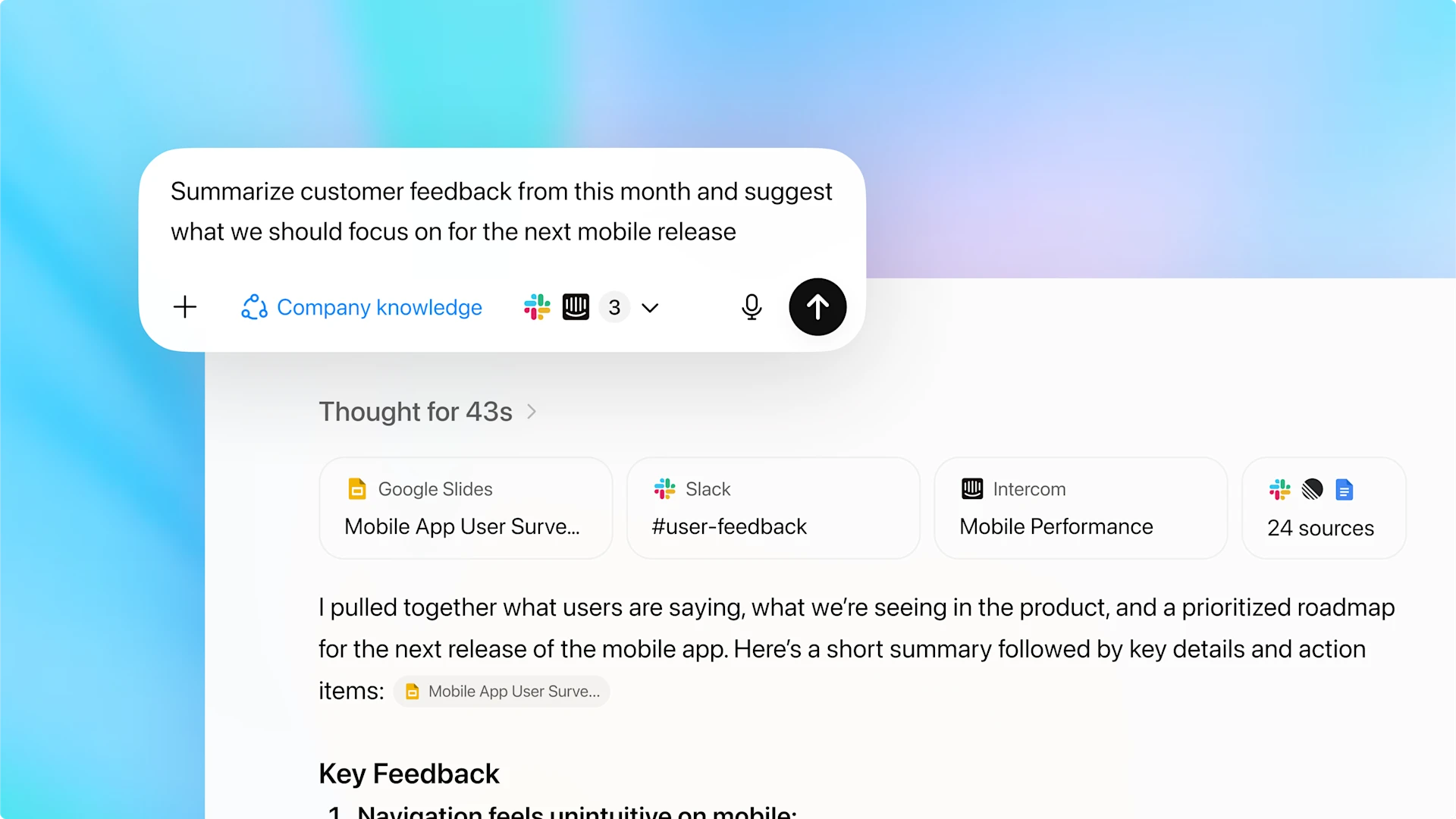
OpenAI suggested use cases, like using Company Knowledge to:
- Turn customer insights into strategy documents by gathering recent feedback shared in Slack, pulling insights from survey decks in Google Slides, and identifying recurring themes from support tickets, helping product teams shape their roadmap.
- Create reports using the latest information, drawing from HubSpot to collect campaign-related contacts or deals, reviewing post-mortem notes and briefs from Google Docs, and summarizing highlights shared across email threads.
- Build release plans by scanning GitHub repositories for open TODOs, checking Linear for connected tickets, and reviewing engineering discussions in Slack for unresolved issues, to then consolidating everything into a single, clear summary of what’s pending, tracked, or still missing.
The are limitless possibilities.
For many companies and organizations, that means a big productivity uplift. Instead of manual searching, switching apps, copying and pasting, and losing context, the model becomes a “single pane” for knowledge.
And in this escalating race to make AI a true collaborative partner, OpenAI is also expanding ChatGPT’s reach once again, by announcing that its 'Shared Projects' feature, once reserved for Business, Enterprise, and Edu accounts, is now available to all ChatGPT users, including those on the Free, Plus, Pro, and Go plans across web, iOS, and Android.
This move signals OpenAI’s intent to make ChatGPT more than a personal assistant. It's positioning it as a shared workspace where teams can work together in real time.
With this Shared Projects feature, users can now invite collaborators to contribute, edit, and continue each other’s work, drawing from a shared pool of chats, uploaded files, and custom instructions. The AI can access everything within a project, ensuring that responses are contextually informed by the group’s collective knowledge.
Shared Projects are expanding to Free, Plus, and Pro users.
Invite others to work together in ChatGPT using shared chats, files, and instructions all in one place. pic.twitter.com/AqeaPGggqj— OpenAI (@OpenAI) October 23, 2025
OpenAI envisions a range of practical uses.
Teams can collaborate on group work, uploading notes, proposals, or contracts to speed up deliverables while staying aligned. Writers and marketers can use content creation projects to maintain consistent tone and style across contributors. Analysts and managers can build reporting hubs, storing datasets and generating weekly updates without starting from scratch. Researchers can also consolidate transcripts, survey data, and market insights in one shared space, letting everyone build upon the same foundation of information.
The feature includes flexible privacy controls: project owners can share access with "only those invited" or "anyone with a link," and switch settings at any time.
Sharing limits vary by plan. According to its release notes webpage, Pro users can manage up to 40 files and 100 collaborators, Plus and Go users up to 25 files and 10 collaborators, and Free users up to 5 files and 5 collaborators.
With this release, OpenAI brings both work apps and collaboration into the heart of ChatGPT, blurring the line between AI chat and workspace.
It’s a step toward a future where co-creating with AI, and with one another, happens seamlessly in the same conversation.

















































































































































































































































































