Google has spent years refining the tools that help people manage their time on phones. App timers, Focus mode, and bedtime schedules have all become standard parts of Digital Wellbeing.
The latest addition, announced earlier this year alongside Android 17, takes a different approach by intervening before an app even opens.
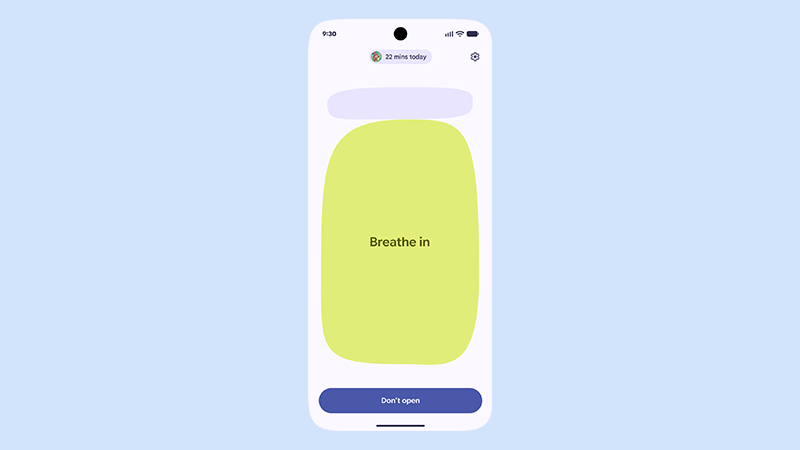
'Pause Point' works by letting users mark certain apps as distracting.
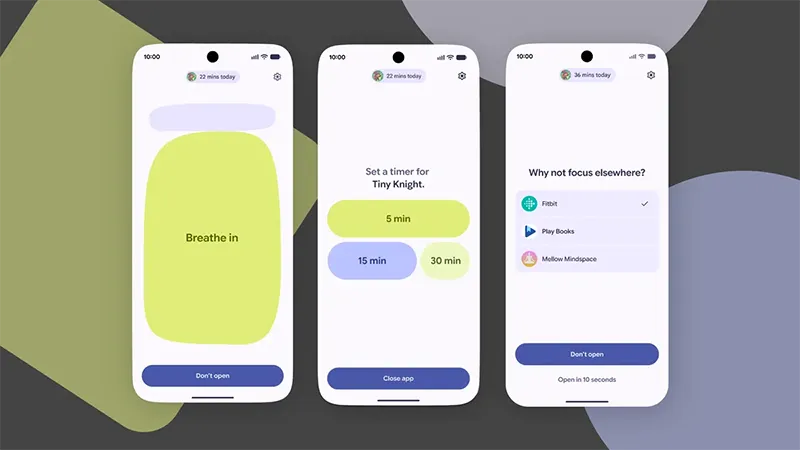
When someone tries to launch one of those apps, the system inserts a 10 second delay.
During that brief window the screen can display a breathing exercise, a personal photo, a reminder of other goals, or suggestions for alternative activities such as an audiobook.
The idea is to create a moment of reflection so the decision to open the app becomes intentional rather than automatic. If the user still chooses to proceed, the feature can also apply a short session limit before the pause returns. Turning the feature off or changing the protected list requires a full device restart, which adds friction meant to discourage impulsive changes.
Although Pause Point was previewed months ago and Android 17 has already reached a broad range of Pixel phones, the feature itself has not appeared on those earlier models.
Google's official support documentation states that it is available on the Pixel 11 series running Android 17 and later, but does not use the word exclusive, yet it also offers no timeline or commitment for older devices.
This matches the pattern Google has followed with several previous software experiments, where new tools first appear on the latest flagships before any decision is made about broader availability.
A promotional video on the official Android YouTube channel uses slightly softer language, describing the feature as currently available on select Android 17 devices and requiring an opt-in.
Google’s approach reflects a broader shift in how technology companies are beginning to think about digital wellbeing.
For years, the emphasis was largely on showing users how much time they had already spent on their devices. Features such as screen-time reports and app limits offered visibility and control, but they largely intervened after a habit had already taken hold.
Pause Point takes a different approach by placing friction at the moment of decision.
That distinction matters in an era when people are surrounded by an almost endless stream of content, notifications, recommendations, and services competing for a limited amount of attention.
Every platform has an incentive to keep users scrolling, watching, reading, and returning, turning attention itself into something of a commodity.
The result is a digital environment in which distraction can become almost automatic. The challenge is no longer simply having access to technology, but maintaining enough awareness to decide when that technology deserves our attention.
Tools such as Pause Point do not solve that problem on their own, nor do they remove the responsibility from users. But they reflect a growing recognition that digital wellbeing may require more than statistics and settings.
Sometimes, the most useful intervention is simply creating a few seconds between an impulse and an action, or a small pause in an online world increasingly designed to eliminate them.
Read: 'Digital Zombies', And How The World Can Fight Or Embrace Them






















































































































































































































































































