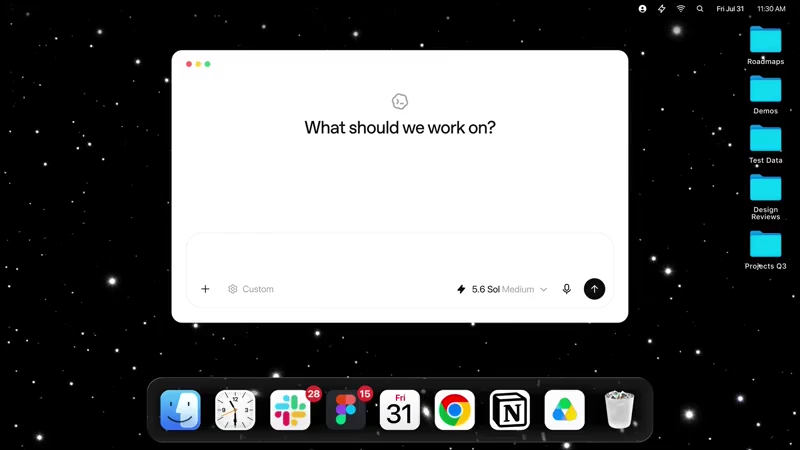
For many people, the hardest part of working with an AI assistant is not getting an answer, but giving it enough context to understand what came before.
A conversation can begin with a document, a website, a message or a half-finished task, yet the assistant may have little knowledge of the work that happened outside the chat.
OpenAI is now trying to reduce that gap by giving ChatGPT a way to remember activity that takes place across a user's computer.
OpenAI has introduced 'Computer History,' an optional feature in the ChatGPT desktop application for macOS that can turn activity across selected apps and websites into a searchable timeline and memories.
The company announced the feature on August 13, describing it as a way for ChatGPT to remember what users have been doing and use that context in future conversations.
The idea is relatively simple.
Instead of requiring users to explain what they were working on every time they return to ChatGPT, the assistant can draw on a record of activity that occurred outside the ChatGPT window.
A user who spent part of a day researching a subject, reading material in a browser, working on a document and communicating with colleagues could later ask ChatGPT to help continue that work without reconstructing the entire process from memory.
Computer History creates a timeline from activity across apps and websites that the user has chosen to include.
OpenAI says the timeline can be used by both ChatGPT and Codex, allowing the information to become part of future interactions rather than remaining limited to the moment when the activity occurred.
Users can also search through the timeline to find earlier work when they do not remember exactly where something was done.
This changes the role of ChatGPT's memory in an important way.
Conventional memory is primarily built around information that appears in conversations or is deliberately saved for future use. Computer History extends that context to activity taking place elsewhere on the computer.
The assistant does not have to wait for a user to say that they spent an hour researching a particular subject or looking at a particular document. The activity can provide some of that background automatically.
OpenAI has given examples involving common workplace tools such as Slack, Chrome, Notion and Google Calendar.
In one example described around the launch, activity from different services can provide enough context for ChatGPT to prepare a work update based on what a person had been doing previously. The practical value is less about remembering individual clicks and more about reconstructing enough of a workflow to make the next interaction more useful.
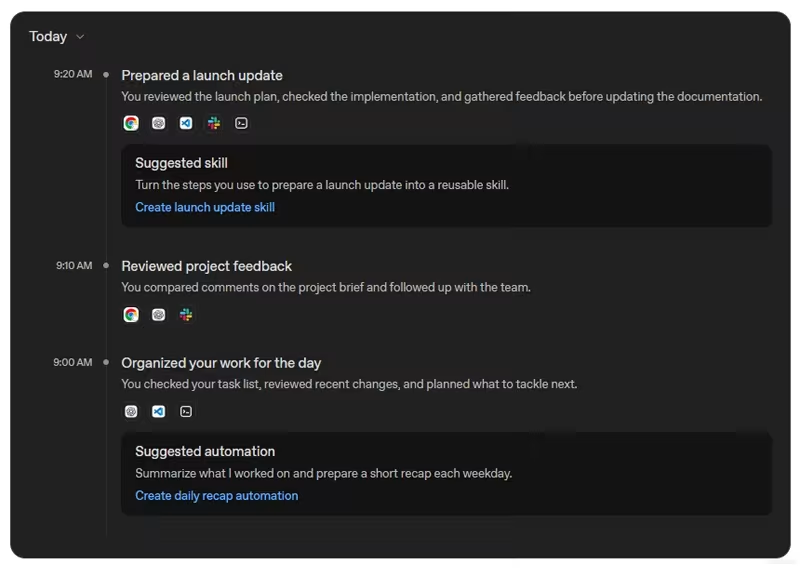
The feature is also intended to help with interrupted work.
Someone might spend several hours on a project, move to another task and return to it the next morning. Instead of searching through browser tabs, documents and messages to determine where they left off, the user can ask ChatGPT to help locate the relevant activity. The timeline provides another way of recovering that context, particularly when the user remembers the general task but not the exact application or page where the work occurred.
Repeated activity can provide another layer of usefulness.
OpenAI says Computer History can help ChatGPT and Codex identify patterns in the way people work. If a particular sequence of tasks happens repeatedly, the system can use that history to help build skills around those workflows.
This fits into OpenAI's broader effort to make Codex capable of continuing work across applications and over longer periods rather than treating every interaction as an isolated request.
That broader direction is important because OpenAI has already been moving Codex beyond traditional software development.
The company previously added computer use, an in-app browser, memory, plugins and the ability to operate applications on the user's computer. Codex can also use context from connected services and previous work to suggest tasks or continue ongoing projects. Computer History adds another source of context to that system by recording what happened across the computer itself.
OpenAI is presenting Computer History as an opt-in feature rather than something that activates automatically. Users have to enable it through Settings and Integrations in the ChatGPT desktop application on Mac.
The company says users can choose which apps and websites contribute to the history, pause collection, and review or delete stored history.
Read: With Computer Use On Mac, OpenAI Revives Codex As An 'Almost Everything' AI Agent
There is also an important technical distinction between Computer History and conventional screen recording.
OpenAI says the feature records interaction events rather than screenshots or screen recordings. It does not capture microphone input or system audio, and private browsing activity is excluded.
The system instead uses activity and context to create timeline entries and memories, while using fewer tokens than the earlier Chronicle research preview.
However, Computer History files can still contain sensitive information. OpenAI notes that these files are not encrypted by Computer History, meaning other programs running under the same macOS user account may be able to access them.
The feature also reflects OpenAI's broader shift toward AI assistants that work alongside the applications people already use. Codex can operate a computer and interact with applications, while Computer History gives ChatGPT additional context about what happened before.
This could make it easier to resume projects and recover previous work, but it also raises questions about how much of a user's digital activity an AI assistant should be able to access and retain.

















































































































































































































































































