
WhatsApp is one of the most popular messaging app. As of February 2018, it has more than 1.5 billion daily active users exchanging more than 60 billion messages per day.
With chatting, sending media and forwarding messages have become common in everyday chat conversations, all those data can quickly eat storage space on mobile phones. While users can certainly delete some of them to save space, but they probably want to backup most of them, especially when it comes to switching devices.
In an agreement between Facebook, which is WhatsApp's parent company, and Google, users are given an option to get free unlimited WhatsApp backups on Google Drive.
Previously, WhatsApp users can backup their data to Google Drive for free. But with the deal, WhatsApp data won't anymore be counted towards their total available storage.
The inked agreement between Facebook and Google allows users to store their data on Google's cloud storage for free, without having to worry about upgrading cloud plans to hold them.
This in indeed a great perk to have since it can potentially save users precious gigabytes of storage.
Google has notified Google Drive users via email, as seen in the following screenshot:
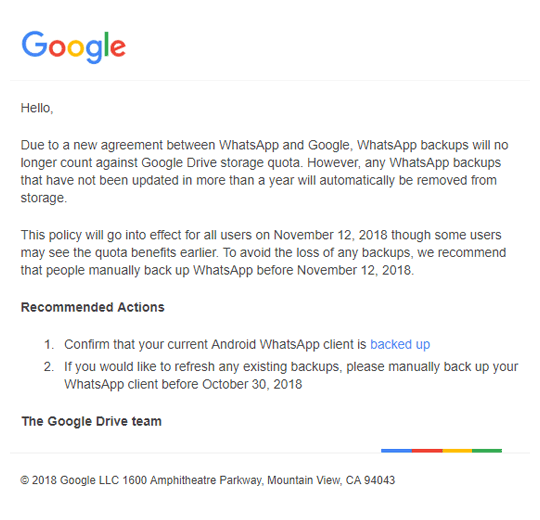
In order to qualify to WhatsApp backup plan with Google Drive, users are required to update their backup at least once a year. From the email, Google also advises users to manually backup their WhatsApp data before November 12th to prevent losing any data.
"Due to a new agreement between WhatsApp and Google, WhatsApp backups will no longer count against Google Drive storage quota," Google said in its statement.
"However, any WhatsApp backups that have not been updated in more than a year will automatically be removed from storage," it added.
To manually backup WhatsApp data, users need to tap on the three-dots menu on the top-right hand side. Then tap on Settings > Chats > Chat Backup. After ensuring that they have logged in with their Google account, they can tap on the 'Backup' button to backup manually.
WhatsApp also provides an option where users can automatically backup their data to Google Drive at regular intervals such as Daily, Weekly or Monthly. Users can also opt to set it to Never backup or Backup manually only.
Like many chat apps, WhatsApp offers end-to-end encryption, but those protections however, aren't extended to any backups made to Google Drive.




















































































































































































































































































