Physical buttons on smartphones have mostly given way to touchscreens, yet a few hardware controls remain for functions that benefit from immediate access without looking at the screen.
On recent iPhone models that include an Action Button, that control can be assigned to different system actions or to third-party shortcuts. One recent addition now allows users to create a shortcut that starts a voice session with Grok Bot.
Grok Bot is a separate system from the conversational Grok interface available through the Grok app or on X.
It consists of persistent AI agents that each run on a dedicated cloud computer equipped with a browser, file system, and terminal. These agents can sign into accounts and websites the user has connected, carry out multi-step tasks across those tools, and continue working even when the user's own device is turned off or idle.
A user can create more than one agent, give them distinct roles, and have them share context or hand work between themselves. Agents can also be shown a workflow once and then repeat versions of it later on a schedule or on request.
The Action Button shortcut works on iPhone 15 Pro and later models after the Grok Bot app has been updated to version 1.16 or newer and opened at least once.
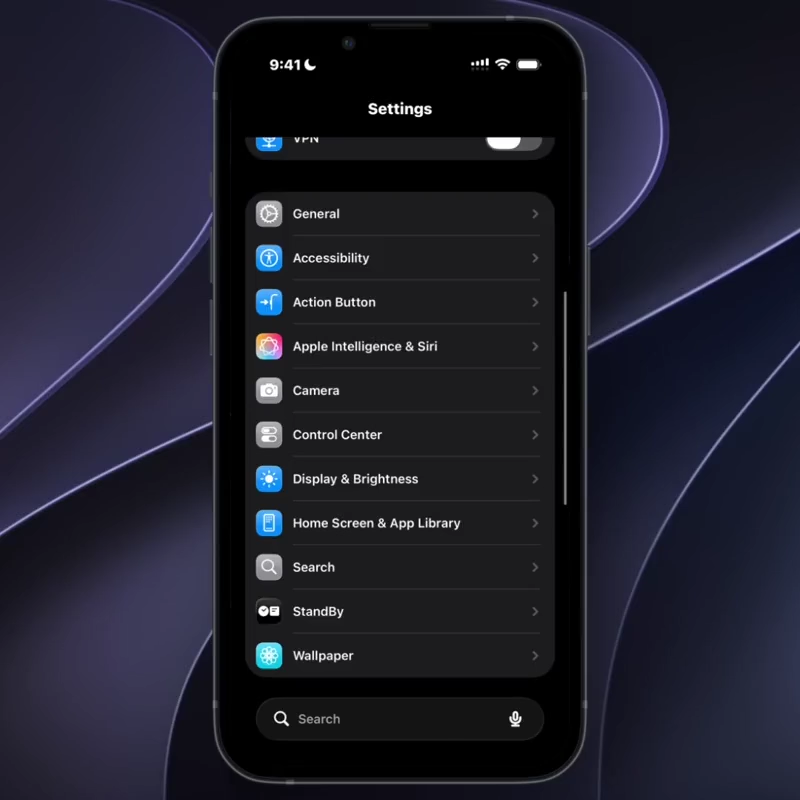
In the iPhone Settings app, users can navigate to Action Button, swipe to the Shortcut option, search for Grok Bot, and selects the Start Voice Chat action.
Once set, a press and hold of the physical button initiates a voice connection to the chosen bot without first opening the app.
The interface that appears is a compact call-style overlay showing a timer and controls for the microphone and hang-up.
Because the agents already maintain ongoing context and can act on connected services, the voice entry point reduces the steps required to issue an instruction while the phone is in another app, locked, or simply in a pocket.
A user can, for example, request a status check on a previously assigned routine, ask for a summary of recent activity on a connected account, or add a new step to an existing workflow without switching contexts or typing.
The same agents remain available through the full desktop or mobile interfaces for longer or more detailed interaction, so the button serves mainly as a low-friction trigger rather than the only method of access.
Setup requires an eligible subscription plan that includes Grok Bot, and the feature is still early enough that the exact wording of the shortcut or the range of supported devices may change.