Microsoft is celebrating Windows 10's first birthday. And not just the company, users of the popular operating system is invited: and they are the ones that are receiving the presents.
On August 2nd, 2016, the company is pushing out a Windows 10 Anniversary Update to Windows 10 PCs, bringing all sorts of new goodies for users to play with. Some are niche related, some are helpful, and some are just plain aesthetic. It's the largest update since Microsoft revamped its operating system in 2015 to include bigger role for Cortana and facial recognition.
Since its first release, more than 350 million devices have been upgraded, helped by its vigorous campaign to bombard computer owners with invitation and frequent update releases. Everything was done up to a point where Microsoft pushed Windows 10 updates to computers automatically, and installed it without the user even realizing (wanting) it.
While it was indeed offensive in delivering updates, the result was well worth it, especially when considering the decline in the PC market. But Microsoft's strategy makes sense because Windows 10 is practically the central of every part of the company's product. The operating system plays a big part of the Xbox One for example, and it also includes Internet of Things and Windows 10 Mobile.
This is reflected In the Anniversary Update.
Microsoft is giving its virtual assistant Cortana a more major role by making it the central part of any search. The new Windows Ink enables users to annotate on their screens more freely and easily, across different apps, using a stylus. The Edge browser that replaced Internet Explorer Microsoft's main web browser. The browser with a codename Project Spartan is also being tweaked to become more power-efficient.
"We are committed to delivering continuous innovation to you: including features that bring Windows Ink and Cortana to the mainstream; a faster, more accessible and more power-efficient Microsoft Edge browser; advanced security features for consumers and enterprises; new gaming experiences and new tools for the modern classroom," said Microsoft in its statement.
Same Old Soul, With A New Spirit
Windows 10 Anniversary Update has a codename called "Redstone" throughout its development. This is Microsoft's first major update for Windows 10, and its first major branch update from the launch codebase which was codenamed "Threshold".
With the update, Microsoft has added a lot of new features, a better polished interface, with the overall aim to provide a better experience in using Windows 10.
What the update is all about, brings a lot of changes to Windows 10, and many of those changes have been actively adjusted based on almost real-time feedback from users on the beta software program. Using the popular Windows Insider Program, Microsoft has millions of active users providing feedback, comments, praise and complaints. The program has received more than 70 million feedback, and from that, many of them are reflected inside Windows 10 Anniversary Update.
And the best of all, "as Microsoft stated, "everyone running Windows 10 will get these new features for free."
Microsoft launched Windows 10 to be a "Windows as a Service". The company's goal was to continue the update as it moves forward, so users can expect updates more frequent. For example, previous version of Windows have security patches and fixes, but for Windows 10, updates are constant.
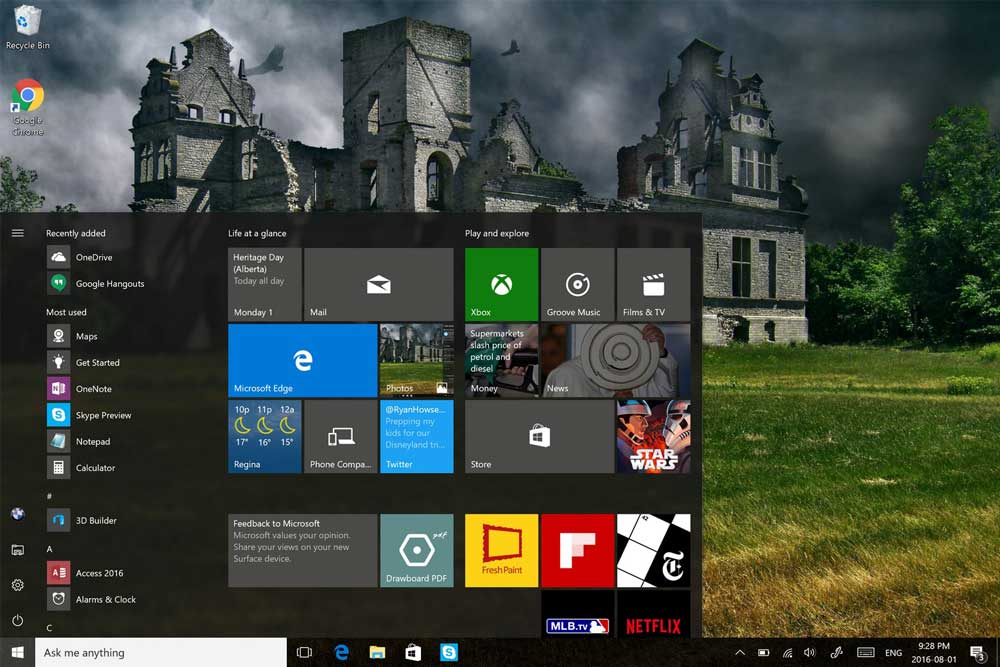
One of the most prominent is the Start Menu. Microsoft tweaked it as it always did on previous iterations. The Start Menu has been a work in progress, and seems to never be neglected. With the Anniversary Update, Microsoft is putting to emphasis the this feature by giving it the ability to add more files.
The next is the "All Apps" option which is now gone. With it now out of the equation, all apps that installed, are now shown default in the Start Menu in a scrollable list, together with the most used and recently added apps at the top. The "Recently Added" option now shows three apps, making users in keeping up with apps easier.
The "Action Center" is also having a little change where its icon has been tweaked. Now it's also able to show how many notifications are there with users able to interact directly with them, such as replying messages through inline reply or a toast pop-up.
The next design change is at the Settings where items get their own icons. In addition to that, some of the settings have been broken out a bit into their own categories for better viewing.
While pretty much of the design comes after the user logs in, Microsoft isn't forgetting the odd thing the Lock Screen is known for. The origin of this feature are from the mobile side of Windows, and here the operating system can show updates, notifications and status quickly. On smart devices, this feature is indeed handy, but on PC it can be annoying. Here with the Anniversary Update, Microsoft is redesigning the Lock Screen to integrate Cortana, with the image on the lock screen having the same image with the login screen. These are meant to improve experience because Windows 10 is known for Cortana, and using two images for a welcoming screen is certainly odd.
Redesigning is to improve experience, but the Anniversary Update is a big update so there are certainly new goodies to see.
The first is the feature to personalize Windows 10 a bit more, and in the update, a Dark Mode is introduced. As the name suggest, this changes Windows 10 default color scheme to plain black. Built-in apps that come with Windows 10 such as email, store and others, are also affected with this setting. The Edge browser on the other hand, also include this dark mode, but has the toggle in the app's settings.
The idea for this feature is primarily for those that use OLED. PC monitors and mobile devices that use this type of display can make us of plain black color to save power because black pixels won't lit.
The next new thing is the Mail app. While this was available to Windows 10 by default and hasn't changed much, it's getting new features that were missed when Windows 10 was first introduced. For example: sending email as another address. Windows 8.1 mail client supports this feature and Outlook.com supports this. Windows 10 didn't until the Anniversary Update.
Still about its apps, OneDrive is also having a change. Microsoft's cloud storage had changed dramatically since Windows 10. While the update isn't tied to the Anniversary Update, there is now an app to access OneDrive where users can download files they need.
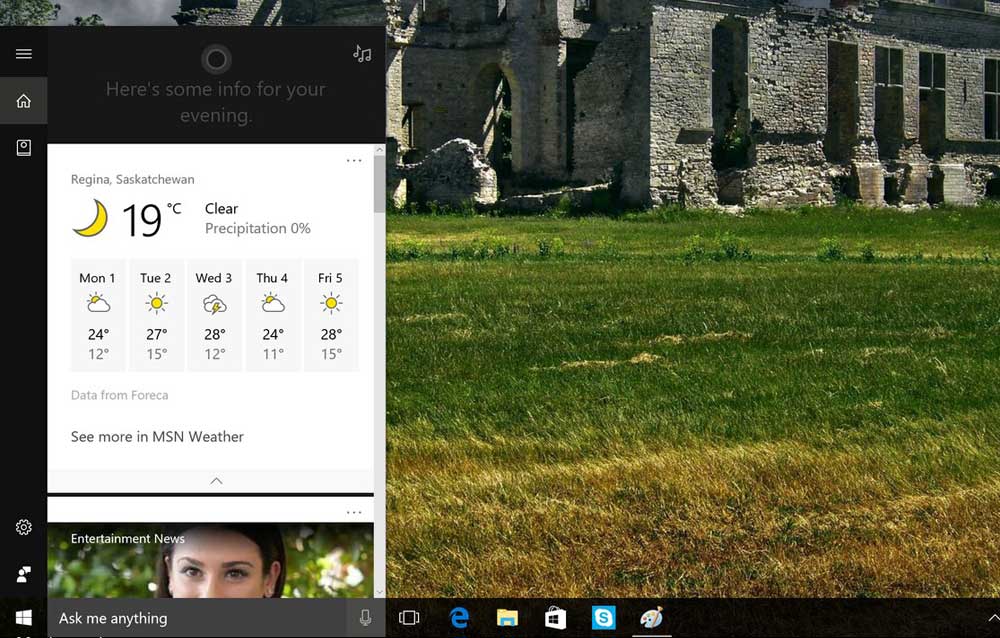
Cortana began its life as a feature for Window Phone. Later, the assistant can be downloaded on rival operating systems such as on Google's Android and Apple's iOS. But the main reason for the assistant to exist is to aid tasksThe virtual assistant now has gotit has gotten to more places. The most obvious change is that Cortana can now be accessed straight from the Lock Screen. Now it can also access calendar and email straight from there.
If users enable voice control for Cortana, they can even as the assistant to play a song or do practically anything it's able to. This is because Microsoft has updated it and expanded its reach deeper into the operating system.
With the update, Cortana can now send notifications from a smartphone to the PC. Users can even reply to SMS messages on the PC using Cortana.
Because Cortana is getting deeper into Windows, Microsoft removed the ability to turn it off. Users are also now unable to assign different browser and search engine, making them limited to Edge and Bing. Users can however, sign out from Cortana to remove personalized feature. But still, Cortana will still be the default search in the taskbar.
Besides Cortana, Microsoft also puts another deeper interest in stylus input. Over the years, the capability of inking support have grown, and with the Anniversary Update, Microsoft is taking Windows 10 to the next level with Windows Ink. Using Ink, users have the ability to use the pen to write on any dialog box and more. Users can also access all their inking apps, such as Sketchpad, Sticky Notes and others. Microsoft also added more features, including a digital ruler. The Ink feature can configured according to the user's needs.
And because Windows 10 is now more Cortana then ever, some of the inking in integrated into the digital assistant. Cortana for example, can automatically decipher hand-written notes, and create reminders based on them.
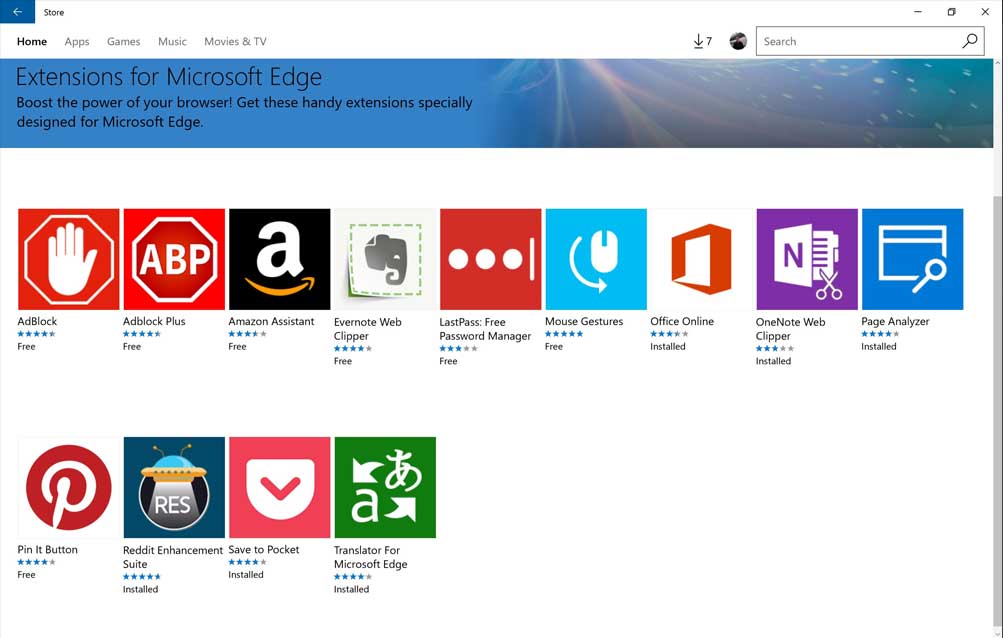
With the world now connected, users will definitely use Windows to access the web. Microsoft has put Edge as Windows' default browser, and for that it should shine brighter than ever. Especially when IE is now ceased to exist.
Along with the Anniversary Update, Edge comes will some of the much needed improvements over its predecessor Internet Explorer. Some of the updates are aimed to improve its standards compliance, but they are mostly minor improvements. For example, Edge that ditched plugins to use extensions. With the update, extensions are now available.
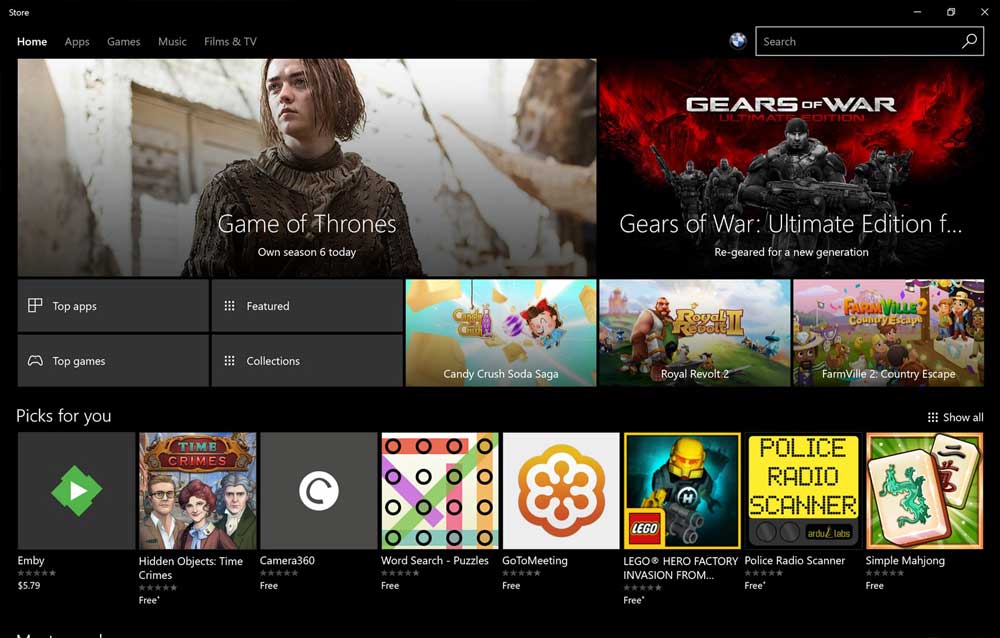
The next improvements come from Xbox which also brings Cortana. Besides the digital assistant, Universal Windows Apps (UWP) and updates to the console. The most prominent update is the new Play Anywhere initiative. Games that are part of this will offer both a version on the Xbox One as well as the Windows Store. This enables users to buy the game on either device, and get the copy on the other. Users can also sync saved game through Microsoft's cloud to all their devices. While Xbox has never been more successful than Sony's PlayStation, but Microsoft has put a lot of improvements over the years.
Microsoft has been updating its PC gaming platform more often than it updates its Edge browser. Edge only have improvements during major OS updates, but for Xbox, Microsoft is updating it more frequently. Now Xbox supports WDDM 2.0 which has the feature to remove the full-screen capabilities on older games. Sandbox model for UWP means apps like FRAPS no longer work.
When Windows 10 was launched, it highlights Windows as a solution for tablets that work along with traditional PCs. At first, this was an improvement to the previous Windows 8 that somehow alienated Windows user. But still it offered less than Windows 8.1 as a tablet interface. With the Anniversary Update, Microsoft is bringing more of Windows 8.1 features back to improve this area.
At first glance, the Start Screen Layout that is still having the basic design, has been adjusted to be more usable. The hamburger menu stays at the top, but now directly above the Apps button. Toggling switches from the Start Screen to the App Apps looks a lot more like Windows 8.1 with a full-screen scrollable list. This should be easier for users to scroll through all of their available apps.
On the left side contains icons for File Explorer, Settings, Power and logout. There’s now an option to auto-hide the taskbar.
The update isn't bringing much, but the change has made Windows 10 more usable.
Windows Everywhere
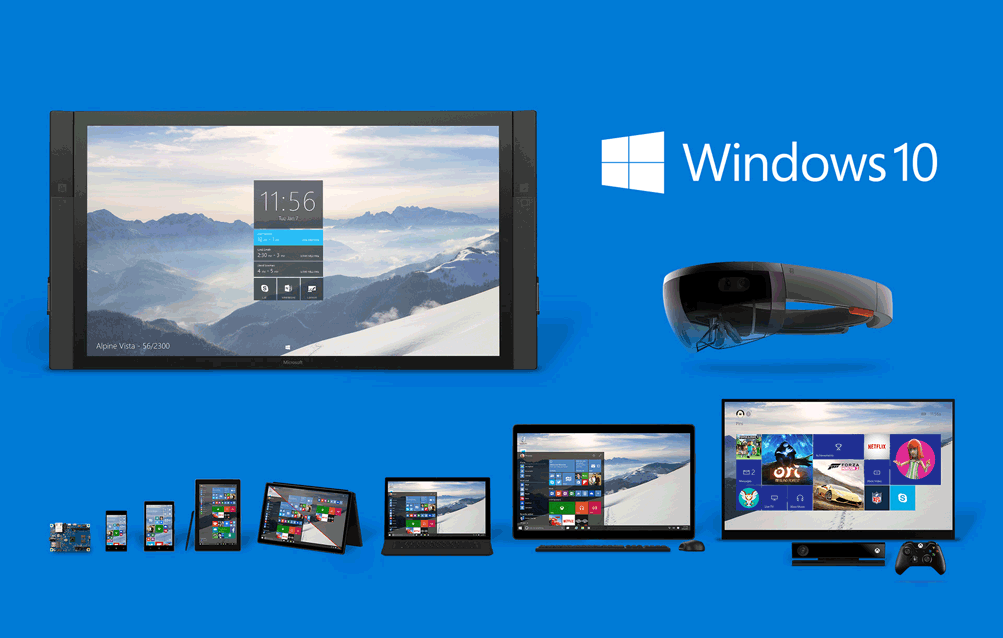
Microsoft has a high hope, and that is to bring Windows 10 to all devices out there. With heavy competition from Google and Apple, Microsoft is still certain that Windows 10 could indeed have a special place in the heart of users. And this is true.
Microsoft has given users the ability to use Windows 10, and have that same experience experienced on other devices running Windows 10 Mobile. Windows 10 and Windows 10 Mobile have the same base, but the mobile version has a different UI to make it work better on small touchscreen devices. And what's more, Microsoft is also investing heavily on Internet of Things, to Hololens, and Surface Hub.
Xbox One is also in Microsoft's list for user-interface and user-experience. From the update, Xbox offers much of the same interface as Windows 10, including the slide-out menu and hamburger icon.
The next worth mentioning is Skype. The app has come a long way, has a lot of competition, and still in the focus of the company. With the Anniversary Update, Skype is updated with its own UWP version, replacing its former WinRT version. With this, Skype also offers a Dark Mode.
With the Anniversary Update, Microsoft delivers the Bash shell. Bash has been available in the Insider Program and has been tested by developers, and now it's available for Windows 10. Bash is practically another shell to make Windows 10 a more friendly place for developers.
Aiding developers doesn't stop there. Microsoft has partnered with Canonical to provide user-mode binaries. What this means, commands which work on Linux Ubuntu will also work on Windows 10. Bash shell isn't running Linux in a virtual machine, so here the Ubuntu binaries do run on Windows 10. This is seen as a step forward after CEO Satya Nadella boldly declared that "Microsoft loves Linux".
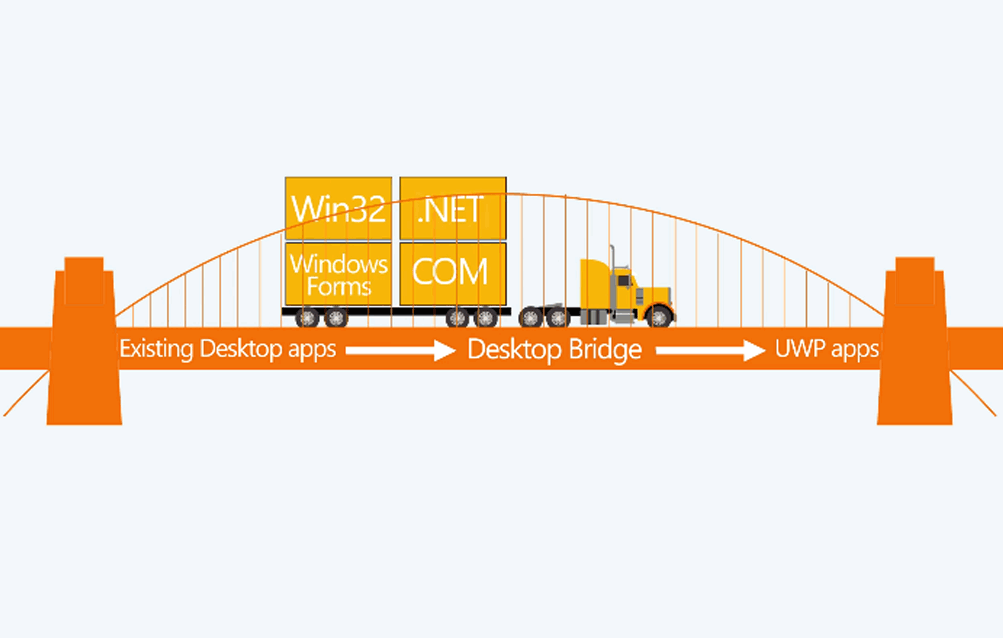
The next is the support for Centennial Apps on Windows 10. The project is Microsoft's solution for existing Win32 apps being moved to the new UWP platform.
Project Centennial is Microsoft’s solution for existing Win32 or .NET apps being moved forward to the new Universal Windows App (UWP) platform. Once those apps has been converted to use UWP, Windows 10 can have the ability to push notifications from them, putting them into Live Tile. This makes those apps much like all other UWP apps. The install process is easier and has a much cleaner interface. Uninstalling those apps should also eliminate any traces. And as added benefits, any converted apps can be transitioned to the new XAML layout that allows for scaling of UI much easier. Those apps can now also be put in the store, and updated from there.
Then comes a huge part of Microsoft's business. Enterprise in a part of Windows, and the company just can't leave users that are using it behind. With the Anniversary Update, Microsoft is bringing updates to things like Windows Hello. There are also features that are dedicated specifically to Enterprise users.
Enterprise Features
Microsoft can’t leave out the Enterprise, since that’s a huge part of their business. The Anniversary Update brings some updates here too. Things like Windows Hello which are also usable by consumers will of course be available, but there are a couple of features targeted specifically towards the enterprise.
For example, Windows Information Protection. This feature was previously known as Enterprise Data Protection, and it's a mechanism to prevent data leaks by employees. Files can be designated as Business files based on where they are located, or where they came from. With this, users won't be able to copy those files or their contents without switching it to a personal file. Every access is controlled by a policy through Mobile Device Management or System Center Configuration Manager.
Another Enterprise feature is the Windows Defender Advanced Threat Protection. The feature will help administrators in detecting, investigating and responding to attacks to their infrastructure. The defense mechanism combines Windows 10's client and the cloud to provide a set of tools and dashboards that enable inspection real time.
Conclusion
Windows Anniversary Update is the first, and indeed the largest update since Windows 10 first shipped. The changes highlight how Microsoft wants it to be the "Windows as a Service". During a year of its existence, Windows 10 has received plenty of updates, but the Anniversary Update really adds a punch to the operating system.
Microsoft is finally able to create a platform which works on all of their systems, and all that by offering the same experience and interface. This update is where Windows 10 should shine, it's a new product made by polishing what's already there, and bringing what should be there in the first place.
Along came with it, is fixes for bugs and user interface issues.
The update isn't available for everyone just yet. Microsoft is gradually sending the update to all Windows 10 users over the coming weeks. The Anniversary Update comes a few days after Microsoft ended a free upgrade program for users eligible to update to Windows 10, which was released in July 2015.
Now, anyone wanting to upgrade Windows to 10 from either 7 or 8, must pay Microsoft (£99.99 for the home version and £189.99 for the professional one). Some users though, have found some workaround to still get Windows 10 for free.
To get the Anniversary Update, users must first have a computer with at least 2GB of RAM, rather than 1GB the usual Windows 10 needs. For the 32-bit version, computers must have 16GB of internal storage, and for the 64bit, 20GB. And as for Windows 10 on mobile, the Anniversary Update works with devices up to 9 inches in suze, up from 7.99 inches. And for PCs, the update is compatible with devices as small as 7 inches, rather than the previous 8 inches.
After having those requirements, users must then turn on automatic updates on their systems so the update download and install itself automatically once the company has made it available for the user. Otherwise, users need to check for updates manually.
And if users don't want to wait, they can use the Media Creation tool to download the update. They need to ensure that they have sufficient data storage available on their devices, USB sticks, DVD or external drive - at least 4GB of free space.




















































































































































































































































































