
The trend of making user interface black or dark happened in the past. But for Wikipedia, it's better late than never.
The free online encyclopedia has finally started rolling out dark mode or dark mode for its website on mobile. But being late is not because it wanted to, or because it just didn't want to follow the trend. Wikipedia is late in bringing its version of dark mode because things aren't that simple.
Bringing dark mode to Wikipedia is a choir at the very least.
In the announcement, Wikipedia said that:
Yes, you read that right. Dark mode is (finally!) here.
One of the most requested features, dark mode improves accessibility and reduces eye strain for readers and volunteer editors across Wikipedia and other Wikimedia projects.
While creating dark mode may seem simple, it… pic.twitter.com/8EncicbZgD— Wikipedia (@Wikipedia) July 17, 2024
In other words, dark mode on Wikipedia is more than just a switch or a toggle that inverts the color of the interface.
"First, the Wikimedia Foundation needed to overcome underlying limitations of our software and architecture, part of which was done by building out the Vector 2022 skin."
Wikipedia said that its platform has content that is user-generated, and that pretty much all of it is built with HTML markup, and that it relies on the assumption that the only mode available is light.
To introduce dark mode, the team was faced with the risk of making the pages that users had crafted over the years no longer accessible.
Then, there is that nature of an encyclopedia, which is expected to provide information that is correct and reliable.
Introducing dark mode as an overlay, can make colors of images to change when they shouldn't.
In one example, Wikipedia explained how dark mode introduced a subtle color change to the International Orange color, which made it difficult for anyone to know which color it really uses.
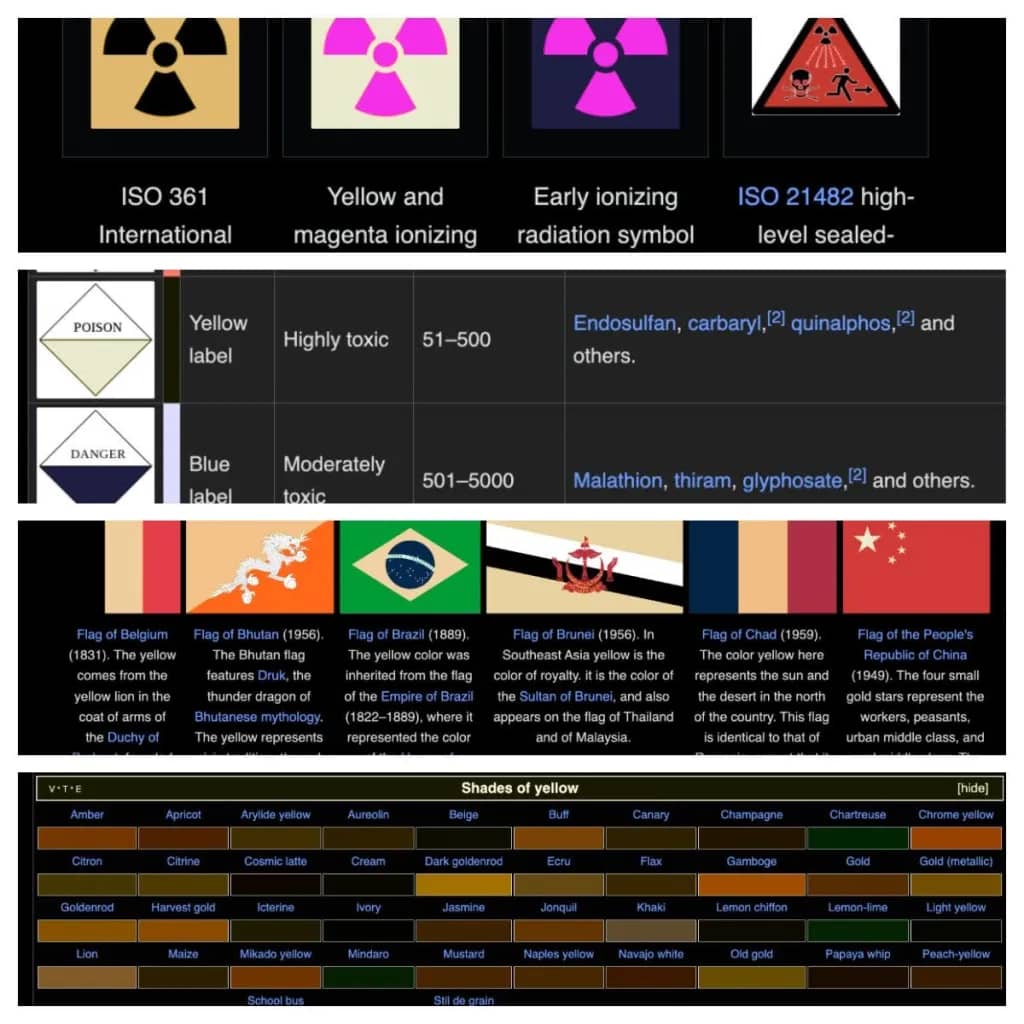
In another example, making the interface dark also led to some confusion to labels and symbols.
"Colour distortion can be confusing, humorous, and sometimes dangerous, as demonstrated above across the Wikipedia articles for Toxicity label, Color of chemicals, Hazard symbol, and Yellow. Consider the implications of a display of inaccurate colours should someone be using Wikipedia to determine what coloured gas is filling their room," said Wikipedia.
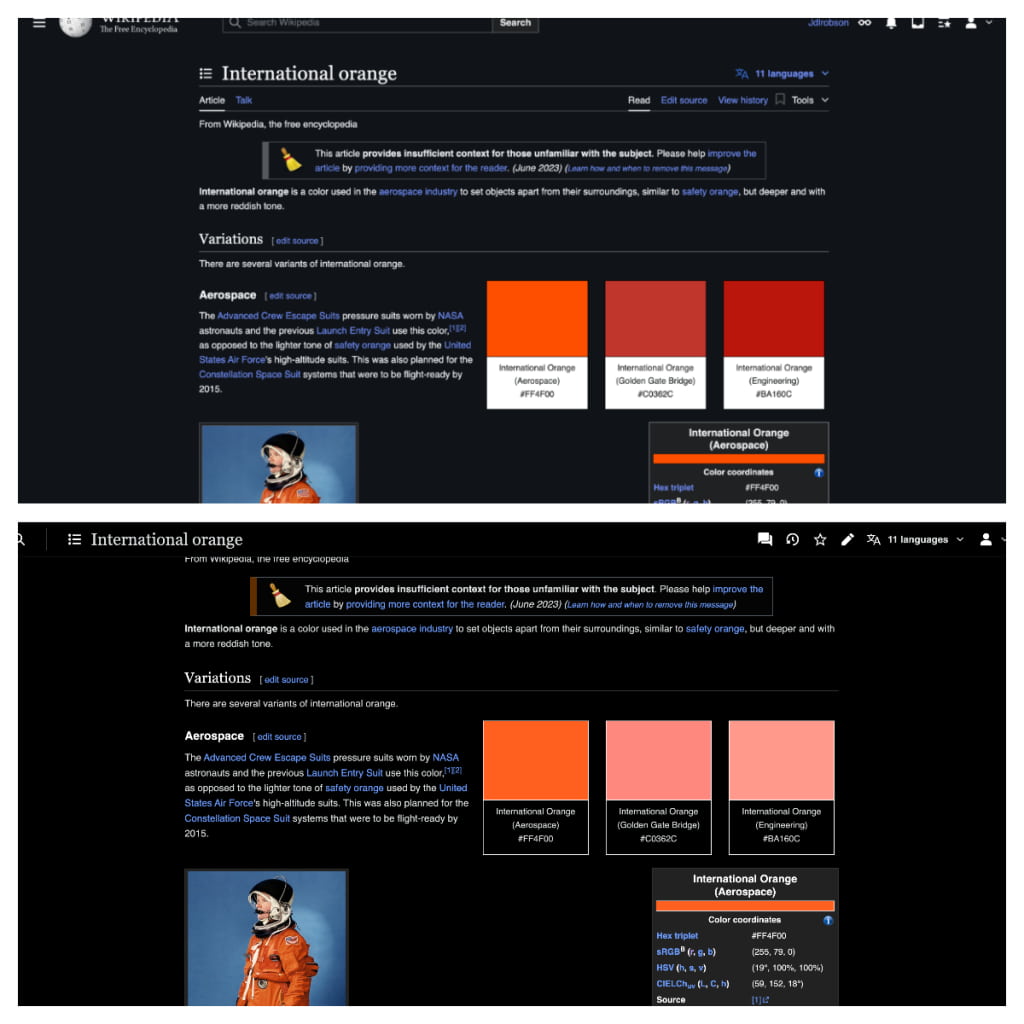
"Sometimes colour plays an important part in a Wikipedia article. We considered a shortcut to enable dark mode, by darkening all colors on the page, but it had a worrisome trait. Consider this article on International Orange and notice below how the colour swatches are subtly different in both articles," continued Wikipedia.
"While colour can have semantic use in conveying knowledge — for example, if describing the colour International orange, a colour helps."
"However, most of the time it is a stylistic choice. Some colours also have undesired connotations that can lead to misunderstandings of information — for example, red can be associated with warning and danger. In general, colour should be used wisely. As part of this project, we wanted to make it easier for volunteer editors to find and fix these issues with user-generated content."
To address these issues, the team began evaluating the potential fixes.
The team also decided to use the Web Content Accessibility Guidelines on color contrast, in order to determine which pages had colors and color combinations that might make reading more difficult.
"Dark mode has been one of the most requested features. It improves accessibility and reduces eye strain for readers and communities across Wikimedia projects by providing a low-contrast environment. The feature is now available on select wikis, on mobile and desktop, in both reading and editing mode!" Wikipedia said.
Due to the issues, Wikipedia considered it a challenge that needed addressing.
" [...] it was important not to take a shortcut and instead make our content better. After all, Wikipedia is all about a constant, collaborative process to improve the encyclopedia," Wikipedia added.
But since Wikipedia is constantly adding new articles and that each and every of its existing articles can also be edited, Wikipedia created tools to allow users to easily flag issues they encounter/
Initially, dark mode on Wikipedia is introduced to all logged-in users.
For those who aren't logged in, the dark mode is initially introduced to only on wikis where technical editors are fixing the color issues, or where there are few issues anyway. This includes English, Modern Written Chinese, French, Japanese, Dutch, Polish, Portuguese, and a number of smaller Wikipedias.
"We look forward to making dark mode available in more languages after we have worked further with their technical editors," said Wikipedia.

















































































































































































































































































