
Progressive Web App, or PWA is a term used to denote a software development methodology where It is seen as a "hybrid"...
Mobile
Latest Stories

Google and Apple have different taste in design. While Apple opts for "dull" but useful design interactions, the former likes splashy colors and attractive visual cues.
To push more of its design language forward into Apple, Google revamps its Gmail in what it calls "the biggest overhaul of the app in nearly four years."
"When you get the next Gmail iOS app update, you’ll notice some exciting changes," said Google on its November 7th, 2016 blog post.
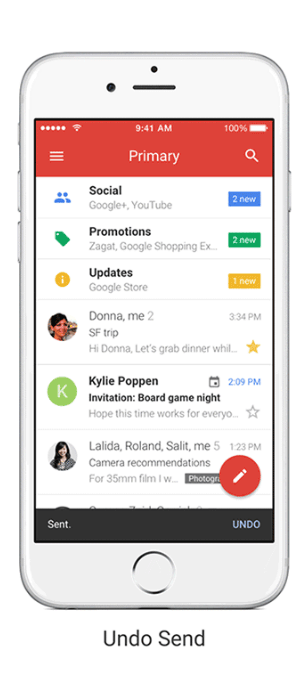
The first up is the new looks. Gmail for iOS now looks a lot more like its Android counterpart: Material Design with a red-colored bar up on its display. By having more of its Material Design-oriented products running on Apple, Google is further pushing its brand influence to the faithful competitor.
While most of the changes are just plain aesthetic, Google also introduces some new features.
And as for the new features, the first is the Undo Send. This feature should come in handy when users realized that they've made a mistake soon after sending an email. Almost immediately to a few seconds after sending a message, users can tap "Undo" at the bottom of the screen. With this, users can prevent embarrassing moments when sending wrong emails to the wrong person.
In the meantime, Gmail for Android has yet to have this feature while Google' own Inbox app already does.
The next is the speed. Google said that it sped up its search with 'instant' results, and also provides suggestion while the user type. And for last, users can also swipe to the side to see archive and deleted emails.
According to Google, these can make the overall user interactions with the app a lot faster.

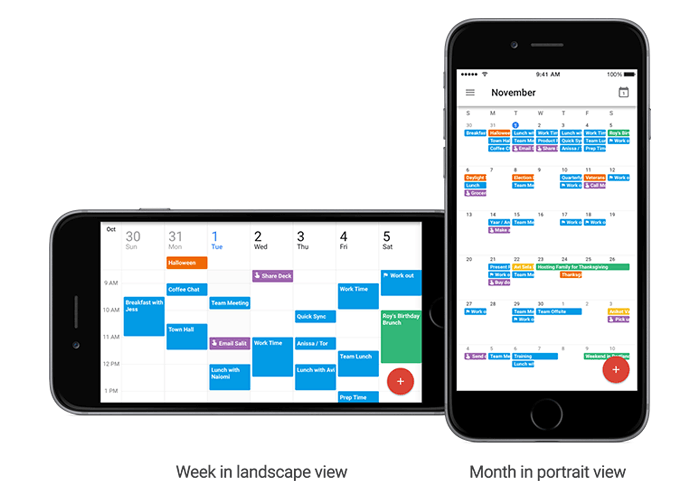
And not just Gmail. Google also makes a few update to its Calendar app based on users' feedback.
- Users can now see month and week view in landscape mode.
- The ability to set up alternate calendars (non-Gregorian calendars - like Lunar, Islamic or Hindu).
- Users can now search for things like events, reminders and goals, straight within Apple' Spotlight Search.


Material Design is a design language created by Google. It has been the design foundations of many Google products, as well as third-party apps as well as websites.
According to Google, "Material is a metaphor, a system for uniting style, branding, interaction, and motion under a consistent set of principles. With Material we believe product teams can realize their greatest design potential."
With its popularity rising, Google is still expecting more people to use Material Design. As a strategy, it releases a new set of designing tools. This is partially its way to expand its design language by making it friendlier and easier to implement
Material Design was introduced in 2014 alongside Android Lollipop. Initially, it was meant to make people rethink how software should be designed on touchscreens. But now, Google wants the design to be a unified system that combines theory, resources, and tools for crafting digital experiences.
So it's much more about interaction than how it looks.
Previously, the search giant has released several tools to help designers and developers to build products using it, now the company wants more than that.
Design As A Continuous Effort

Design is not just something to please the eyes. It's also about interactions and how can something be represented in a way that appeals in user-experience. Because design is an art of continuous problem solving, Google kept investigating and validating needs by crafting and developing new ideas to create new solutions.
As a "metaphor" to rationalize design and implementation, Material design is a shared language to help designers and developers to create a style, brand, interaction and motion under a cohesive set or principles.
And because the new suite of tools are open-source projects, Google is expecting their expansions to be fast.
Gallery
Gallery is where users can organize their design workflow in one place. This way, everyone in a team can have a clear view and keep up with any progress and process. Here, team members can give feedback on everything.
The set of tools work similarly like a GitHub for designers. It makes things easier for people to upload, share, and comment on designs. With version control, users can also add different interactions. And because it also has a presentation layer, users can give out simple web links when they want to share the design to others.
Stage
Stage is brought forward by the teams behind Pixate and Form. Stage changes the way designers and developers build interactive experiences. It enables a more dynamic intentional and systematic workflow for crafting digital experience, apposed to static design.
This way, users can speed up their prototyping process and enables them to test out and demo movement in their apps at much earlier stages.
Remixer
Remixer is a real-time, on-device, connected UI tweaker. Designers and developers can create prototypes of apps that they can interact with directly, and with it, they can also make adjustments on-the-fly to Android, iOS and web interfaces.
App makers can also change values across multiple devices.
Putting The Tools Into A New Home
To make things easier for designers and developers, Google also launched Material.io. In its quest to make all of Material Design accessible, the company put existing works together into one place.
The website and its tools are not exclusively meant for people trying to work with Material Design; they're also for those that are inspired by the same philosophy. The idea of integrating the motion and feel of apps early in the design process is essential to Material Design. So in the website, Google establishes a new visual identity to those that have interest in the the design's initiatives.
People can get support on the latest visual guidance, as well as releases from tools and reusable components.
The goal of Material.io is to focus on different aspects of design process, and to streamline the works. And besides the listed tools above, Google also included a Resizer as an interactive viewer, and Devices that is essentially a list of device sizes, resolutions and more.
With the set of tools, Google hopes that ti will get more designers and developers to adopt Material Design in their work.

Cyanogen has been been around reimagining mobile computing by giving users the ability to customize their mobile devices...
Yahoo!'s homepage was once a place where people can read top headlines, keep up with sports news and scores, get stock...

Facebook has a lot of features, and that makes it heavy to most mobile devices in the market. With 24 hours connectivity...
Google has chat apps available, and Hangouts isn't the most popular. While it's availability is almost on any Android...
Allo and Duo are two apps made by Google, meant to further complicate the messaging market. First announced at the Googl...

Navigating somewhere on Google Maps? We're used to its inaccurate compass that tend to point to the wrong direction....

Who just don't love vacations? They're great, and can be the best way to loosen up some knots after a long straight...

Email is still the choice for many people when they want to send data and information to others in a more discreet way...

Moments is Facebook's private photo-sharing app. It helps users in creating shared photo albums from friends and family...